

Disclosure: this article contains an affiliate link. If you buy through it, we may earn a commission.
Restaurant Agency Studio pricing covers a structured system designed to help agencies and freelancers build websites for food businesses more efficiently. By using pre-built niche packs and a standardized delivery process, you can avoid slow setup times and generic pitches. This approach reduces technical configuration, allowing you to focus your efforts on securing new clients.
How our studio agency builds restaurant websites
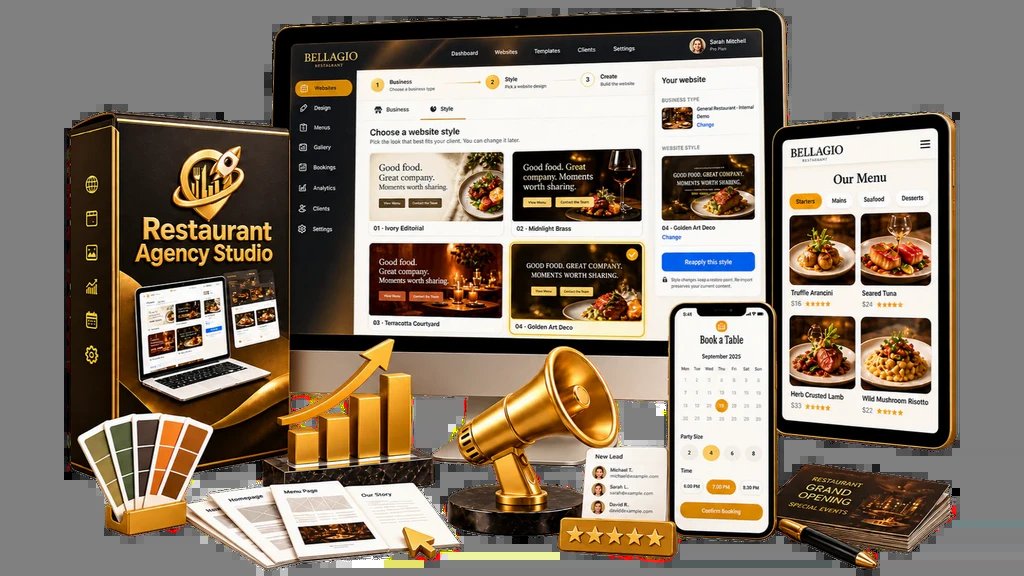
Many agencies struggle to balance the speed of delivery with the quality of the final product. This studio system uses a WordPress-based foundation designed to streamline the entire workflow, from the initial prospect pitch to the final site handover. Because every client project runs on its own WordPress installation, you maintain a clean, organized separation between your agency’s internal tools and the live sites you deliver.
- Configure the Agency Hub: You start by following a guided onboarding process to set up your primary workspace within your WordPress environment. This step establishes the environment where you’ll manage your various restaurant projects.
- Select Design Systems: You choose from a variety of professional design styles to match the branding requirements of your target client. These styles act as the visual framework for the site.
- Apply Niche Content Packs: You pair your chosen style with one of 10 specialized niche content packs. These packs provide the industry-specific elements that food businesses need, such as layout structures for menus and service pages.
- Generate Personalized Demos: You can turn a simple business name or a link from a business directory into a live, personalized demo. This allows you to show a potential client exactly how their business would look online before you even sign a contract.
- Pitch and Finalize Delivery: Once the client approves the demo, you build out the full site. You use the included tools to add the specific menu items, photo galleries, and booking pathways required by the restaurant owner.
Why Specialized Niche Packs Matter
General-purpose website templates often require hours of manual adjustment to make them look like they belong to a specific industry. Restaurant owners have very particular needs that a standard business site doesn’t cover. When you use niche-specific content, you don’t have to guess where the menu goes or how to display a reservation button.
| Feature Type | Role in Client Delivery |
|---|---|
| Niche Content Packs | Provides industry-specific text, layout, and image placeholders. |
| Searchable Menus | Allows customers to find dishes quickly on the live site. |
| Booking Pathways | Connects the restaurant’s availability to the user’s interface. |
| Personalized Demos | Converts a business name into a visual proof for pitching. |
Using Restaurant Agency Studio helps you avoid the common mistake of presenting a generic template that the client can’t visualize as their own. When you can show a restaurant owner their actual business name on a functioning site, the conversation shifts from a technical sale to a business value discussion. This makes the pitch significantly more persuasive than showing a portfolio of unrelated projects.
Restaurant Agency Studio Pricing: Who Should Consider It
This studio model suits freelancers and local consultants who want to scale their operations by focusing on a specific, high-demand sector. Because the system relies on WordPress, it’s a good fit for anyone already familiar with that platform who wants to standardize their workflow. It isn’t designed for developers looking to build custom, from-scratch code or those who don’t intend to work with WordPress.
If you’re currently spending too much time on the technical setup of every new project, the standardized nature of these niche packs can help you regain your time. However, you must verify that your hosting environment supports the requirements of the WordPress installations used by the system. Ensuring your web hosting service meets the minimum requirements for the platform is an essential step before you begin pitching to local businesses.
Troubleshooting Common Setup Questions

Why does the demo not look right after inputting the business name?
If the demo appears misaligned, check that the business name you entered is correct and that the directory link is active. The system relies on accurate data to pull in the relevant details. Ensure you’re using the most recent version of your chosen style pack, as older versions might not align with updated content modules.
Can I change the style after selecting a niche pack?
Yes, you can swap styles to see how different looks affect the presentation of the niche content. This is useful during the pitch phase if you’re unsure which aesthetic will appeal most to the restaurant owner. Always save your progress before switching styles to avoid losing any personalized text or images you have already added.
Is it possible to use these sites for businesses other than restaurants?
The content packs are specifically built for the food and beverage industry, including menus and booking tools. While the underlying WordPress structure is flexible, using these for a non-restaurant business would require significant manual changes. This system is optimized for food businesses where menus and reservations are the primary site requirements.
Frequently Asked Questions
Does this system require a monthly subscription fee?
The system operates as a WordPress-based studio setup. You should confirm if there are any ongoing costs associated with your specific WordPress hosting provider or any premium plugins you choose to integrate beyond the core studio tools. Always check your hosting account details to understand your recurring expenses.
Do I need to be a professional web designer to use this?
You don’t need to be a professional designer to use the system, as it provides pre-built styles and niche packs. It’s intended for people who want a professional output without building every element from scratch. Basic familiarity with how to navigate a WordPress dashboard is helpful for managing the installations.
Can I customize the booking pathways for each client?
Yes, you can customize the booking path to match the specific needs of each restaurant. The system provides the foundation for these pathways, which you then tailor by adding the restaurant’s specific details. This ensures that the online booking experience aligns with the restaurant’s actual operations.
What happens if a client wants to host the site elsewhere?
Because each site is a standard WordPress installation, you can migrate the site to the client’s preferred hosting provider once the project is complete. You’ll need to use standard WordPress migration tools to move the files and database. Always test the site after migration to ensure the menu and booking functions remain active.
How many niches are included in the studio?
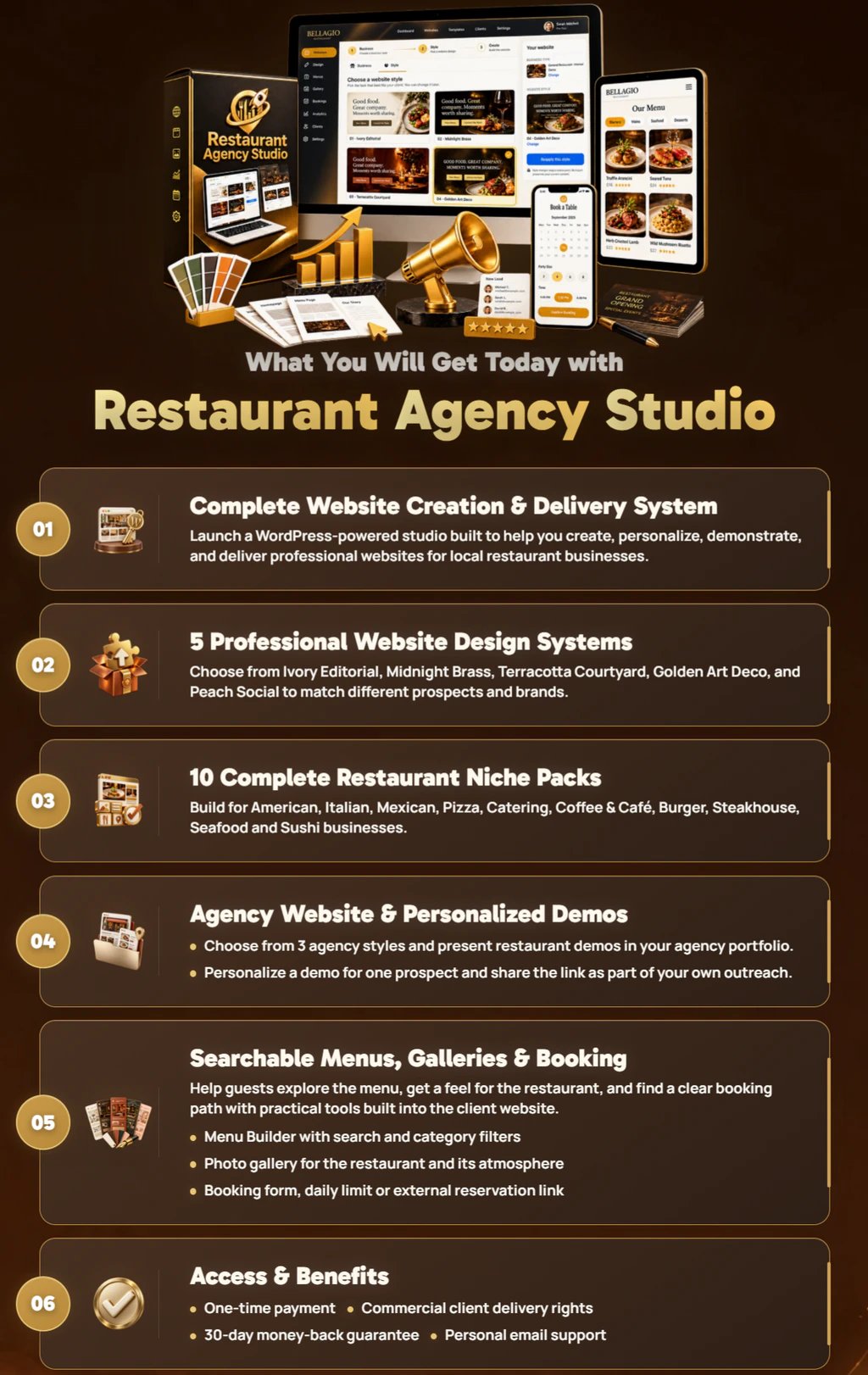
The studio includes 10 complete niche content packs tailored for various restaurant businesses. These packs provide the essential structures needed to display menus, galleries, and booking information. You can combine these packs with professional design styles to create a unique starting point for your clients.
How to Manage Multiple Client Websites Efficiently
The studio uses individual WordPress installations for each project to prevent configuration errors and keep your workflow organized. This architecture ensures that a plugin conflict on one site doesn’t impact your other managed projects. You must still manage updates for each site individually.
| Project Stage | Action Required | Expected Output |
|---|---|---|
| Prospecting | Enter business name or directory link | Live personalized demo |
| Pitching | Show demo to restaurant owner | Verbal or written feedback |
| Development | Add menu items and gallery images | Fully functional local site |
| Delivery | Migrate to client hosting | Live public-facing website |
Ensuring Your Client’s Menu is User-Friendly
The searchable menu feature is a core component of the niche packs because it improves mobile accessibility and search engine visibility. Unlike PDF menus, which are difficult to read on phones, these searchable menus allow customers to find items quickly. This feature requires accurate data entry to be effective.
Why Personalized Demos Increase Conversion Rates
You can reduce sales friction by using the system to generate a personalized demo featuring the owner’s branding and menu. This approach shows the client exactly how their site will look, rather than forcing them to imagine the final result from a generic portfolio.
Tip: Before presenting a demo, verify that the restaurant’s contact information and address are correctly pulled from their business listing to establish immediate trust.
Why does the menu search function return no results?
If the search function isn’t returning results, ensure that you have correctly categorized your menu items within the WordPress backend. The search tool relies on these categories to filter the content for the user. If you have recently imported a menu, check that all items are published and assigned to the correct parent menu structure, as unpublished items will remain hidden from the front-end search.
What should I do if the booking pathway link is broken?
A broken booking link usually occurs if the URL for the reservation system hasn’t been fully updated or if the plugin handling the scheduling needs a configuration check. Verify that you have input the correct destination URL in the booking pathway settings. If you’re using an external reservation service, ensure that the API keys or integration codes provided by that service are correctly saved in the WordPress dashboard.
Why do my images appear blurry on the live site?
Blurry images are often the result of uploading files that are smaller than the designated layout containers. Always use high-resolution images for the gallery and menu sections to ensure they look sharp on modern, high-density displays. If you must use smaller files, consider using a plugin to optimize image loading, but prioritize starting with high-quality source files to maintain the professional aesthetic of the design systems.
Can I add custom functionality outside of the niche packs?
You can extend the functionality of the WordPress installation by adding your own plugins, provided they’re compatible with the base system. However, be mindful that adding too many external plugins can slow down the site loading speed. Only add features that are necessary for the specific client, such as an e-commerce plugin for online ordering or an events calendar for live music venues.
Is the system compatible with all WordPress themes?
The studio comes with its own professional design systems that are specifically matched with the niche packs. While you can technically install other themes, doing so may break the layout and design consistency that the system provides. It’s best to stick with the provided design systems to ensure the menu and booking tools function as intended.
How do I handle site maintenance for my clients?
Maintenance is a separate service you can offer to your clients once the site is live. This includes updating the WordPress core, plugins, and themes, as well as performing regular backups. You should set up a clear agreement with your client regarding what maintenance tasks are included in your service package to avoid confusion later.
Are there limits on the number of sites I can build?
The system is designed to help you launch your agency, and it supports the creation of multiple client websites. Since each site is a separate WordPress installation, your only practical limit is the capacity of your hosting environment and the time you have to manage your projects. Ensure your hosting plan can support the number of sites you intend to build.
Can I use my own domain names for these sites?
Yes, you can use any domain name you own or that the client provides for their restaurant website. Once you have built the site on your development server, you’ll map the client’s domain to the site during the migration process. Ensure the domain is properly pointed to the hosting server where the site will live.
What is the best way to handle restaurant photos?
The most effective way to handle photos is to ask the restaurant owner for high-quality professional images of their signature dishes. If they don’t have professional photos, offer to take a few high-quality shots yourself or guide them on how to take better photos with their phone. High-quality visuals are essential for the gallery and menu sections.
Can I translate the site into another language?
WordPress supports localization, meaning you can translate the site content into other languages if the restaurant serves a bilingual or international audience. You’ll need to use a translation plugin to manage the different language versions of the menu and site text. Ensure that the design systems you choose support the text expansion that often occurs during translation.
How do I ensure the site is mobile-friendly?
The design systems included in the studio are built to be responsive, which means they automatically adjust to fit different screen sizes like phones and tablets. You should test every site on a mobile device before delivery to ensure that the menu is easy to navigate and the booking button is accessible with a single thumb tap.
Restaurant Agency, in short
You don’t have to keep struggling with slow workflows or inconsistent results. It’s time to stop reinventing the wheel and start scaling your business with confidence. Pick a niche pack today, customize your first template, and see how much faster you’ll land that next client. Your agency’s growth shouldn’t wait any longer.




