
BannerBoo makes building animated ads fast, polished, and client-ready—without any code.
You pour energy into ads that vanish in the feed. Static images fail to grab attention, and endless file requests slow you down. I’ve been there. BannerBoo promises a clean fix: an all‑in‑one, code‑free ad builder that turns ideas into animated HTML5, GIF, and MP4 creatives in minutes. You get smart resizing, a timeline for motion, stock assets built in, and a branded share link to collect feedback without email chaos. If you run campaigns, manage multiple brands, or ship ads to different platforms, the BannerBoo Lifetime Deal Review you’re about to read will help you decide if this tool fits your daily workflow.

What is BannerBoo?
BannerBoo is a code‑free, drag‑and‑drop platform for building animated ads for social media and ad networks. It helps you design, animate, and export HTML5, AMP HTML, GIF, and MP4 files in minutes. You can start from 7,000+ templates or a blank canvas, pull free assets from Unsplash, Pexels, and Pixabay, remove backgrounds in one click, and resize a master banner to many formats automatically. A Branded Share URL (CNAME) lets you preview work under your domain, gather comments, and move faster. The built‑in AI Ad Generator speeds up copy and creative variations to scale campaigns with less effort.
My Personal Experience & In-Depth Walkthrough:
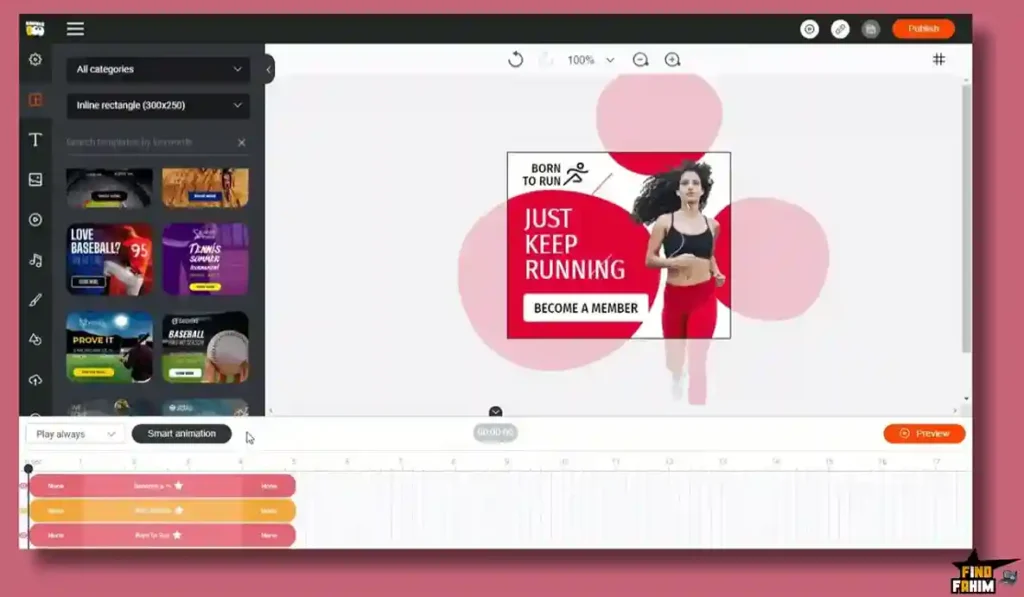
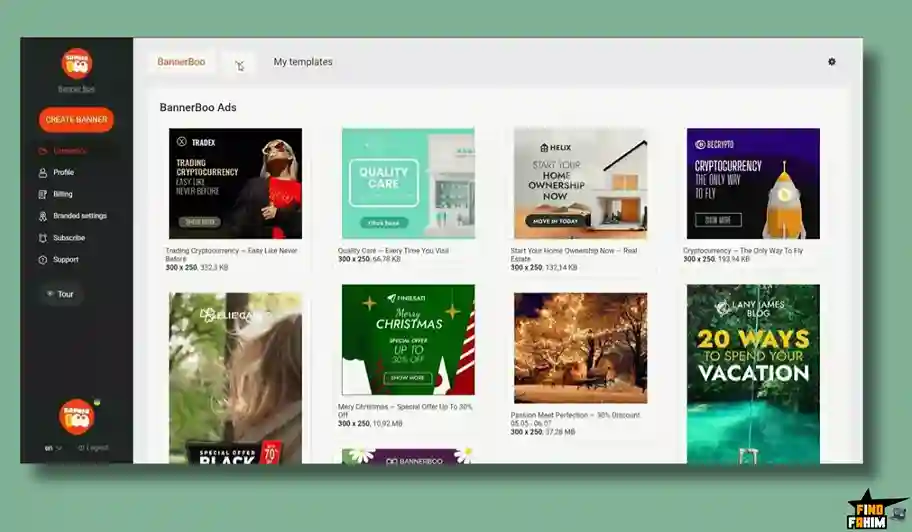
For the last 48 hours, I built and exported a full mini‑campaign in BannerBoo to see how far I could push it. I set up a workspace for a fictional eCommerce brand, then opened the template library. The first surprise was breadth. Seasonal promos, app installs, and remarketing frames were all there. I picked a clean product promo template and jumped into the editor.
The canvas felt familiar. I dragged in a product photo, used the one‑click background remover, and it cleaned the image well. On hair‑thin edges it needed a quick refine, which is common with auto tools, but it saved me time. Aligning layers was smooth. Auto‑snap kept everything neat, which I count as a big win when I’m iterating fast.
Next, I opened the timeline. I added a simple entrance fade, then a slide and a pulse on the call‑to‑action. The timeline is straightforward and visual. You can drag key moments, set durations, and preview in real time. I would love even more granular easing controls for motion nerds, but for daily ad work, this is more than enough.
I tried the AI Ad Generator to draft offer lines. It suggested short, punchy options and a few variants for A/B tests. This was a big pro for me. It broke the “blank page” problem and kept the tone on‑brand with light edits. Some lines felt generic, so I nudged the prompt with my audience details. That fixed it.
Resizing was where BannerBoo really flexed. I designed a master banner, clicked to auto‑resize, and watched it produce a set for stories, square feeds, and display sizes. I made quick tweaks per size. This saved at least an hour compared to manual rebuilds. Huge pro.
Sharing with a client is often my bottleneck. I set up a Branded Share URL with a custom CNAME. My preview link looked like it lived on the client’s domain. Comments came in right on the preview. No email threads. No “which version is this?” confusion. That felt enterprise‑grade in a simple wrapper.
Exporting was painless. HTML5 for display networks, MP4 for social, and GIF for lightweight loops. The files were clean and uploaded without warnings. Longer animations took a bit more render time, which is normal, but still within a coffee‑sip wait.
In short: BannerBoo handled concept to delivery in one place. Speed stood out. The editor is approachable for non‑designers, yet it stays powerful enough for pros. I hit a small learning curve on advanced timing but got comfortable fast. For an ad maker, that balance is the point.

What Makes It Stand Out / Key Features
- Code‑free animated ad builder: export HTML5, AMP HTML, GIF, and MP4 for any platform
- 7,000+ ready‑to‑edit templates plus smart auto‑resize from a single master banner
- AI Ad Generator for quick headlines, copy tweaks, and creative variations
- Branded Share URL (CNAME) with commenting for client‑friendly reviews
- One‑click background remover for faster product cutouts
- Timeline animation with transitions, delays, and pulsation highlights
- Integrated stock libraries: Unsplash, Pexels, Pixabay, plus icons and animated SVGs
- Workspaces for each brand and custom‑branded templates to standardize output
- Publish everywhere: ad networks and social platforms without compatibility headaches
What I Like
- The timeline preview feels fast and intuitive for quick motion edits
- Auto‑resize turns one master design into many formats in minutes
- HTML5, AMP HTML, GIF, and MP4 exports cover every placement I need
- Branded Share URL with comments cuts approval time and confusion
- Deep template library gets me 80% there on tight deadlines
- Built‑in stock assets reduce tab‑hopping and license worries
- AI suggestions help me spin A/B variants without stalling
- Clean, lightweight HTML5 output that ad networks accept easily

What Can be improved
- More granular easing curves and keyframe controls for advanced motion
- Bulk export file naming/versioning options could be smarter
- Background remover can leave artifacts on complex, wispy edges
Pricing And Affordability
BannerBoo is available through a lifetime deal format on AppSumo. Pricing and limits can change, so always confirm on the deal page. Here’s a high‑level view to guide your decision.
| Plan/Tier | Best For | Core Inclusions | One‑Time Price |
|---|---|---|---|
| Tier 1 | Solo marketers | Access to BannerBoo features, export to HTML5/GIF/MP4, template library | See current deal page |
| Tier 2 | Small teams | Everything in Tier 1 plus higher limits and more brand/workspace capacity | See current deal page |
| Tier 3 | Agencies | Highest limits, advanced collaboration, more brand templates/workspaces | See current deal page |
Note: Specific limits for users, workspaces, exports, and branding features depend on the live AppSumo listing.

Why should you buy BannerBoo
If you run paid campaigns or social promos, speed and consistency win. BannerBoo gives you both. You can design once, auto‑resize to many placements, and export to HTML5, GIF, and MP4 without touching code. The template library jump‑starts ideas. The AI Ad Generator clears creative blocks and speeds A/B testing. The Branded Share URL (CNAME) makes client reviews smooth and on‑brand. I built a complete set of animated ads in a few hours, and approvals were faster than usual. For agencies and in‑house marketers alike, the BannerBoo Lifetime Deal Review points to a strong value: lifetime access that removes monthly bloat while you ship clean, animated ads for every network.
Lifetime Deal Overview of BannerBoo
| Item | Details |
|---|---|
| Deal Type | Lifetime access to BannerBoo via AppSumo (subject to listing) |
| Access Scope | Features and limits tied to purchased tier (see live deal page) |
| License Stacking | As specified on AppSumo (varies by campaign) |
| Updates | Future plan updates per deal terms (verify on listing) |
| Users/Workspaces | Varies by tier; intended for solos, teams, or agencies |
| Export Formats | HTML5, AMP HTML, GIF, MP4 |
| Support | Standard vendor support (see vendor policy) |
| Refund Window | AppSumo refund policy as stated on the listing |
Comparison With Competitors of BannerBoo
| Product | HTML5 Export | GIF/MP4 Export | AI Ad Tools | Smart Resize | Branded Share/CNAME | Stock Libraries | Best For |
|---|---|---|---|---|---|---|---|
| BannerBoo | Yes (HTML5, AMP HTML) | Yes | Yes | Yes | Yes (CNAME) | Yes | Marketers and agencies needing fast animated ads |
| Creatopy | Yes | Yes | Varies by plan | Yes | Share links; CNAME varies | Yes | Team collaboration on display ads |
| Canva | No | Yes | Yes | Yes (Pro) | Share links; no CNAME | Yes | Social graphics and simple video loops |
| Adobe Express | No | Yes | Yes | Yes | Share links; no CNAME | Yes (plan‑dependent) | Brand kits and social promos |
| Google Web Designer | Yes | Limited | No | Manual | No | No | Designers building rich HTML5 ads |
FAQ Of The BannerBoo Lifetime Deal Review
Is BannerBoo good for beginners who are not designers?
Yes. The drag‑and‑drop editor, templates, and timeline make it simple to start. You can get a polished animated ad without code.
Can I export ads for all major platforms?
Yes. You can export HTML5 for display networks and GIF/MP4 for social platforms. That covers most placements you use daily.
Does BannerBoo include stock photos and icons?
Yes. You can pull assets from Unsplash, Pexels, and Pixabay. There are also vector icons and animated SVGs to speed up builds.
How does the Branded Share URL help?
You share a custom preview under your CNAME. Clients view, comment, and approve in one place. It reduces email back‑and‑forth and mislabelled files.
What about AI in BannerBoo?
The AI Ad Generator drafts headlines and variations. It helps start concepts fast and build A/B tests with less manual copywriting.
Conclusion
BannerBoo delivers on the promise of fast, code‑free animated ads. It streamlines design, motion, export, and approvals in one place. The template library, AI Ad Generator, and auto‑resize cut hours from each campaign. Branded Share URLs make client feedback smooth and on‑brand. If you want to ship more animated HTML5, GIF, and MP4 creatives with less friction, the BannerBoo Lifetime Deal Review points to a strong buy—especially if you value lifetime access without ongoing fees.




