
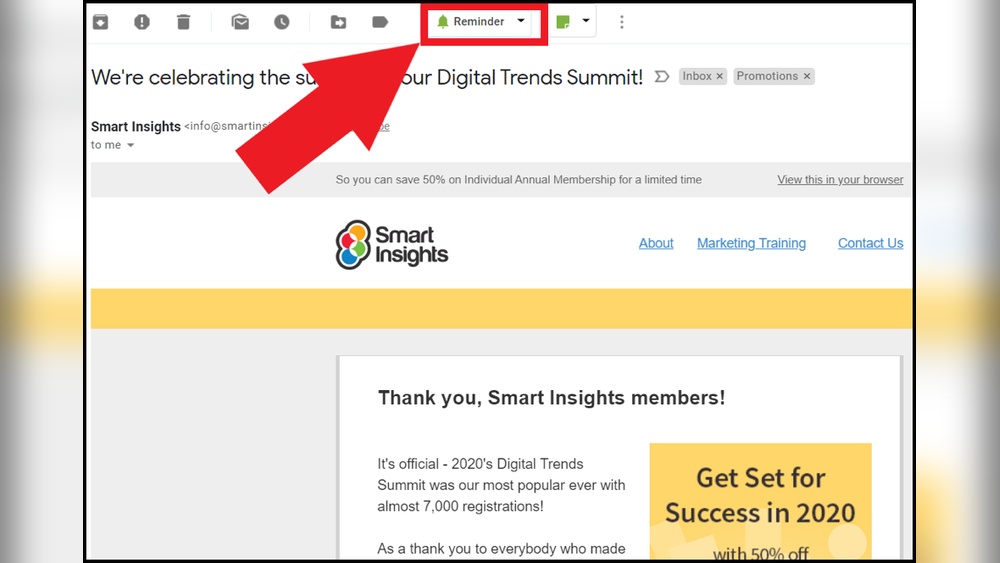
Are you overwhelmed by a constant flood of emails? Imagine having a simple trick that lets you clear your inbox clutter without losing track of important messages.
That’s exactly what snoozing an email does. When you snooze an email, it temporarily disappears from your inbox and reappears later—right when you’re ready to deal with it. This clever feature helps you focus on what matters now, while making sure nothing slips through the cracks. Curious how snoozing can transform your email routine? And what if you could take this a step further with AI managing your inbox around the clock? Check out Snoooz, an AI-powered assistant that answers, sorts, and prioritizes your emails for you. Keep reading to learn what snoozing an email really does, why it’s a game-changer, and how Snoooz can make your life even easier.
Credit: www.rightinbox.com
What Does Snoozing Email Mean?
Snoozing an email is a handy feature to temporarily hide a message from your inbox. It helps you focus on urgent emails while postponing less critical ones. Later, the snoozed email returns to your inbox at a set time or date. This way, you won’t forget to read or reply to it.
Definition And Purpose Of Email Snoozing
Email snoozing lets you pause an email and bring it back later. It works like a reminder system within your email app.
- You remove the email from your inbox now.
- The email reappears at a time you choose.
- This keeps your inbox clean and organized.
- It helps you handle emails at the right moment.
Purpose: To manage emails efficiently without losing track of important messages.
How Snoozing Differs From Other Email Actions (e.g., Muting, Archiving)
| Action | What It Does | When to Use |
|---|---|---|
| Snoozing | Temporarily removes email; returns at chosen time | Delay response, avoid clutter, reminder for later |
| Muting | Stops notifications for a conversation; keeps email | Ignore ongoing threads without deleting emails |
| Archiving | Moves email out of inbox but keeps it stored | Keep emails for reference but clear inbox |
Common Platforms Supporting Email Snoozing
Several popular email services support snoozing:
- Gmail: Offers built-in snooze with customizable return times.
- Outlook: Includes snooze to delay emails until later.
- Yahoo Mail: Provides snooze options on mobile and web.
- Third-party apps: Many email clients add snooze as a feature.
Note: Snoozing is becoming a standard feature for better inbox control.
How Does Snoozing Email Work?
Snoozing email helps you manage your inbox by delaying emails temporarily. It keeps your inbox tidy and lets you focus on important tasks. This feature moves emails out of your main view and brings them back when you are ready to handle them.
Temporarily Removing Emails From Your Inbox
Snoozing removes emails from your inbox temporarily. The emails do not get deleted or archived. Instead, they disappear from your main inbox view. This helps reduce clutter and distractions.
The email stays hidden until the set time arrives. This way, your inbox shows only the emails you want to see now.
Scheduling Reappearance Of Emails At A Specific Time
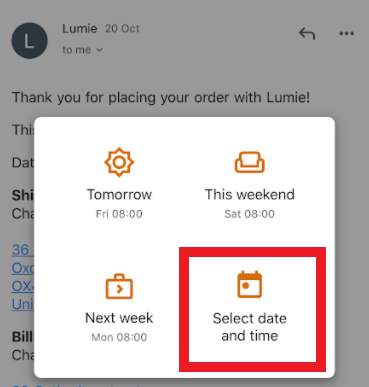
You can set a specific time for snoozed emails to return. This can be minutes, hours, or days later. At that time, the email reappears in your inbox like a fresh message.
Snoozing allows you to:
- Choose exact date and time for return
- Plan follow-ups or reminders
- Handle emails when it suits your schedule
Managing Workflow By Creating A ‘later’ Pile
Snoozing creates a virtual “later” pile. Emails you want to deal with later get moved here. It helps you separate urgent emails from less urgent ones.
This method improves your workflow by:
- Prioritizing tasks easily
- Reducing inbox stress
- Ensuring important emails don’t get lost
Locating Snoozed Emails In Dedicated Folders
Snoozed emails often move to a special folder or label. This keeps them organized and easy to find. The folder acts as a temporary holding area.
Once the scheduled time arrives, the email moves back to your inbox. You can also manually check the folder to review snoozed messages.
| Folder Name | Purpose |
|---|---|
| Snoozed | Stores emails hidden from inbox until scheduled time |
| Inbox | Where snoozed emails reappear after the set time |
Key Benefits Of Snoozing Emails
Snoozing emails helps manage your inbox more effectively. It temporarily hides emails and brings them back at a chosen time. This feature offers several important benefits that improve email handling and productivity.
Reducing Cognitive Load By Decluttering The Inbox
Snoozing removes less urgent emails from your immediate view. This creates a cleaner, less crowded inbox. A tidy inbox lowers stress and helps the brain focus on current tasks.
Less clutter means fewer distractions. You can prioritize important emails without feeling overwhelmed by all messages at once.
Preventing Missed Tasks With Timely Reminders
Snoozing sets emails to reappear when you are ready to handle them. This acts as a reminder for follow-ups or important actions. It ensures no tasks get lost or forgotten.
By scheduling emails to return at the right time, you stay on top of deadlines. Snoozing helps track emails that need your attention later.
Improving Focus By Handling One Task At A Time
Snoozing allows you to process emails one by one. It prevents multitasking overload from many messages arriving at once. This focused approach improves your efficiency.
Working through emails step-by-step reduces mistakes and speeds decision-making. It supports better concentration on each email’s content.
Enhancing Email Follow-up Efficiency
Snoozing simplifies following up on important emails. You can delay responses until you have full information or time to reply properly. This makes your follow-ups more thoughtful and effective.
Organized follow-ups improve communication and build stronger relationships. Snoozing helps keep your email workflow smooth and professional.

Credit: zapier.com
Pricing And Affordability Of Email Snoozing Features
Email snoozing helps users manage their inbox by temporarily hiding emails. It brings emails back at a chosen time to handle later. Many email services offer this feature, but pricing and availability vary widely. Understanding these differences helps decide which service suits your needs and budget.
Availability In Free Vs. Paid Email Services
Many free email services include basic snoozing features. Gmail and Outlook free versions allow users to snooze emails at no extra cost.
- Free versions typically limit snooze options to standard time frames.
- Paid services often offer advanced controls, like custom snooze times and AI-powered assistance.
AI tools like Snoooz add automation and personalized responses but usually require a subscription.
Cost Considerations For Premium Email Clients Offering Snoozing
Premium email clients and add-ons charge monthly or yearly fees. Prices depend on features and user limits.
| Service | Price Range | Key Snoozing Features |
|---|---|---|
| Gmail (Free) | $0 | Basic snooze times, limited customization |
| Outlook 365 | $5–$20/month | Custom snooze, integrations, AI tools |
| Snoooz AI Assistant | Varies; subscription-based | Automated replies, sentiment analysis, smart rules |
Factor in your email volume and need for automation when choosing.
Value For Money: Is Snoozing Worth The Investment?
Snoozing saves time and reduces inbox stress. It helps prioritize emails without losing track.
- Improves productivity by reminding you at the right time.
- Enhances email management with AI personalization and automation.
- Reduces missed emails and forgotten tasks.
Paid snoozing options offer more flexibility and advanced tools. They suit professionals handling many emails daily.
For casual users, free snoozing may be enough. Businesses benefit more from premium features like those in Snoooz.
Pros And Cons Of Using Email Snoozing
Email snoozing helps manage your inbox by temporarily hiding emails. It resurfaces them later, so you can handle them at the right time. This feature offers clear benefits and some downsides. Understanding both helps you use snoozing wisely.
Advantages Based On Real-world Usage
- Improves Focus: Snoozing delays less urgent emails, reducing distractions.
- Better Time Management: Handles emails when you are ready, avoiding overload.
- Prevents Forgetting: Snoozed emails return to your inbox, so nothing gets lost.
- Custom Scheduling: Set specific times for emails to reappear, matching your workflow.
- Reduces Stress: Keeps your inbox cleaner, lowering anxiety about unanswered emails.
Potential Drawbacks And Limitations
- Missed Urgency: Important emails might be delayed if snoozed accidentally.
- Inbox Clutter: Snoozed emails can pile up if not managed well.
- Over-reliance: Relying too much on snoozing may cause procrastination.
- Sync Issues: Some email clients may not update snoozed emails properly.
- Confusion: Multiple snoozed emails returning together can overwhelm you.
How To Mitigate Common Issues When Snoozing Emails
- Set Clear Priorities: Snooze only non-urgent emails to avoid missing deadlines.
- Use Reminders: Combine snoozing with calendar alerts for important follow-ups.
- Limit Snooze Duration: Keep snooze times short to prevent inbox pileups.
- Regular Inbox Review: Check your snoozed emails daily or weekly.
- Use Smart Tools: Employ AI assistants like Snoooz to automate sorting and reminders.
Who Should Use Email Snoozing?
Email snoozing helps manage busy inboxes by delaying emails until the right time. It suits people who want to stay organized and respond effectively. Snoozing avoids distractions from less urgent emails. It makes sure important messages appear when you can focus on them. This tool is valuable for many professions and work styles.
Ideal User Profiles And Work Scenarios
- Sales professionals: Manage follow-ups without losing track of leads.
- Customer support agents: Prioritize urgent tickets and snooze non-urgent ones.
- Remote workers: Control email flow during off-hours or meetings.
- Project managers: Delay emails until project phases are ready for review.
- Freelancers: Organize client emails by priority and timing.
In busy workdays, snoozing helps keep the inbox clean. It lets users focus on tasks without losing track of important messages.
Best Practices For Different Professions And Workflows
| Profession | How to Use Email Snoozing | Benefits |
|---|---|---|
| Sales Reps | Snooze follow-ups until clients are ready to engage. | Improves response timing, increases conversion chances. |
| Customer Support | Snooze low-priority tickets; prioritize urgent ones. | Boosts customer satisfaction, reduces overload. |
| Project Managers | Snooze emails related to future phases or deadlines. | Keeps inbox focused, prevents distraction. |
| Freelancers | Snooze emails from clients until ready to work. | Helps manage workload and deadlines. |
When Not To Use Email Snoozing
- Urgent emails: Do not snooze messages needing immediate action.
- Time-sensitive deadlines: Snoozing may cause missed deadlines.
- Legal or compliance communications: Always respond promptly.
- Personal or emergency messages: Treat these with priority.
Using snoozing without care can delay important responses. Avoid snoozing when quick replies matter.
Tips And Tricks To Maximize Productivity With Email Snoozing
Email snoozing helps manage inbox overload by postponing emails. This feature lets you focus on urgent tasks now and deal with less pressing emails later. Using snoozing smartly keeps your workflow smooth and stress low. Below are key tips to use snoozing effectively and boost your email management.
Combining Snoozing With Other Email Management Tools
Pair snoozing with tools like automated filters, labels, and AI assistants such as Snoooz. This combination sorts emails and sets replies automatically, saving time.
- Filters: Automatically categorize emails before snoozing.
- Labels: Tag emails to find them easily after snooze ends.
- AI Assistants: Use AI to draft replies while snoozed emails wait for your review.
This mix creates a clear, organized inbox and prevents important emails from getting lost.
Setting Effective Snooze Times For Optimal Workflow
Choose snooze times that fit your daily rhythm and task deadlines. Avoid setting too long or too short snooze periods.
| Snooze Duration | Best For | Tip |
|---|---|---|
| 1-2 hours | Short breaks, quick tasks | Use for emails needing fast follow-up |
| End of day | Non-urgent emails | Review when your workload is lighter |
| Next week | Long-term tasks | Plan ahead for important deadlines |
Adjust snooze times based on your workload to keep productivity steady.
Using Snoozing To Support Task Prioritization And Follow-up
Snoozing helps prioritize emails by delaying less urgent messages. It clears your inbox for important emails that need immediate attention.
- Mark urgent emails: Handle these before snoozing others.
- Snooze low-priority emails: Set reminders to follow up at the right time.
- Track snoozed emails: Use tools like Snoooz to get notifications and personalized replies.
This strategy prevents missed deadlines and keeps follow-ups timely.

Credit: www.youtube.com
Frequently Asked Questions
What Happens If I Snooze An Email I Sent?
Snoozing a sent email removes it temporarily from your inbox. It reappears later to remind you to follow up. The email still reaches the recipient immediately and does not unsend or delay sending.
What Does Snoozing An Email Do In Outlook?
Snoozing an email in Outlook removes it from your inbox temporarily. It reappears at a chosen date and time. This helps reduce clutter and ensures you address emails later without forgetting them.
What Happens If Someone Replies To A Snoozed Email?
Replying to a snoozed email unsnoozes it automatically. The email returns to your inbox for immediate attention.
What Happens If I Mute An Email?
Muting an email conversation stops notifications for new replies. The conversation stays in your inbox but no alerts appear. This helps reduce distractions from ongoing email threads without deleting or archiving messages. You can still read and respond to muted emails anytime.
Conclusion
Snoozing an email helps you manage your inbox better. It hides emails temporarily, so you focus on urgent tasks. The email returns at the time you choose, keeping important messages visible later. This feature reduces distractions and keeps your inbox organized. For smarter email management, consider using Snoooz. It uses AI to reply, sort, and manage emails automatically. Snoooz saves time and keeps your communication smooth, especially when you’re busy or away. Try it to see how easy email management can be.




