
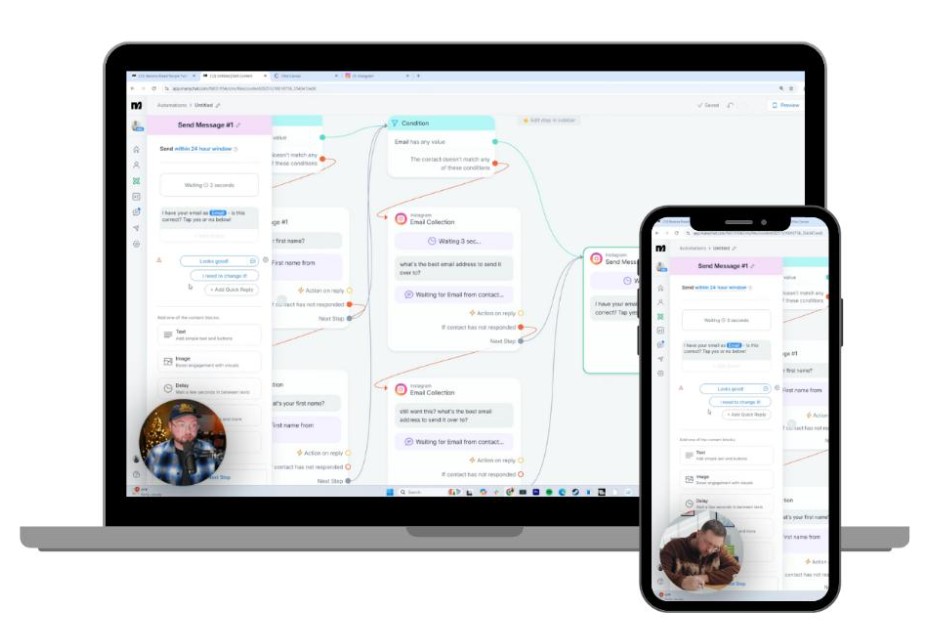

Introduction: Is Manychat Worth Using?
Social media can help a business reach new customers. But getting attention is only the first step.
People may comment on a post, ask about a product, request a discount code, or send a direct message. If you receive many messages every day, replying to each person manually can take a lot of time.
This is where Manychat can help.
Manychat is a messaging automation platform. It helps creators and businesses automate certain conversations across supported social media and messaging channels. You can set up automatic replies, send information through direct messages, organize contacts, and guide people toward a useful next step.
For example, imagine that you publish an Instagram Reel about an online marketing tool. You ask viewers to comment with the word “GUIDE” if they want more information. With a suitable Manychat automation, someone who comments can receive a private message with the requested information.
You do not have to send every message manually.
That does not mean Manychat will automatically generate sales or guarantee more followers. Results depend on your content, audience, offer, message quality, and automation setup. It also has plan limits and messaging rules that users need to understand.
In this detailed Manychat Review, we will examine its features, benefits, limitations, pricing, setup process, and potential uses for affiliate marketers and online business owners.
We will also explain who may benefit from it, who may not need it, and what to consider before paying for a subscription.
What Is Manychat?
Manychat is a platform for automating conversations with people who interact with a business through supported messaging channels.
Instead of answering every common question manually, you can create automated message flows. These flows can respond to specific actions, provide information, ask simple questions, and guide people through a conversation.
Depending on your plan, account, and connected channel, Manychat can support automation across platforms such as Instagram, Facebook Messenger, TikTok, WhatsApp, Telegram, SMS, and email.
Not every channel is included in every plan. You should check the current plan details before choosing a subscription.
Manychat is especially relevant to businesses that receive repeated questions or want to respond quickly to social media engagement.
Here are a few examples:
- A creator wants to send a free guide to people who comment on a post.
- An online store wants to answer common product questions.
- An affiliate marketer wants to share useful product information with interested followers.
- A coach wants to send people information about a service.
- A marketing agency wants to manage messaging workflows for a client.
- A content creator wants to organize conversations and reduce repetitive work.
The main idea is simple: automate suitable parts of the conversation so you can spend more time creating content, helping customers, and improving your business.
How Does Manychat Work?

Manychat works through triggers and automated message flows.
A trigger is an action that starts an automation. A flow is the series of steps that follows that action.
For example, a person might comment on an Instagram post. That comment can trigger an automation. The automation can then send a private message, provide a requested resource, or ask the person what information they need.
A basic workflow may look like this:
- You publish a social media post.
- A viewer comments or takes another supported action.
- Manychat detects the configured trigger.
- The automation sends an appropriate response.
- The person interacts with the message, where required.
- The flow continues according to your settings.
- You review engagement and adjust the automation.
The exact steps depend on the channel and automation you build.
For example, a comment-triggered private reply on Instagram does not automatically mean the person has opted into continued messaging. According to Manychat’s guidance, the person generally needs to interact with the private message, such as by replying or clicking an eligible button or quick reply, to open the messaging window and be added as an opted-in contact.
This distinction matters. A well-designed automation should respect platform rules and make it clear why a person is receiving a message.
Manychat does not remove the need for a good marketing strategy. It helps carry out parts of that strategy.
Visit Manychat Officeal Website >>>
Who Should Consider Manychat?
Manychat may be useful for people and businesses that communicate with their audience through supported messaging channels.
1. Affiliate Marketers
Affiliate marketers often promote products through social media posts, short videos, tutorials, and product comparisons.
People may comment with questions such as:
- Where can I find the tool?
- Is there a tutorial?
- What does the product do?
- Can you share the guide?
- Where can I learn more?
You can build an automation that responds to a suitable comment and provides the requested information.
For example, a post about email marketing software could invite viewers to comment with a keyword to receive a beginner’s checklist. The automation can send the checklist and, where appropriate, explain what to do next.
This may help you respond to interested people more consistently. It does not guarantee affiliate clicks, purchases, or commissions.
2. Digital Marketers
Digital marketers often manage several campaigns at once. They may need to answer questions, share resources, and direct interested people toward landing pages.
Manychat can help automate repeated interactions. A marketer could create different flows for a free guide, a webinar, a product tutorial, or a campaign-specific offer.
The main benefit is organization. Each flow can serve a specific purpose rather than sending the same generic response to everyone.
3. Content Creators
Creators may receive comments asking for recipes, templates, product details, video resources, or other information.
Manychat can help deliver that information through supported automations. This is useful when a creator regularly publishes content that encourages people to request something.
For example, a creator who shares productivity tips could offer a weekly planning template. People who request it may receive an automated message with the resource.
4. Online Store Owners
An online store may receive repeated questions about products, order information, promotions, or store policies.
Some of these conversations may be suitable for automation. A flow could provide basic product information or direct customers to the correct support resource.
Complex complaints, sensitive account questions, and unusual requests still need human attention. Automation should make customer service more helpful, not make customers feel ignored.
5. Coaches and Consultants
Coaches and consultants often use social media to attract potential clients.
Manychat can help deliver introductory resources, answer common questions, and guide interested people toward a booking process.
For example, a fitness coach could share a beginner’s checklist. A business consultant could send a service overview. A language tutor could provide details about lesson options.
The flow should help people understand their options without pressuring them into a purchase.
6. Marketing Agencies
Agencies may use messaging automation to help clients manage social media interactions.
A local business might need an automated response for appointment questions. A creator might want to distribute resources. An online store might need a more organized way to handle repeated product inquiries.
Before using Manychat for client work, agencies should check plan limits, user access, channel requirements, and how the client’s accounts will be connected.
Manychat Features Explained in Detail

Manychat includes several types of tools for managing conversations and automating common tasks. The exact features available depend on your subscription and connected channels.
1. Instagram Comment Automation
Instagram comment automation is one of the most relevant features for creators and social media marketers.
You can configure an automation to respond when someone comments on an eligible post or Reel. The flow can include a public reply and a private message, depending on the trigger and settings.
Suppose you publish a Reel explaining how to plan social media content. At the end, you ask viewers to comment “PLAN” to request a checklist.
You can create a flow that responds to the configured comment and sends a private message about the checklist.
This can make the process easier when many people request the same resource.
Manychat’s documentation explains how to configure comment triggers and private replies. It also describes the limitations of the first private reply and the interaction required to continue the conversation.
Why it may help: You can respond to eligible comments more consistently and reduce repetitive manual work.
What to remember: The automation must be configured correctly. Platform rules still apply, and a private reply is not the same as permission for unlimited follow-up messages.
2. Automated Direct Messages

Direct messages are an important part of many social media marketing strategies.
People often prefer to ask a question privately before visiting a website or considering a product. If you receive similar questions frequently, automated messages may help you respond faster.
A Manychat flow can send a configured message after a supported trigger. It may provide a resource, explain the next step, or ask a simple question.
For example, a digital marketer could create a flow for people who request a content calendar. The message might explain what the calendar includes and how to access it.
A useful automated message should be clear and relevant. It should answer the person’s request rather than immediately pushing a sales pitch.
3. Lead Generation
Lead generation means attracting people who may be interested in your product, service, or content and helping them take an appropriate next step.
Manychat can support parts of this process through automated conversations and contact collection, depending on the plan and channel.
A simple lead-generation workflow could look like this:
- Publish a helpful social media post.
- Offer a relevant checklist or guide.
- Invite interested people to request it.
- Send the resource through an appropriate automation.
- Ask a clear follow-up question, if permitted.
- Direct interested people toward a relevant page or next step.
This approach gives people a reason to interact with your content.
For affiliate marketers, a helpful resource may be more useful than sending a product promotion immediately. Someone who receives a beginner’s guide can learn about the topic before deciding whether a recommended tool meets their needs.
Lead generation still requires a valuable offer and an audience that cares about it. Manychat cannot create genuine demand by itself.
4. Visual Automation Builder
Manychat lets users build automated flows instead of writing every response manually.
A visual builder helps you arrange message steps and define what happens next. You can design a simple sequence first and then add more steps when your needs become more advanced.
For example, an automation might ask a person whether they want a beginner guide or a product comparison. The next message can depend on the option they select.
This structure can make conversations more organized.
Beginners should start with a small flow. A long automation with too many conditions can be difficult to test and maintain.
Before publishing a flow, check the wording, links, trigger conditions, and destination pages. Test it from the user’s perspective so you can spot confusing steps.
5. Contact Organization and Tags
Contact organization can help you distinguish between people who have different interests.
For example, an affiliate marketer might organize contacts based on the resources they requested. One group might be interested in email marketing, while another wants information about content creation.
Tags can help organize these interactions when the selected plan supports the relevant features. Manychat’s current Essential plan description includes contact information collection and audience segmentation with tags.
This can make future communication more relevant.
However, collecting contact information should serve a clear purpose. Be transparent about what you collect, follow applicable privacy requirements, and do not treat a request for one resource as blanket permission for unrelated marketing.
6. Multiple Messaging Channels
Manychat supports multiple messaging channels, but the available channels depend on the subscription.
The current pricing page lists Instagram, TikTok, Facebook Messenger, Telegram, WhatsApp, SMS, and email across its plan comparison. The Free and Essential plans have narrower channel options than Pro, Business, and Advanced.
This matters if your audience uses more than one platform.
For example, a creator may mainly use Instagram. A business with a larger customer base may also need WhatsApp or email. A team that wants to bring several supported channels into its workflow should compare the plans carefully.
Do not assume every channel is available on every subscription or in every region. Confirm the details shown for your own account before buying.
7. Unified Inbox
A unified inbox helps users manage conversations from connected channels in one place, where supported by their plan.
This can be useful for a business that receives messages across several channels. Instead of switching between separate platforms for every interaction, users may be able to handle supported conversations through a more organized workspace.
Plan limits matter here, too. The number of users and inbox seats varies by subscription.
A solo marketer may only need one seat. A customer support team may need shared access and conversation assignments. The Business and Advanced plans list shared inbox capabilities, with different user and inbox-seat limits.
The right setup depends on the size of your team and how you handle customer questions.
8. Broadcasts and Campaign Messaging
Some Manychat plans include broadcasts and additional tools for reaching an audience through supported channels.
A broadcast is a message sent to an eligible audience rather than a response to one specific action.
A business might use a broadcast to share an update, announce a new resource, or communicate an offer to people who are eligible to receive it.
These campaigns need careful planning. Sending too many messages can annoy people and reduce trust. Messaging permissions and channel policies also affect when and how messages can be sent.
Do not assume that a contact can receive any message at any time. Review the applicable rules before building a campaign. Manychat’s documentation explains the 24-hour messaging window for Instagram, Messenger, and WhatsApp.
9. AI-Powered Conversations
The current Manychat pricing page lists AI-powered conversation features on selected paid plans. These features are described as helping answer direct messages and comments, respond to common questions, and guide conversations toward business goals.
AI can be useful for handling common questions or providing a first response. It still needs suitable instructions, accurate business information, and ongoing review.
For example, a business might configure responses to explain its services, opening hours, or basic product details.
But AI-generated responses can be incomplete or incorrect. Important details such as prices, refund terms, delivery policies, and product limitations should be checked carefully.
Do not allow automated responses to invent guarantees or make promises your business cannot keep. Give users a way to contact a person when the question is complicated or sensitive.
10. Automation Templates
Manychat’s current Free plan listing mentions ready-made templates for common automations. These can help new users get started without designing every step from scratch.
Templates can save setup time, but they are starting points rather than complete marketing strategies.
You should adjust the wording, trigger, message sequence, and destination to match your audience. A template written for an online store may not be appropriate for an affiliate blog or a coaching business.
The best automation is one that serves a clear purpose and feels natural to the person receiving it.
How Affiliate Marketers Can Use Manychat

Affiliate marketing is a performance-based business model. You promote a product or service through an affiliate program and may earn a commission when someone completes a qualifying action.
Manychat can help with parts of the communication process. It does not replace your website, product reviews, content strategy, or affiliate tracking.
Here are practical ways affiliate marketers may use it.
1. Share a Free Resource
A free resource can give people a reason to interact with your content.
For example, you could publish a post about choosing an email marketing tool. You could offer a checklist that helps beginners compare features, ease of use, and costs.
A viewer who requests the checklist may receive an automated message with the relevant information.
The resource should be useful on its own. It should not be a thin excuse to push an affiliate offer.
2. Answer Common Product Questions
People may ask the same questions about a product repeatedly.
They might want to know what the tool does, who it is designed for, or whether it suits beginners. You can prepare answers to common questions and use suitable automations to share accurate information.
Keep the answers balanced. Explain limitations as well as benefits. If a question requires personal judgment or current information, direct the person to a reliable source or answer manually.
3. Direct Interested People to a Detailed Review
Suppose you publish a short video about a social media automation platform.
A viewer may want to understand its features, pricing, limitations, and alternatives before making a decision. An automation could provide a relevant next step, such as directing the viewer to your detailed review, if that is permitted by the channel and message setup.
Your review should help readers make an informed choice. It should not present every product as the best option for every person.
For example, your Manychat review could explain the difference between a free plan and paid plans, discuss the learning curve, and show the types of workflows that may be useful.
4. Organize Different Audience Interests
Not everyone who follows you wants the same product.
One person may be interested in email marketing. Another may want AI writing tools. Someone else may need a social media scheduler.
Where supported, contact tags and segmentation can help organize these interests. That makes it easier to build more relevant workflows.
A person who requests a content calendar should not automatically receive unrelated messages about every product you promote.
5. Support a Content Funnel
A content funnel is a sequence that helps people move from discovering a topic to learning about a solution.
Here is a simple example for an affiliate marketer:
Step 1: Helpful social content
Publish a tutorial, comparison, or practical tip.
Step 2: Relevant interaction
Invite viewers to request a resource or ask a question.
Step 3: Automated response
Provide the requested information through a suitable flow.
Step 4: Useful next step
Help the person learn more through a relevant guide or review.
This process can help make your marketing more organized. It does not guarantee that people will click your affiliate links or buy a product.
Your results will depend on the quality of the content, how closely the offer matches the audience, and whether the next step provides real value.
6. Promote Products Without Overloading Every Message
Automation should not mean sending a sales pitch at every opportunity.
A better approach is to answer the person’s request first. If a relevant product recommendation makes sense, explain why it may help and who should consider it.
Affiliate disclosures are also important. Follow the rules that apply to your audience and platform, and make your financial relationship clear when required.
The goal is to build trust. A useful recommendation can help people make decisions. An aggressive or misleading message can damage that trust.
A Practical Manychat Example for a Digital Marketing Business
Let’s imagine that you run a website about digital tools and online business software.
You publish an Instagram Reel called “Three Things to Check Before Buying an Email Marketing Tool.”
At the end of the Reel, you invite viewers to comment with a keyword to request a free comparison checklist.
Here is how you could plan the workflow.

Step 1: Create a Useful Post
The Reel should explain something practical. It could discuss email automation, subscriber management, integrations, or pricing.
Avoid promising results that you cannot prove. The post should be useful even to viewers who never buy anything.
Step 2: Choose a Clear Call to Action
A call to action tells viewers what to do next.
For example:
“Comment CHECKLIST if you want my guide to comparing email marketing tools.”
This tells people what they will receive. It is more specific than asking them to comment without explaining why.
Step 3: Build the Automation
Configure the relevant comment trigger and private reply in Manychat.
The exact settings depend on the channel and the automation type. Review the current instructions and test the flow before publishing it.
Step 4: Send the Requested Information
The initial message should explain why the person is receiving it and what to do next.
For example, it could say that the requested checklist is ready and provide an eligible way to access it.
Do not add several unrelated offers to the first message. Keep the experience simple.
Step 5: Make the Next Step Optional and Relevant
If the person interacts in a way that permits the conversation to continue, you may be able to provide another helpful resource.
For example, you could offer a detailed comparison of two email marketing tools. The comparison should explain meaningful differences rather than simply promoting the product with the highest commission.
Step 6: Review Performance
Track the metrics available to you, such as comments, message interactions, visits to your review, and affiliate conversions reported by your affiliate program.
These measurements tell you different things. A high number of comments does not necessarily mean a high number of sales.
Use the data to improve the post, resource, and message flow.
Manychat Pricing Review: What Does It Cost?

Pricing is an important part of this Manychat Review. The right plan depends on your audience size, channels, automation requirements, and team.
The current official pricing page lists five plans: Free, Essential, Pro, Business, and Advanced. The prices below are the advertised annual-billing rates shown on the pricing page as checked on October 18, 2026. Your account may show different availability or pricing depending on your region and billing setup.
| Plan | Advertised annual-billing price | Included active contacts per month |
|---|---|---|
| Free | $0 | 25 |
| Essential | $14/month, billed annually | 250 |
| Pro | $29/month, billed annually | 2,500 |
| Business | $69/month, billed annually | 7,500 |
| Advanced | $139/month, billed annually | 25,000 |
These are starting points for comparing plans, not a guarantee of the amount you will pay. Taxes are excluded, additional active contacts may cost extra, and the plan offered to your account may vary. Check the current purchase page before subscribing.
1. Free Plan
The Free plan costs $0 and is designed for people who want to explore basic automation.
The current listing includes:
- Up to 25 active contacts per month.
- Two selected channels from Instagram, TikTok, Facebook Messenger, and Telegram.
- Up to four active automations.
- One user and one inbox seat.
- Basic unified inbox access.
- Manychat branding on the first message to a contact.
This plan may be enough to learn the interface and test a small workflow.
It is less suitable if you need a larger contact allowance, many automations, more messaging channels, or advanced team features.
Who should consider it? Beginners who want to test basic automation before committing to a paid subscription.
2. Essential Plan
The Essential plan is advertised from $14 per month with annual billing. The current pricing page lists 250 active contacts per month and two selected channels from its eligible options. It also includes unlimited custom automations, contact information collection, tags, and access for two users.
This plan may suit a creator or small business that needs more flexibility than the Free plan offers.
Before buying, check the active-contact allowance and any extra-contact charges. A low starting price may not be the final cost if your audience grows.
Who should consider it? A small creator or business that needs more automation options and basic contact organization.
3. Pro Plan
The Pro plan is advertised from $29 per month with annual billing and includes 2,500 active contacts per month. The current listing includes up to three supported channels, advanced automations, broadcasts, AI-powered conversations, and access for three users.
This plan may be relevant to marketers who need more channels and more advanced workflows.
It may also be worth comparing if you want to use eligible AI features or broadcast capabilities. Do not upgrade just because a plan has more features. Check whether those features solve a real problem in your business.
Who should consider it? A growing creator or business with regular messaging activity and a clear need for more advanced tools.
4. Business Plan
The Business plan is advertised from $69 per month with annual billing. The current pricing page lists 7,500 active contacts per month, unlimited eligible channels, five users, shared inbox features, and priority support.
A business with several team members may value the shared inbox and conversation assignment options.
A solo affiliate marketer may not need this plan. A larger operation should compare the cost with the time it expects to save and the additional work it can manage.
Who should consider it? A growing business or team that needs broader channel access and shared conversation management.
5. Advanced Plan
The Advanced plan is advertised from $139 per month with annual billing. It lists 25,000 active contacts per month, unlimited eligible channels, ten users, shared inbox functionality, and priority support.
This plan is aimed at teams with larger contact volumes and more complex requirements.
It may be unnecessary for a beginner or small affiliate website. Before choosing it, estimate your contact volume and make sure your business needs the additional capacity.
Who should consider it? Larger teams and high-volume businesses that need the plan’s higher limits and team features.
Important Pricing Details
The advertised monthly price may not reflect the full cost of using Manychat.
Keep these points in mind:
- Annual billing requires paying for the selected annual term.
- Taxes may be added.
- Additional active contacts may create extra charges.
- Features and plan availability may differ by account or region.
- Channel availability and messaging rules can affect what you can do.
- Your business may also have separate costs for landing pages, website hosting, email tools, or other marketing software.
Manychat’s new pricing model was introduced on March 2, 2026, and its help documentation says availability may vary by region and account. Check the plan details visible to you before making a decision
Is Manychat Free?
Yes. The current pricing page lists a Free plan at $0. It includes limited contact capacity and basic automation features.
The Free plan can be a practical way to explore the platform. You can learn how triggers and message flows work before deciding whether a paid plan is necessary.
But free access has limits. The current listing includes up to 25 active contacts per month and up to four active automations. It also limits the available channels and includes Manychat branding.
A free plan is not automatically the best option for every user. If you need more contacts or advanced features, compare the paid plans and calculate the expected cost.
Is Manychat Easy to Use?
Manychat is designed to help users build messaging automations through a visual interface. Its quick automation options can help beginners set up common workflows without building everything from scratch.
That said, the experience depends on what you want to build.
A simple automation may be straightforward. A complex flow with several conditions, contact tags, multiple channels, and follow-up steps will take more planning.
New users should begin with one clear task. For example, they might automate a reply to a specific type of Instagram comment.
Then they can test the workflow, check the message wording, and confirm that the intended next step works.
You do not need to automate every conversation. Some questions require a personal response. Good automation helps you handle repetitive work while leaving room for human support.
How to Get Started With Manychat

If you are new to messaging automation, it is better to start small. A simple, well-tested workflow is more useful than a complicated one that confuses your audience.
Step 1: Identify Your Main Goal
Before creating an account or choosing a plan, decide what you want to improve.
Your goal might be to:
- Reply to common social media comments.
- Send a requested resource.
- Answer frequently asked questions.
- Organize conversations.
- Guide interested people toward a relevant page.
- Reduce repetitive manual replies.
Choose one main goal first. This will help you decide whether Manychat fits your needs.
Step 2: Choose Your Main Channel
Think about where your audience already interacts with you.
If most of your audience uses Instagram, start by checking the Instagram features and account requirements. Manychat’s Instagram connection guidance says that an Instagram professional account, either Business or Creator, is required; a personal account cannot connect in the same way.
If you use another supported channel, review its requirements before building your workflow.
Do not select a plan based only on the number of features it advertises. Make sure it supports the channels you actually need.
Step 3: Select a Suitable Plan
Beginners can compare the Free plan with the available paid options.
Consider your contact volume, required automations, channels, and number of users. Check whether the features you want are included in the plan offered to your account.
If you are testing an idea, avoid paying for a high-tier plan before you know whether the workflow is useful.
Step 4: Create a Simple Automation
Start with one clear trigger and one useful response.
For example, you could configure an eligible comment trigger for a post that offers a checklist. The automation can send a message explaining how to access the requested resource.
Keep the first version short. You can add conditions or follow-up steps later if they are genuinely useful.
Step 5: Test Before Publishing
Testing is an important part of the process.
Check that:
- The correct trigger starts the flow.
- The message matches the post.
- The resource or destination works.
- The wording is clear on a phone.
- The next step is easy to understand.
- The flow respects the relevant messaging rules.
- There is a way for a person to get help when automation is not enough.
Do not assume that a workflow works simply because the builder allows you to publish it.
Step 6: Monitor the Results
After publishing, look at the results that matter to your goal.
If you want to distribute a resource, check whether people are interacting with the flow and accessing the resource. If you want to reduce repetitive work, assess whether the automation is handling the intended questions correctly.
If you are an affiliate marketer, compare messaging activity with relevant website visits and the conversions reported by your affiliate program.
Use those results to improve the flow. Do not judge success only by the number of automated messages sent.
What Are the Main Benefits of Manychat?

1. Less Repetitive Manual Work
One of the main benefits of automation is reducing the need to send the same response repeatedly.
If people often request the same guide or ask the same basic question, a suitable workflow can handle much of that repetitive work.
This can give you more time for content creation, customer support, research, and other business tasks.
2. Faster Responses to Eligible Interactions
A configured automation can respond to a supported trigger without requiring you to type each response manually.
A timely response may make it easier for a person to continue the conversation while they are still interested.
The actual experience depends on the platform, settings, and messaging rules.
3. More Consistent Communication
Manual replies can vary depending on how busy you are. An automation can use a prepared message for a defined situation.
This can help maintain consistency in product explanations, resource delivery, and frequently asked questions.
The messages still need regular review. A consistent incorrect answer is not helpful.
4. Better Organization
Contact tags, inbox features, and automation flows can help organize some interactions.
This may be valuable if you manage multiple content topics or receive messages across supported channels.
The benefits depend on whether your chosen plan includes the organizational features you need.
5. More Structured Marketing Workflows
Manychat can help you connect social media engagement with a relevant next step.
Instead of simply collecting comments, you can offer a guide, answer a question, or help a person find additional information.
A structured workflow can make your marketing process easier to manage. It cannot replace a useful offer or an understanding of your audience.
6. Options for Different Business Sizes
The listed plans range from a limited Free option to higher-capacity plans with broader channel access and team features.
This gives users different options to compare. The right choice depends on actual needs rather than business size alone.
What Are the Disadvantages of Manychat?
No marketing platform is right for every business. Consider these limitations before subscribing.
1. Paid Features Can Increase Costs
The Free plan has limited capacity. Paid plans cost more as the included contact allowance and features increase.
Additional active contacts can also affect the final bill. Check the pricing details before committing to a subscription.
2. Learning Takes Time
Simple workflows may be easy to create, but more complex automations require planning and testing.
You may need time to learn triggers, conditions, contact organization, message rules, and flow design.
If your business receives very few messages, the time needed to set up and maintain automation may outweigh the benefit.
3. Platform Rules Still Apply
Manychat does not remove the messaging restrictions imposed by the channels you use.
For example, Meta’s messaging rules include a 24-hour window for Instagram, Messenger, and WhatsApp. Sending a private reply to a comment does not automatically open that window.
You should understand the applicable rules before sending automated follow-up messages.
4. Automation Can Feel Impersonal
People do not always want to interact with a bot. A repetitive message may feel unhelpful if it does not address their question.
Write messages in a natural tone. Make the purpose clear. Provide a route to human assistance when necessary.
5. It Does Not Guarantee Sales
Manychat can help automate conversations, but it cannot guarantee revenue.
Sales depend on several factors, including the audience, content, offer, product quality, pricing, trust, and the next step you provide.
A poorly targeted campaign may receive little interest even if the automation works correctly.
6. Some Questions Need Human Attention
Automated flows work best when the situation is predictable.
A customer with a complicated complaint, a buyer who needs specific advice, or a person asking about an unusual situation may need a human response.
Use automation to support your service process rather than replacing every personal interaction.
Manychat Pros and Cons
| Pros | Cons |
|---|---|
| Automates selected messaging tasks | Free plan has limited capacity |
| Can respond to eligible comment triggers | More advanced workflows take planning |
| Can send requested information automatically | Paid plans may increase operating costs |
| Supports multiple channels on eligible plans | Channel availability varies by plan and account |
| Helps organize certain contacts and conversations | Messaging rules still apply |
| Offers a visual approach to flow building | Incorrect flows can send confusing responses |
| May help reduce repetitive work | Does not guarantee leads, clicks, or sales |
| Offers plans for different levels of use | May be unnecessary for low-volume accounts |
Is Manychat Good for Beginners?
Manychat can be a reasonable option for beginners who have a clear reason to automate social media conversations.
You do not need to begin with a complex marketing funnel. A single workflow that answers a common question or sends a requested resource can be enough to learn the basics.
The important question is whether you have a repetitive task worth automating.
For example, if you regularly publish Instagram posts and receive many requests for the same resource, a simple comment-triggered flow may be useful.
If you rarely receive comments or direct messages, the Free plan may be sufficient for initial exploration—or you may not need a dedicated automation platform yet.
Beginners should focus on the following:
- Learn the basic interface.
- Build one simple automation.
- Test the complete conversation.
- Review the messaging rules.
- Measure whether it saves time or improves the user experience.
- Upgrade only if the limits prevent you from doing something you genuinely need.
This approach helps you avoid paying for features before you understand their value.
Is Manychat Good for Affiliate Marketing?
Manychat may be useful for affiliate marketers who already attract attention through social media and want to handle certain interactions more efficiently.
It can support resource delivery, responses to eligible comments, and workflows that guide people toward relevant information.
But it is not a replacement for an affiliate marketing system.
You still need useful content, accurate product information, a relevant audience, and a clear explanation of why a product may be suitable. You also need to follow the rules of your affiliate program and the messaging platform.
For example, you could publish a comparison of two email marketing tools and offer a free selection checklist. An automation may help deliver the checklist to people who request it. Your website can then provide the detailed comparison, including the advantages and limitations of each tool.
This approach puts education before promotion.
Affiliate marketers should also make disclosures clear when required and avoid sending unsolicited promotional messages. A person who requests one resource has not necessarily agreed to receive every future promotion.
My assessment: Manychat is worth evaluating if messaging is a meaningful part of your affiliate marketing process. It is less compelling if your business depends mainly on SEO articles and receives little social media engagement.
Manychat vs. Manual Messaging

Manual messaging and automation each have a place.
| Area | Manual messaging | Manychat automation |
|---|---|---|
| Repeated questions | You type each response | A configured flow can answer eligible triggers |
| Personal attention | Easy to adapt each response | Depends on the design and capabilities of the flow |
| Setup time | Little automation setup needed | Time is required to build and test workflows |
| High message volume | Can become time-consuming | Can reduce repetitive work |
| Complex questions | A person can respond directly | Often needs human follow-up |
| Cost | Uses your time and existing tools | May involve a paid subscription |
| Consistency | Replies may vary | Prepared messages can be consistent |
Manual messaging may be better for a small account with occasional questions. Automation may be more useful when the same tasks happen frequently.
You can also combine both methods. Automate predictable tasks and answer more complicated questions personally.
Manychat vs. Other Messaging Automation Tools
Manychat is not the only messaging automation platform. Before buying, compare it with other tools that support your preferred channels and workflow.
The right comparison depends on your needs. Some businesses primarily want social media comment automation. Others need customer support, email marketing, a sales CRM, or a broader customer communication system.
Use these criteria when comparing options:
- Supported channels: Does the platform support the channels your audience uses?
- Automation builder: Can you create the triggers and flows you need?
- Contact limits: How many active contacts are included?
- Pricing: What is the full cost at your expected usage level?
- Team access: Can your staff manage conversations appropriately?
- Analytics: Can you measure the results that matter?
- Compliance: Can you use the platform while following channel and privacy rules?
- Support: Is suitable help available if an automation fails?
Do not choose a tool only because it has the most features. A smaller tool that solves your actual problem may be a better fit.
Manychat’s main appeal is its focus on messaging automation and social media engagement workflows. Whether that makes it the right option for you depends on the exact tasks you want to automate.
Things to Check Before Buying Manychat
Before you pay for Manychat, take a few minutes to review the following points. They can help you avoid choosing the wrong plan or building an automation that does not meet your needs.
1. Check Your Instagram Account Type
If Instagram is your main channel, check whether your account meets Manychat’s connection requirements. Its guidance specifies a professional Instagram account, either Business or Creator.
2. Check Your Monthly Contact Allowance
Compare the included active contacts with your expected usage. If you regularly interact with a large audience, the cheapest paid plan may not be the most cost-effective choice.
Check additional-contact charges as well.
3. Confirm Your Required Channels
Make a list of the channels you actually use. Then compare that list with the options available in your account.
Do not pay for a higher plan just to access channels you do not intend to use.
4. Understand Messaging Permissions
Review the rules for the channel you plan to automate. A comment, private reply, and opted-in conversation are not always treated the same way.
For Instagram, Manychat explains that a private reply to a comment does not automatically opt a person into further messaging. The person needs to interact with the message in an eligible way for the conversation to continue under the applicable rules.
5. Test Every Link and Message
An automation can work technically while still giving people the wrong information.
Check every message, button, destination, and condition before publishing. Review the workflow again whenever you change the offer or destination.
6. Review the Cancellation and Billing Terms
Before subscribing, read the terms shown during checkout. Confirm the billing period, renewal conditions, and cancellation process.
Do not assume that a price shown as a monthly equivalent means you will be charged only one month at a time.
7. Protect Customer Information
Collect only information you need. Explain how it will be used and follow applicable privacy requirements.
Make sure your workflow does not ask for passwords, payment details, or other sensitive information through an unsuitable messaging process.
Common Mistakes to Avoid With Manychat
Even a useful automation can perform poorly if it is planned badly.
Mistake 1: Automating without a clear goal. Before creating a flow, decide what problem it should solve. An automation should have a purpose beyond simply sending messages.
Mistake 2: Making every message promotional. Answer the person’s question first. Share a relevant recommendation only when it helps.
Mistake 3: Using long, confusing messages. Keep each message focused on one idea. Give the person a clear next step.
Mistake 4: Ignoring platform rules. Read the current messaging requirements and configure your flow accordingly.
Mistake 5: Failing to test. Test the trigger, message sequence, links, and follow-up conditions before publishing.
Mistake 6: Upgrading too early. Start with the plan that meets your actual needs. Upgrade when a specific limitation becomes important.
Mistake 7: Treating comments as guaranteed leads. A comment indicates engagement, but it does not automatically mean someone is ready to buy.
Mistake 8: Leaving automations unattended. Review your flows regularly. Update outdated information, remove broken destinations, and check whether messages still match your content.
Frequently Asked Questions About Manychat
1. What is Manychat used for?
Manychat is used to automate selected messaging interactions. Depending on the plan and connected channel, it can help businesses respond to eligible comments, send direct messages, organize contacts, and create automated conversation flows.
2. Is Manychat free to use?
Yes. The current pricing page lists a Free plan at $0, with limited active contacts, channels, and automations. Paid plans provide additional capacity and features.
3. How much does Manychat cost?
The current pricing page advertises annual-billing prices starting at $14 per month for Essential, $29 for Pro, $69 for Business, and $139 for Advanced. Pricing, taxes, contact charges, and plan availability may vary.
4. Is Manychat good for affiliate marketers?
It can be useful for affiliate marketers who receive social media engagement and want to automate suitable responses or resource delivery. It does not guarantee affiliate clicks, sales, or commissions.
5. Can Manychat automatically reply to Instagram comments?
Yes, it supports eligible Instagram post and Reel comment automations. You can configure a public response and a private message, subject to the available features and messaging rules.
6. Can Manychat send direct messages automatically?
Yes, it can send configured messages when a supported trigger occurs. The type of automation and permitted follow-up messages depend on the channel, settings, and applicable rules.
7. Does Manychat work with Instagram personal accounts?
Manychat’s Instagram connection guidance specifies a professional account, either Business or Creator. Personal accounts do not meet that connection requirement.
8. Does Manychat guarantee more sales?
No. Automation can help manage conversations, but sales depend on your audience, offer, content, pricing, and overall marketing strategy.
9. Is Manychat difficult for beginners?
A simple automation may be manageable for a beginner. More advanced workflows take planning and testing. Starting with one small task can make the learning process easier.
10. Can Manychat help generate leads?
It can support lead-generation workflows by delivering resources and collecting or organizing information where the selected plan and channel permit it. The quality of the offer and the audience still matters.
11. Does Manychat support multiple channels?
Yes. Its plan comparison lists channels such as Instagram, TikTok, Facebook Messenger, Telegram, WhatsApp, SMS, and email. The available selection depends on the plan.
12. Is Manychat suitable for small businesses?
It may be suitable if a small business receives repeated questions or needs to organize conversations. A business with very few messages may find manual replies simpler.
13. Can Manychat replace a human customer support team?
It can automate some routine tasks, but it should not replace human support for complex complaints, sensitive issues, or situations that need individual judgment.
14. Which Manychat plan is best?
There is no single best plan for everyone. The Free plan may suit basic testing, while paid plans provide different levels of contact capacity, channel access, automation, and team features. Choose based on your actual requirements.
15. Is Manychat worth the money?
It may be worth paying for if it saves meaningful time or supports a useful business workflow. Compare the subscription cost with the value you expect to receive, and avoid upgrading for features you will not use.
Final Verdict: Should You Use Manychat?

Manychat is worth considering if you want to automate repetitive messaging tasks and make your social media communication more organized.
Its main strengths are its messaging automation features, comment-triggered workflows, contact organization options, and plans for different levels of use. For the right business, these tools can reduce repetitive work and help deliver information to interested people more consistently.
The limitations matter, too. You need to learn how to build and test flows, follow channel messaging rules, and monitor your contact usage. Paid plans may become more expensive as your requirements grow. Most importantly, automation does not guarantee leads, sales, or commissions.
For affiliate marketers, I would consider Manychat when social media engagement is already an important part of the business. It can help connect a post to a useful resource or relevant product information. If your strategy relies mainly on search traffic to your website, it may be a secondary tool rather than a priority.
My recommendation is to start with one clear use case. Test whether it saves time or improves the experience for your audience. Then decide whether a paid plan offers enough value to justify its cost.
Overall, Manychat is a practical messaging automation option for creators, affiliate marketers, and businesses that have a real need to manage repeated conversations. It is not essential for everyone, but it may be a useful addition to the right marketing workflow.




