
Ready to build your own website without the headache of complicated coding? Shopify makes it simple for you to create a professional, fully functional website that fits your unique needs.
Whether you want to showcase your products, share information, or launch an online store, Shopify gives you the tools to bring your vision to life quickly and easily. In this guide, you’ll discover step-by-step how to use Shopify to make a website that looks great, works smoothly, and helps you grow your business.
Keep reading, and you’ll be amazed at how straightforward building your perfect site can be.
Getting Started With Shopify
Starting a website with Shopify is simple and user-friendly. It suits beginners and small business owners. The platform guides you step-by-step to build your online presence. You do not need coding skills to create a professional site. Shopify offers tools to design, customize, and manage your website easily.
Before diving into building, set clear goals. Knowing your website’s purpose helps shape its design and features. Shopify supports various site types, from online stores to blogs and portfolios. Planning ahead ensures your site works effectively for your needs.
Signing Up And Setting Goals
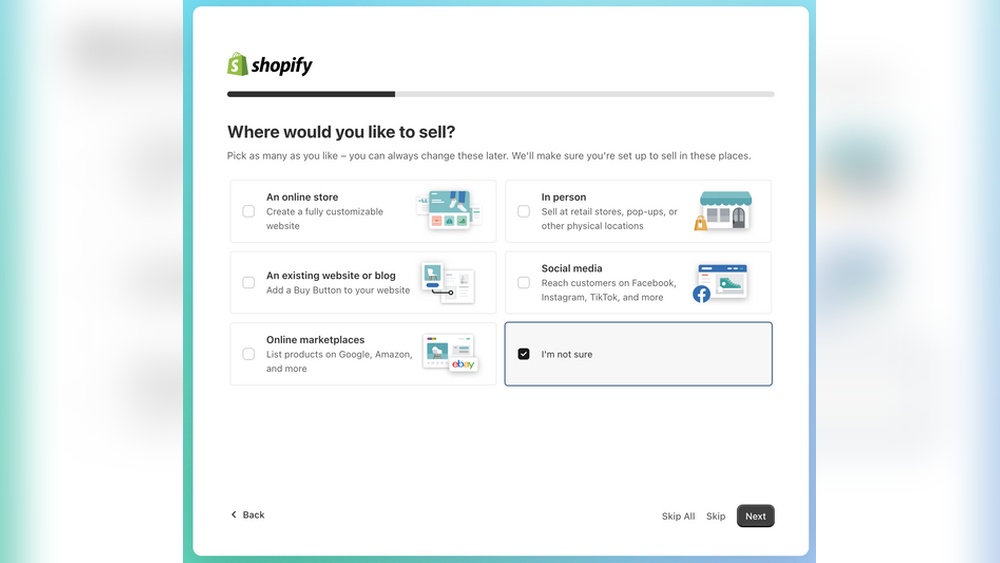
Begin by creating a Shopify account. Visit the Shopify website and sign up for a free trial. Enter basic details like your email, store name, and password. After signing up, think about your main goal.
Ask yourself: What do I want my website to do? Is it to sell products, share information, or offer services? Setting clear goals helps you choose the right tools and design. It also guides your content and marketing strategy.
Choosing Your Website Purpose
Decide the main purpose of your website early on. Shopify allows you to build an online store, a portfolio, or a blog. Each purpose needs different features and layouts.
For an online store, focus on product pages, shopping carts, and payment options. For a portfolio, highlight images and project details. For a blog, organize posts and categories clearly. Knowing your purpose makes customization easier.

Credit: www.shopify.com
Selecting A Theme
Selecting the right theme sets the foundation for your Shopify website. It shapes how visitors see your brand and navigate your store. A good theme balances style with function. It highlights your products and makes shopping easy. Shopify offers many themes to fit different business types. Choosing one that fits your needs helps create a smooth user experience.
Exploring Free And Paid Themes
Shopify provides both free and paid themes. Free themes are a great start for beginners. They offer clean designs and basic features. Paid themes come with more options and unique styles. These often include advanced layouts and customization tools. Consider your budget and the features you need. Pick a theme that matches your brand’s look and feel. Testing a few themes can help you decide what works best.
Mobile-responsive Design Options
Most Shopify themes are mobile-responsive by default. This means your site will look good on phones and tablets. Mobile shopping is very common today. A responsive design ensures your customers have a smooth experience on any device. Check theme previews on different screen sizes. Choose a theme that adjusts well to all devices. This improves user satisfaction and can boost sales.
Customizing Your Site
Customizing your Shopify site is key to creating a unique and professional online presence. Shopify offers tools that let you tailor your website’s look and feel without needing to write code. You can make changes easily and see how your site will look in real time.
Personalizing your site helps build trust with visitors. It also improves user experience and can boost sales. Simple adjustments like adding your logo, changing colors, or rearranging content make a big difference.
Using The Drag-and-drop Builder
The drag-and-drop builder in Shopify is simple and intuitive. You can move elements around your page by clicking and dragging. No coding skills are needed to place images, text, or buttons exactly where you want them.
This tool saves time and lets you experiment with layouts. You see instant results, so you can quickly adjust your design until it fits your brand and style.
Adding Sections And Blocks
Shopify divides pages into sections and blocks for easy editing. Sections are large content areas, like a slideshow or product list. Blocks are smaller pieces, such as text, images, or buttons inside a section.
You can add, remove, or reorder these parts to customize your site’s structure. This flexibility helps create a clear and attractive layout that guides visitors smoothly through your content.
Incorporating Brand Elements
Adding your brand elements makes your site truly yours. Upload your logo and select colors that match your brand identity. Consistent use of fonts and images strengthens your brand message.
Shopify’s theme settings let you easily change these elements. This helps your website look professional and builds recognition with your customers.
Adding Content
Adding content is a key step in building your Shopify website. Content gives your site purpose and helps visitors understand your brand. It makes your site useful and engaging. Focus on clear, simple content that matches your business goals. This section covers how to upload products and create essential pages.
Uploading Products
Start by adding your products to Shopify. Go to the “Products” section in your dashboard. Click “Add product” to enter details like title, description, price, and images. Use clear photos to show your product well. Write simple descriptions that explain benefits and features. Set inventory and shipping options carefully. Organize products with tags and categories for easy browsing. Make sure prices and stock are accurate to avoid confusion.
Creating Essential Pages
Every website needs important pages beyond products. Create an About page to share your story and values. Add a Contact page with your email, phone, and address. This builds trust with visitors. Include a FAQ page to answer common questions. A Policies page helps explain shipping, returns, and privacy. Use simple language on all pages. Keep content short and focused. These pages improve user experience and help your site rank better in search engines.
Setting Up E-commerce Features
Setting up e-commerce features on Shopify is essential for running a successful online store. These features enable smooth transactions, efficient shipping, and wider product reach. Shopify offers easy tools to configure payments, manage shipping, and connect sales channels. Each step helps your store operate professionally and serve customers better.
Configuring Payments
Start by choosing how customers will pay for their orders. Shopify supports many payment gateways, including Shopify Payments, PayPal, and credit cards. Enable the options that suit your business and customers. Set up tax calculations and currency preferences. Test the payment system to ensure smooth checkout.
Managing Shipping Options
Shipping settings control how you deliver products. Define shipping zones based on locations you serve. Set shipping rates by weight, price, or flat fees. Add options for local pickup or dropshipping if needed. Use Shopify’s shipping labels to print and track packages. Clear shipping policies build trust with buyers.
Connecting Sales Channels
Expand your store’s reach by connecting sales channels. Shopify allows selling on Facebook, Instagram, Amazon, and more. Each channel syncs your products and inventory automatically. Choose channels popular with your target market. Manage all orders from one Shopify dashboard. This saves time and grows sales.
Extending Functionality
Extending the functionality of your Shopify website allows you to tailor your site to better meet your needs. Shopify offers many ways to enhance your store beyond the basic setup. These options help improve user experience and increase sales potential.
By adding apps and tools, you can automate tasks, add new features, and connect with other services. This flexibility makes Shopify suitable for small shops and growing businesses alike.
Exploring Shopify Apps
Shopify’s App Store features thousands of apps to expand your store’s capabilities. Many apps focus on marketing, SEO, customer support, and inventory management. Installing an app is simple and often requires no coding skills.
Popular apps include email marketing tools, review collectors, and social media integrations. You can also find apps for dropshipping, loyalty programs, and analytics. Test different apps to see which ones fit your business best.
Integrating Additional Tools
Shopify supports integration with external tools and platforms. You can connect your store with payment gateways, accounting software, and shipping services. These integrations help streamline your operations and save time.
Use API connections or built-in options to sync data between Shopify and other tools. This ensures your inventory, orders, and customer information stay up to date. Integrations also enhance customer experience by offering smooth checkout and fast shipping.
Using A Custom Domain
Using a custom domain on Shopify helps your website stand out. It makes your site easier to find and remember. Custom domains also build trust with your visitors. Shopify lets you add your own domain or buy a new one. This section explains how to purchase and connect domains. It also shows how custom domains improve brand professionalism.
Purchasing And Connecting Domains
Shopify offers domain purchases directly from its platform. You can search for available names and buy them with just a few clicks. After buying, Shopify automatically connects the domain to your store. If you already own a domain, you can link it to Shopify by changing DNS settings. This process takes a few minutes but may take up to 48 hours to update worldwide. Shopify provides easy instructions to guide you through each step. Once connected, your website will load with your custom domain name.
Enhancing Brand Professionalism
A custom domain gives your website a professional look. It shows visitors that your business is serious and trustworthy. Using a domain that matches your brand name makes your site easier to recall. It also helps with search engine rankings, making your store more visible online. Custom domains remove the Shopify default URL, making your web address cleaner. This small change can boost customer confidence and improve your marketing efforts.
Testing And Launching
Testing and launching your Shopify website is a crucial step before going live. It ensures your site looks great and works well for all visitors. Proper testing avoids issues that could hurt user experience or sales.
Spend time checking your site on different devices and testing all features. This process helps catch errors and fix them early. Once everything works smoothly, you can confidently publish your website.
Previewing On Multiple Devices
Shopify allows you to preview your website on desktops, tablets, and smartphones. This helps you see how your site adapts to different screen sizes. Make sure images, text, and buttons look clear and fit well on each device.
Check navigation menus and interactive elements on all devices. A mobile-friendly site improves customer experience and boosts search rankings. Adjust your theme settings if something looks off or does not work properly.
Checking Site Functionality
Test all links, buttons, and forms on your website. Ensure your shopping cart and checkout process work without errors. Confirm payment methods are set up correctly and transactions complete smoothly.
Verify that product pages display accurate details and prices. Test loading speed to keep visitors engaged. Fix any broken links or missing images before launch. Functionality testing helps build trust with your customers.
Publishing Your Website
After thorough testing, it is time to publish your Shopify site. Connect your custom domain for a professional web address. Use Shopify’s publishing tools to make your site live for the world.
Announce your launch through your marketing channels. Monitor your website closely in the first days for any issues. Update your site regularly to keep content fresh and relevant.
Benefits Of Shopify
Shopify offers many benefits that make building a website simple and effective. It suits beginners and experienced users alike. The platform combines ease, power, and flexibility in one place. Here are some key benefits of using Shopify for your website.
Ease Of Use Without Coding
Shopify lets you create a website without writing code. The drag-and-drop builder makes design simple. You can add text, images, and products easily. No need to hire a developer or learn programming. This saves time and lowers costs. Beginners find it very friendly and fast to use.
All-in-one Platform Features
Shopify includes hosting, security, and payment options in one package. You do not need separate services. It handles SSL certificates to keep your site safe. The platform supports multiple payment methods for customers. Marketing tools and analytics come built in. Everything you need is under one roof.
Scalability For Business Growth
Shopify grows with your business needs. Start with a small store and expand easily. Add more products and features as sales increase. The platform can handle high traffic and large inventories. You can upgrade plans without changing your website. This makes Shopify a good long-term solution.
Customization Options
Shopify offers many themes to change your site’s look. Both free and paid themes are available. You can customize colors, fonts, and layouts. For advanced users, code access allows deeper changes. Apps from the Shopify store add extra functions. This helps your site stand out and fit your brand.

Credit: www.youtube.com

Credit: www.youtube.com
Frequently Asked Questions
Can I Use Shopify To Build A Website?
Yes, Shopify lets you build websites easily using customizable themes, drag-and-drop tools, and built-in e-commerce features.
How Much Does It Cost To Start A Website With Shopify?
Starting a Shopify website costs $29/month for the Basic plan. Additional expenses include domain fees, premium themes, and apps. Shopify offers a 3-day free trial to test features before committing.
Do I Need An Llc To Run A Shopify Store?
No, you don’t need an LLC to run a Shopify store. You can operate as a sole proprietor. Forming an LLC offers legal protection and tax benefits but is optional for starting your store.
Is It Free To Create A Shopify Website?
Creating a Shopify website starts with a free 3-day trial. After that, monthly plans apply to keep your site live.
Conclusion
Building a website with Shopify is simple and fast. You can create a site that fits your needs. The platform offers tools to design, add content, and sell products. No coding skills are needed to get started. Shopify also supports growth as your business expands.
Try customizing your site with themes and apps. Test your website well before publishing. A good website helps attract and keep customers. Start your Shopify journey today and watch your ideas take shape.




