

Are you wondering which software can take your email marketing to the next level? Choosing the right email marketing tool is crucial for connecting with your audience, boosting engagement, and growing your business.
But with so many options out there, how do you know which one fits your needs best? Whether you’re a beginner looking for simplicity or an advanced user craving powerful automation, this guide will help you find the perfect software for your email campaigns.
Keep reading to discover top tools, key features to look for, and how to pick the one that matches your goals perfectly. Your next successful email campaign starts here!
Popular Email Marketing Tools
Email marketing tools help businesses send emails, automate campaigns, and track results. Many popular tools offer easy-to-use builders, segmentation, and analytics. These tools often provide free plans to start. Choosing the right software depends on ease of use, automation options, and e-commerce support.
Here are some popular email marketing tools that suit different business needs and budgets.
Mailchimp Features And Pricing
Mailchimp is great for beginners with a strong free plan. It offers drag-and-drop email builders and basic automation. Pricing grows as your contact list expands. It also supports integrations with many apps for marketing growth.
Mailerlite For Small Businesses
MailerLite is affordable and user-friendly, ideal for small businesses. It includes email automation, landing pages, and pop-ups. The free plan allows up to 1,000 subscribers. It offers clean design templates and easy segmentation.
Advanced Automation With Activecampaign
ActiveCampaign focuses on advanced automation and CRM features. It helps create complex customer journeys and personalized emails. The tool is suitable for marketers who want detailed targeting. It also supports sales automation and integrations.
Ecommerce Focused Klaviyo
Klaviyo is popular among e-commerce stores, especially on Shopify. It offers deep integration with shopping platforms. You can send targeted emails based on customer behavior. Klaviyo also provides detailed analytics to boost sales.
Omnisend’s Email And Sms Combo
Omnisend combines email marketing with SMS campaigns. It works well for e-commerce businesses using Shopify or WooCommerce. The platform offers automation workflows for both email and text messages. This helps increase customer engagement.
Hubspot’s All-in-one Platform
HubSpot provides an all-in-one marketing, sales, and service platform. Its email tool includes drag-and-drop editors and personalization. The CRM integration helps manage contacts and track interactions. HubSpot suits businesses wanting a full marketing suite.
Constant Contact For Beginners
Constant Contact is easy to use and perfect for beginners. It offers email templates and list management tools. The platform supports small businesses with event marketing features. It also provides reliable customer support.
Brevo’s Affordable Crm Solution
Brevo, formerly Sendinblue, offers affordable email marketing with CRM features. It includes email automation, transactional emails, and SMS marketing. The free plan allows sending up to 300 emails per day. Brevo suits businesses needing multi-channel communication.

Credit: www.tiny.cloud
Key Features To Consider
Choosing the right software for email marketing depends on key features. These features help create, send, and track effective emails. They also save time and improve results. Understanding these features helps you pick the best tool for your needs.
Drag-and-drop Email Builders
Drag-and-drop builders let you create emails easily without coding. You can add images, text, buttons, and more by dragging elements. This saves time and helps design professional emails quickly. It suits beginners and those who want simple editing.
Automation Workflows
Automation workflows send emails automatically based on triggers. For example, welcome emails, birthday offers, or follow-ups. This feature helps keep your audience engaged without manual effort. It also improves customer experience and saves work.
Audience Segmentation
Segmentation divides your audience into groups based on behavior or data. You can target each group with specific messages. This increases email relevance and engagement. Segmentation can be by location, purchase history, or interests.
Analytics And Reporting
Analytics show how your emails perform. You get data on open rates, clicks, and conversions. Reporting helps you understand what works and what does not. Use this insight to improve future campaigns and reach goals.
Platform Integrations
Good email software connects with other tools you use. This includes CRM, e-commerce, or social media platforms. Integrations help sync data and automate tasks. They make your marketing efforts more efficient and unified.
Email Deliverability
Email deliverability means your emails reach the inbox, not spam. Quality software ensures high deliverability rates. It uses tools to check spam scores and follows email rules. This increases the chance your message is seen and read.
Choosing The Right Software
Choosing the right software for email marketing is key to running effective campaigns. The right tool helps send emails, automate tasks, and track results. It must fit your business needs and skill level. Consider ease of use, features, and pricing before deciding. Different tools serve different purposes. Understanding these can save time and money.
Tools For Ecommerce Businesses
Ecommerce businesses need software that integrates well with online stores. Klaviyo stands out for Shopify and WooCommerce shops. It offers deep data tracking and targeted campaigns. Omnisend also combines email and SMS marketing for more reach. Both tools help boost sales with personalized messages. Look for options that sync with your store and track customer behavior.
Best Options For Beginners And Small Biz
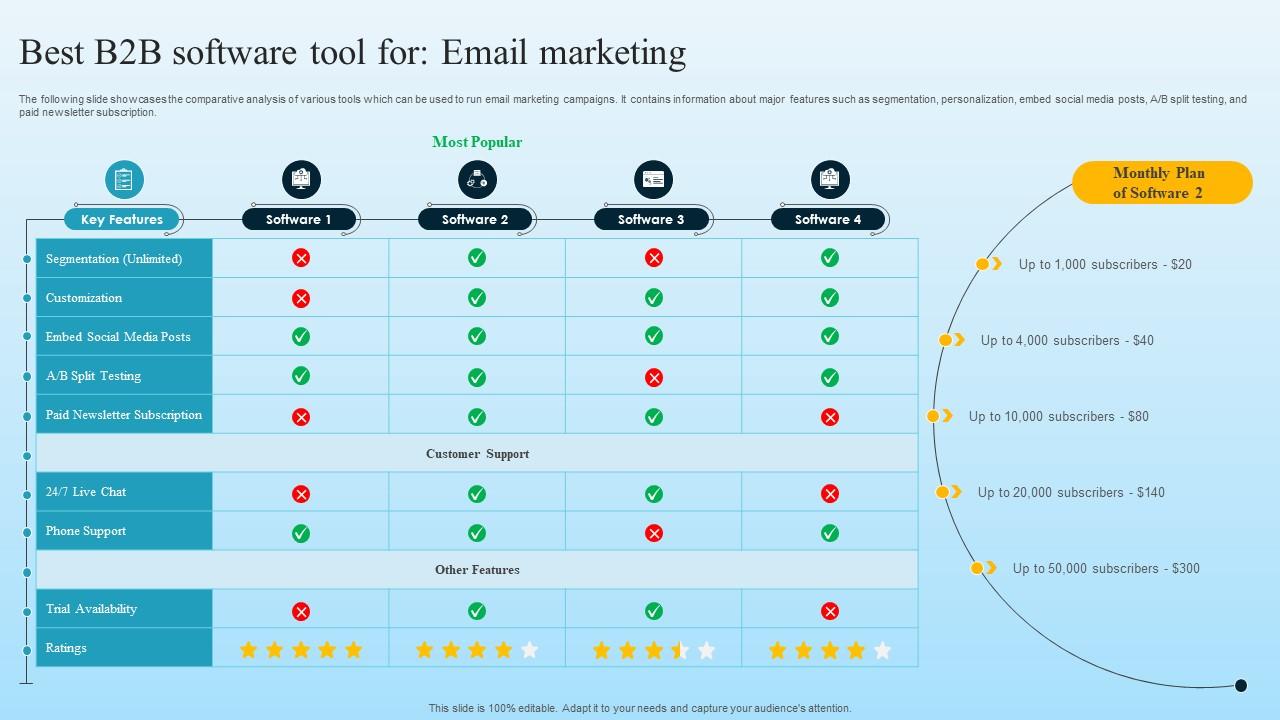
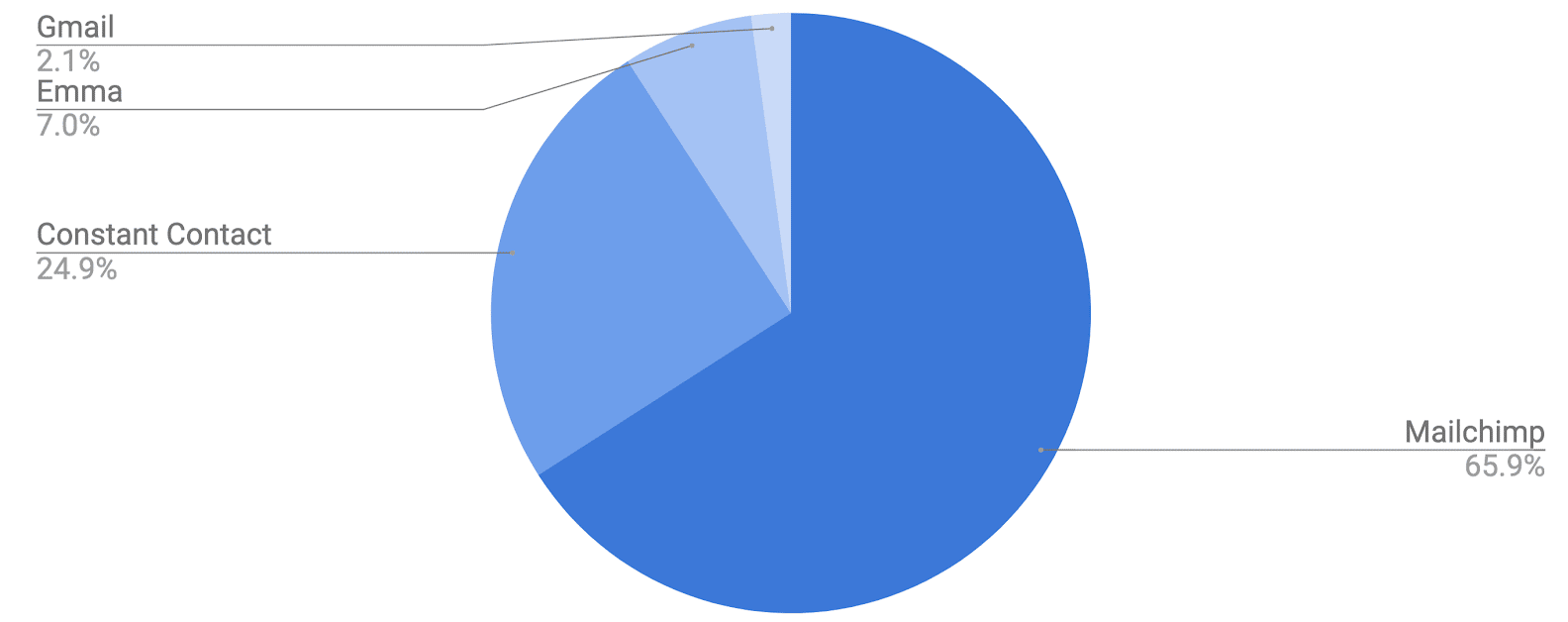
Beginners and small businesses need simple and affordable tools. Mailchimp offers a free plan with easy drag-and-drop editors. MailerLite is known for its user-friendly design and strong support. Constant Contact provides good templates and basic automation. These platforms help create professional emails without much experience. They offer enough features to grow your list and send campaigns.
Platforms For Advanced Automation And Crm
Advanced users need software with strong automation and CRM features. ActiveCampaign allows complex workflows and customer management. HubSpot combines email marketing with sales and service tools. Brevo (Sendinblue) offers email, SMS, and live chat in one platform. These options help manage leads and personalize communication at scale. They suit businesses aiming for detailed tracking and automation.
Credit: www.slideteam.net
Free Email Marketing Solutions
Free email marketing solutions offer a great starting point for small businesses and new marketers. These tools allow users to send campaigns without upfront costs. Many popular platforms include free plans with essential features. They help beginners learn and grow their email lists.
Free plans often include basic email builders, limited contacts, and simple automation. These features are enough for small email campaigns. Users can test different templates and track basic metrics. This lets them understand what works before investing in paid plans.
Overview Of Free Plans
Most free plans allow users to send emails to a limited number of contacts. For example, Mailchimp offers up to 500 contacts and 1,000 emails per month. MailerLite provides 1,000 subscribers and 12,000 emails monthly. These plans include drag-and-drop editors and simple automation features.
Free plans also provide basic templates and reporting tools. Users can create newsletters, welcome emails, and simple drip campaigns. Some platforms offer signup forms and landing pages to grow email lists. These features help businesses start email marketing with no cost.
Limitations And Scalability
Free email marketing plans often have limits on subscribers and email volume. Users may face restrictions on advanced automation and segmentation. Reporting options in free plans can be basic and lack detail. Branding from the platform may appear in emails on free tiers.
As email lists grow, free plans may no longer meet business needs. Upgrading to paid plans unlocks more contacts, emails, and features. Paid plans offer better automation, integrations, and customer support. Businesses should choose platforms that allow easy upgrades to scale efficiently.
Integrations And Automation Enhancers
Integrations and automation enhancers play a crucial role in email marketing software. They connect your email tools with other apps and services to streamline workflows. Automation saves time by handling repetitive tasks automatically. These features help create smarter, more personalized campaigns. Integrations also improve data flow between platforms. This leads to better insights and targeting. Choosing software with strong integration options is essential for growing businesses.
Using Zapier With Email Tools
Zapier acts as a bridge between email marketing software and many other apps. It connects tools without needing code. You can automate actions like adding new contacts or sending follow-up emails. Zapier supports hundreds of apps, including CRMs, forms, and social media. This lets you create custom workflows that fit your business needs. Setting up a Zap is simple and quick. It helps keep your data synced and campaigns updated automatically.
Enhancing Campaigns With Additional Apps
Many email marketing platforms allow adding extra apps to boost campaign power. Tools for analytics, surveys, or e-commerce can integrate seamlessly. For example, adding a survey app helps gather customer feedback directly from emails. E-commerce integrations track purchases and trigger targeted emails. Analytics apps provide deeper insights into campaign performance. These apps expand the base email tool’s capabilities. Using them leads to more effective and engaging campaigns.
Credit: kindful.com
Frequently Asked Questions
What Software Is Best For Email Marketing?
Top email marketing software includes Mailchimp for beginners, ActiveCampaign for advanced automation, Klaviyo for eCommerce, and HubSpot for all-in-one marketing. Choose based on your business size, automation needs, and platform integrations to maximize email campaign success.
What Is The Most Commonly Used Email Software?
The most commonly used email software is Microsoft Outlook, known for its robust features and business integration. Gmail also remains highly popular for personal and professional use worldwide. Both offer easy-to-use interfaces, strong security, and seamless integration with other tools.
What Are The Tools Used In Email Marketing?
Email marketing tools include Mailchimp, MailerLite, ActiveCampaign, Klaviyo, Omnisend, and HubSpot. They offer email builders, automation, segmentation, analytics, and integrations. Choose tools based on business size, automation needs, and e-commerce focus for best results.
Which Software Is Commonly Used For Email Communication?
Commonly used software for email communication includes Microsoft Outlook, Gmail, Apple Mail, and Thunderbird. These platforms offer easy sending, receiving, and organizing of emails efficiently.
Conclusion
Choosing the right email marketing software depends on your needs. Consider ease of use, automation, and integration options. Some tools fit beginners, while others suit advanced users or e-commerce businesses. Test a few platforms to find what works best for you.
Good software helps create, send, and track emails effectively. Start simple, then explore features as you grow. Email marketing remains a powerful way to connect and engage with your audience.




