

Are you wondering which email software most people rely on every day? Choosing the right email program can make a huge difference in how smoothly your communication flows and how productive you feel.
Whether you use email for work, staying in touch with friends, or managing your busy schedule, the software you pick matters. You’ll discover the most commonly used email software, what makes it popular, and how it compares to other options out there.
Keep reading to find out which email client could be the perfect fit for your needs—and why millions trust it already.
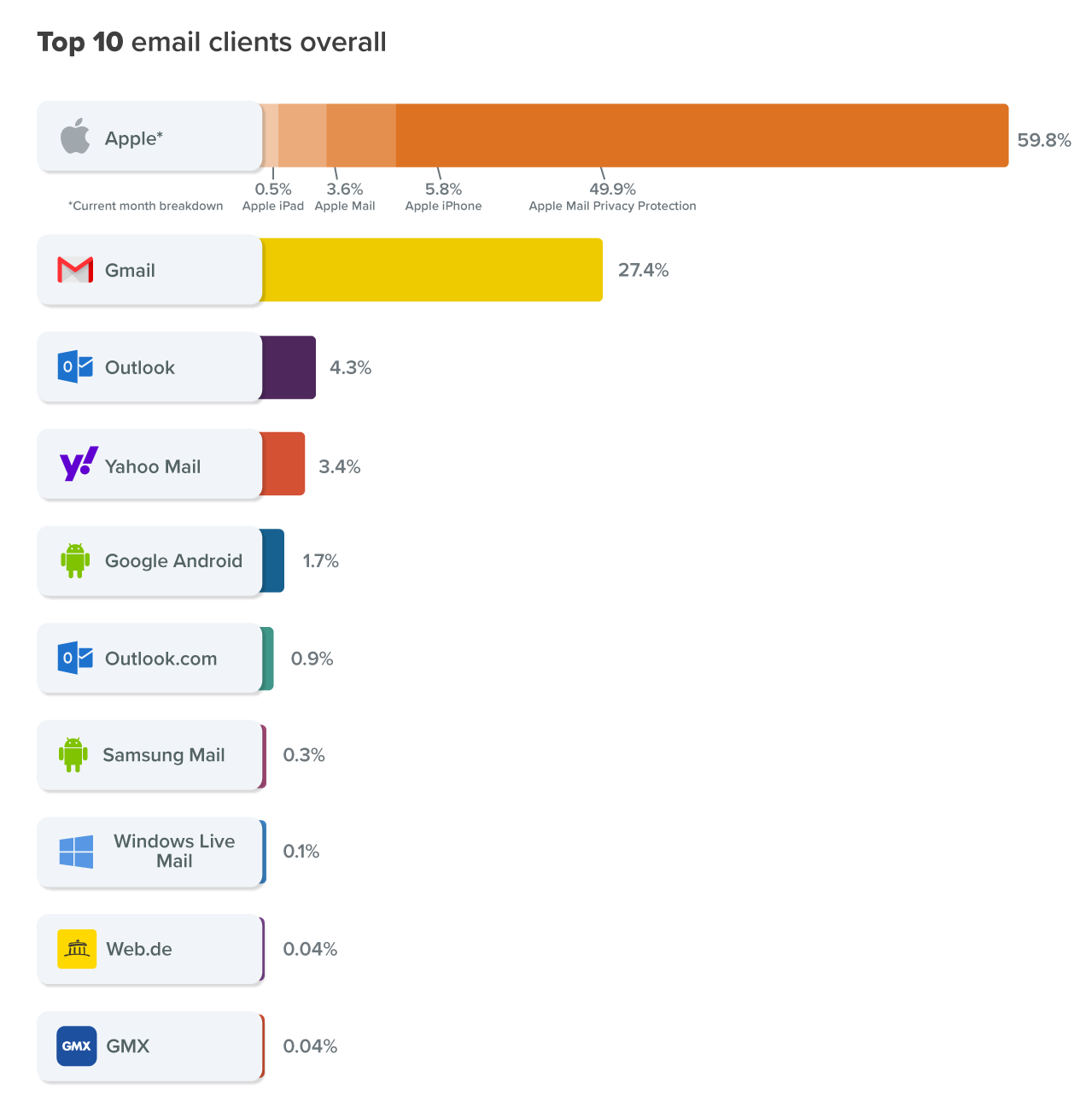
Credit: www.litmus.com
Popular Email Clients
Email clients are software applications designed to manage your emails efficiently. They help you send, receive, and organize messages. Popular email clients vary in features, design, and security. Choosing the right one can improve your daily communication and productivity.
Many people use email clients that are easy to navigate and offer good integration with other tools. Some focus on privacy, while others emphasize user-friendly interfaces or powerful organizational features. Below are some of the most popular email clients used worldwide.
Gmail
Gmail is one of the most widely used email services. It offers a clean interface and strong integration with Google apps. Users can access their email from any device with internet access. Gmail also provides excellent spam filtering and smart categorization features.
Outlook
Outlook is a popular choice, especially in workplaces. It integrates well with Microsoft Office tools. Outlook offers features like calendar, contacts, and task management all in one app. It supports both personal and business email accounts.
Apple Mail
Apple Mail comes pre-installed on Mac and iOS devices. It has a simple design and works smoothly with Apple’s ecosystem. The app supports multiple email accounts and offers useful features like smart mailboxes and VIP contacts.
Thunderbird
Thunderbird is a free, open-source email client. It allows users to customize their experience with add-ons. Thunderbird provides strong security options and works well for managing multiple accounts. It is popular among users who prefer flexibility and control.
Proton Mail
Proton Mail focuses on privacy and security. It offers end-to-end encryption to protect your emails. This client is ideal for users who want to keep their communication private. Proton Mail also has a simple, user-friendly interface for easy use.

Credit: talk.macpowerusers.com
Top Alternatives By Use Case
Choosing the right email software depends on specific needs. Many alternatives excel in different areas. Here are top options based on common use cases. This helps you find the best fit for your email tasks.
Speed And Power Users
Superhuman is perfect for users who want speed and efficiency. It offers fast workflows and many keyboard shortcuts. Its AI helps keep the inbox clean and organized.
Mailbird is another fast option, mainly for Windows users. It combines multiple accounts into one inbox for quick access. It suits freelancers and those needing a smooth experience.
Teams And Collaboration
Spark focuses on teamwork with smart inbox features. It supports shared emails and collaborative notes. AI tools help organize messages and prioritize tasks.
Front is designed for teams handling customer communication. It allows shared inboxes and real-time conversations. This tool keeps everyone on the same page.
Privacy And Security
Proton Mail offers strong privacy with end-to-end encryption. It keeps emails safe from unwanted access. This tool is ideal for users valuing security above all.
Thunderbird is free and open-source, allowing customization and privacy controls. It supports encryption and advanced security options. Many users trust it for secure email management.
Google Ecosystem Users
Gmail integrates perfectly with Google Workspace apps. It syncs emails, calendars, and contacts seamlessly. This option suits those already using Google services daily.
General Productivity
Mailspring is a simple client supporting multiple accounts. It offers useful productivity tools and a clean interface. It works well for users handling various email addresses.
eM Client is a strong desktop alternative for business users. It supports calendars, tasks, and contacts alongside email. This software helps organize all communication in one place.
Features That Matter
Choosing the right email software depends on the features that improve daily email management. These features help save time and keep communication smooth. They also protect privacy and connect your email with other work tools. Understanding these key features helps pick the best email software for your needs.
Ai And Automation
AI features help organize emails faster. They can sort important messages and suggest quick replies. Automation reduces repetitive tasks like scheduling and follow-ups. This saves time and keeps your inbox clean.
Unified Inboxes
Unified inboxes gather all your email accounts in one place. This means no switching between apps or tabs. It is easier to track conversations and respond quickly. This feature suits users with multiple email addresses.
Customization Options
Customizing the email interface makes work more comfortable. Users can change themes, layouts, and notification settings. Custom folders and tags help sort emails better. This keeps your inbox organized your way.
Security And Encryption
Strong security protects your email from hackers and spam. Encryption keeps your messages private and safe. Two-factor authentication adds an extra layer of protection. These features are vital for sensitive or business emails.
Integration With Other Tools
Email software that connects with calendars, task managers, and cloud storage boosts productivity. It lets users attach files easily and schedule meetings directly. Integrations create a smoother workflow between apps.
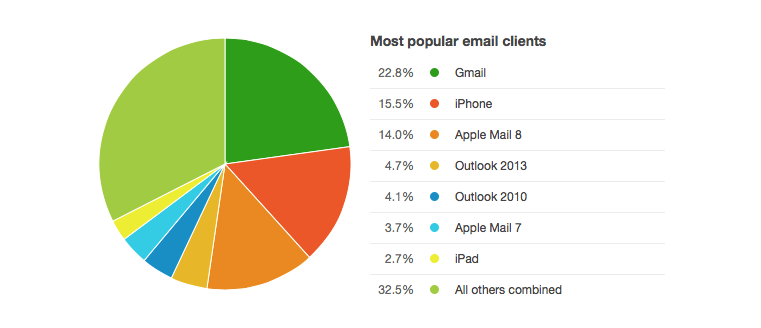
Credit: www.campaignmonitor.com
Choosing The Right Client
Choosing the right email client shapes how you manage your messages daily. The best client fits your habits and needs. It can boost productivity and reduce email stress. Focus on what matters most for your workflow, security, teamwork, or device use.
Based On Workflow Needs
Some email clients focus on speed and efficiency. They offer features like keyboard shortcuts and quick search. These tools help you handle many emails fast. Productivity apps often have unified inboxes to see all messages at once. Choosing one helps you stay organized and save time.
For Privacy Enthusiasts
Privacy is important for many users. Some email clients encrypt your messages to keep data safe. They block trackers and do not scan your emails. Open-source clients often provide better privacy controls. These choices protect your personal information from unwanted access.
For Team Collaboration
Teams need to share emails and work together smoothly. Certain clients offer shared inboxes and real-time chat features. Collaboration tools help manage projects and client communication in one place. This improves coordination and avoids missing important messages.
For Platform Compatibility
Your devices affect which email client works best. Some clients run only on Windows or Mac. Others support mobile platforms like iOS and Android. Cross-platform clients let you access email on any device. Choose one that fits your hardware for easy access everywhere.
Emerging Email Apps
Emerging email apps bring fresh ideas to managing your inbox. They focus on speed, collaboration, and simplicity. These apps often add smart features and improved designs. Many cater to users who want more than basic email functions.
Let’s explore some popular emerging email apps that offer unique benefits.
Superhuman
Superhuman is designed for fast email handling. It uses keyboard shortcuts to speed up tasks. The app helps users reach inbox zero quickly. AI features assist with writing and organizing emails. It suits people who handle many emails daily.
Spark
Spark focuses on team collaboration and smart sorting. It groups emails by importance and sender. Users can share emails and comments with teammates. The app includes a smart reply feature. It works well for groups and busy professionals.
Mailbird
Mailbird offers a clean and simple interface. It supports multiple email accounts in one inbox. The app integrates with many productivity tools. It is popular among freelancers and small businesses. Mailbird aims to improve workflow and save time.
Em Client
eM Client is a full-featured desktop email app. It supports calendars, contacts, and tasks. The app works on Windows and Mac systems. It is a good alternative to traditional Outlook. eM Client fits users wanting strong business features.
Missive
Missive blends email with team chat features. It allows real-time collaboration on emails. Users can assign tasks and share drafts. The app supports group inboxes and shared labels. Missive is helpful for teams managing customer support.
Frequently Asked Questions
What Is The Most Used Email Program?
The most used email program is Gmail, known for its user-friendly interface and Google integration. Outlook and Apple Mail also have large user bases worldwide.
What Email Is Better Than Outlook?
Superhuman excels in speed and AI features. Proton Mail offers strong privacy. Spark supports team collaboration. Thunderbird is highly customizable and open-source. Gmail integrates well with Google apps. Choose based on your needs for speed, privacy, or collaboration.
Is There A Better Email App Than Gmail?
Yes, alternatives like Proton Mail offer stronger privacy, Spark and Superhuman provide advanced features, and Outlook suits Microsoft users better. Choose based on your priorities.
What Is The Most Widely Used Email Provider?
Gmail is the most widely used email provider globally. It offers easy access, strong integration, and free services to billions of users.
Conclusion
Choosing the most common email software depends on your needs. Gmail leads with ease and Google integration. Outlook suits business users with strong security and office tools. Alternatives like Thunderbird offer customization and privacy. Teams may prefer Spark or Missive for collaboration.
Speed lovers often pick Superhuman or Mailbird. Think about what matters most: privacy, speed, or teamwork. The right email client makes managing messages simpler. Explore options to find your best fit today.




