Are you trying to decide between QuickBooks and Sage for your business accounting? Both are powerful tools, but they serve very different needs.
If you’re a startup or small business looking for an easy-to-use, affordable option, QuickBooks might be just what you need. On the other hand, if your business is growing fast, managing multiple locations, or requires advanced financial reporting, Sage could be the better fit.
This ultimate comparison guide will help you understand the key differences, pros, and cons of each software so you can confidently choose the right solution for your business. Keep reading to find out which one matches your goals and makes your accounting easier.

Credit: alphalogix.co.uk
Quickbooks Overview
QuickBooks is a popular accounting software designed for small to medium-sized businesses. It helps users manage finances with easy-to-use tools. Many startups and freelancers choose QuickBooks to handle daily accounting tasks without complexity.
The software offers a simple interface, making bookkeeping less stressful. It supports invoicing, expense tracking, and bank connections. QuickBooks also provides mobile apps for managing accounts on the go.
Target Users
QuickBooks mainly serves small businesses, freelancers, and startups. It suits users who want straightforward accounting without deep technical knowledge. Many accountants recommend QuickBooks for small clients due to its ease of use.
Key Features
- Simple invoicing and payment tracking
- Expense and receipt management
- Bank account integration with automatic updates
- Basic inventory control in higher plans
- Mobile app access for remote management
Advantages
- Easy setup and user-friendly design
- Affordable pricing for small businesses
- Strong automation for bank feeds
- Widely supported by accountants and bookkeepers
- Regular updates and strong community support
Limitations
- Limited features for large or complex businesses
- Less suited for multi-entity accounting
- Basic inventory features only in higher tiers
- Customization options are somewhat limited
- May require upgrades as business grows
Sage Overview
Sage is a robust accounting software designed for growing businesses. It supports complex financial management and multi-entity operations. Sage offers scalable solutions that adapt as companies expand. The platform fits various industries with customizable features. Many medium to large businesses rely on Sage for its depth and flexibility.
Target Users
Sage primarily serves mid-sized and large businesses. It fits companies with complex accounting needs. Businesses managing multiple entities find Sage useful. Industries like manufacturing, construction, and finance benefit from Sage. It suits firms needing detailed financial reports and compliance tools.
Key Features
Sage provides advanced multi-entity management capabilities. It offers customizable financial reporting and dashboards. Users access project and fund accounting tools. The software supports strong inventory and supply chain management. Sage includes an open API for smooth integrations. It also offers industry-specific modules tailored to user needs.
Advantages
Sage scales well with growing business complexity. It handles multi-dimensional accounting efficiently. The software delivers detailed, customizable reports. It supports compliance with industry regulations. Sage’s flexibility allows users to tailor features. Integration options enhance overall business workflows.
Limitations
Sage has a steeper learning curve than simpler software. It requires more time to set up and master. The cost is higher compared to basic accounting tools. Non-accountants may find the interface less intuitive. Some users need expert help for full customization. Smaller businesses may find it overly complex.
Feature Comparison
Comparing features of QuickBooks and Sage helps identify which suits your business. Both software offer core accounting tools but differ in depth and flexibility. This section breaks down their key features to highlight strengths and limitations. Clear understanding aids better decisions for your accounting needs.
Accounting Capabilities
QuickBooks offers easy-to-use accounting for small businesses. It handles invoicing, expense tracking, and basic payroll smoothly. Sage provides advanced accounting suited for larger firms. It supports complex multi-entity and project accounting. Sage’s features cover diverse industries with detailed financial controls.
Reporting And Analytics
QuickBooks delivers essential financial reports and simple dashboards. It helps track profit, loss, and cash flow clearly. Sage offers powerful analytics with customizable reports. Users gain insights with detailed data visualizations. Sage’s tools support strategic decisions for growing businesses.
Inventory Management
QuickBooks includes basic inventory tracking for small inventories. It handles product quantities and sales efficiently. Sage provides comprehensive inventory management with real-time updates. It supports multiple warehouses and batch tracking. Sage suits businesses with complex supply chains.
Bank Integration
QuickBooks excels in bank integration with automatic transaction imports. It simplifies bank reconciliations and cash flow monitoring. Sage also offers bank connectivity but focuses more on financial controls. It integrates well with multiple accounts and currencies. Both streamline financial data entry.
Customization And Scalability
QuickBooks is customizable with add-ons but best for small to medium businesses. It grows moderately but may limit complex needs. Sage is highly scalable, built for expanding companies. It allows deep customization of workflows and reports. Sage adapts to business growth and complexity.
Pricing And Cost
Understanding the pricing and cost differences between QuickBooks and Sage helps businesses choose the right software. Both platforms offer various plans that cater to different business sizes and needs. Pricing can vary greatly depending on features and scalability.
Entry-level Plans
QuickBooks offers affordable entry-level plans ideal for small businesses and startups. These plans include basic bookkeeping, invoicing, and expense tracking. Sage’s entry-level options tend to be pricier and focus on more advanced accounting features. Sage targets businesses that need stronger financial controls from the start.
Advanced Pricing
As businesses grow, pricing for both QuickBooks and Sage increases with added features. QuickBooks charges monthly fees based on user count and feature access. Sage pricing often involves custom quotes, reflecting its complex modules and multi-entity support. Sage’s advanced plans suit companies requiring detailed reporting and compliance tools.
Value For Money
QuickBooks provides excellent value for small to medium businesses with simple accounting needs. It balances cost and usability effectively. Sage delivers value through powerful features that support larger, more complex organizations. Businesses with multi-entity operations often find Sage worth the higher investment.
Ease Of Use
Ease of use is a key factor when choosing between QuickBooks and Sage. It affects how quickly you learn the software and how smoothly you manage your accounting tasks daily. Both programs offer different experiences based on their design and target users. Understanding these differences helps you pick the right tool for your business needs.
User Interface
QuickBooks has a clean and simple user interface. It shows clear menus and icons, making navigation easy for beginners. The dashboard highlights important financial data at a glance. Sage, on the other hand, offers a more detailed interface. It suits users who need advanced features and deeper insights. The design can feel busy to new users but benefits experienced accountants.
Learning Curve
QuickBooks is easier to learn. Most users can start basic accounting tasks within a few hours. It uses familiar terms and guides users step-by-step. Sage requires more time to understand. Its complexity fits larger businesses with varied accounting needs. Training or professional help might be necessary to use Sage effectively. The learning curve is steeper but pays off with powerful functions.
Support And Resources
Both QuickBooks and Sage provide strong customer support. QuickBooks offers extensive online tutorials, forums, and live chat. Its large user base means many third-party guides are available. Sage provides detailed documentation and professional support plans. The help is thorough but can be slower for smaller questions. Users of Sage often rely on certified consultants for complex issues.
Credit: austinbookkeepinghub.com
Industry Suitability
Choosing the right accounting software depends heavily on the industry and business size. QuickBooks and Sage cater to different market segments and needs. Understanding their industry suitability helps businesses pick the best fit for their operations. This section explores how each software serves various industries and company sizes.
Small Businesses And Startups
QuickBooks is ideal for small businesses and startups. It offers simple setup and easy-to-use features. Users can track expenses, create invoices, and manage basic inventory. Its affordability suits tight budgets. The software supports freelancers and small teams well. QuickBooks also connects smoothly with banks, saving time on transactions.
Mid-market And Large Enterprises
Sage targets mid-market and large enterprises with complex financial needs. It handles multi-entity accounting and advanced reporting. Sage offers deeper customization options to match business processes. The software supports compliance and audit requirements better. Larger companies benefit from Sage’s scalability and powerful dashboards. However, it requires more accounting knowledge to operate effectively.
Specialized Industry Features
Sage provides specialized modules for industries like construction and manufacturing. These features address unique accounting challenges in those sectors. QuickBooks has some industry-specific tools but is less comprehensive. Businesses in regulated or complex industries often prefer Sage. It supports project accounting, fund management, and inventory control in detail. This makes Sage a better choice for niche markets.
Integration And Compatibility
Integration and compatibility are essential for choosing the right accounting software. They determine how well the software connects with other tools and systems. This affects efficiency, data flow, and ease of use. Both QuickBooks and Sage offer various options for integration and compatibility. Understanding these options helps you pick the best fit for your business needs.
Third-party Integrations
QuickBooks supports a large number of third-party apps. It connects with popular tools for payroll, payments, inventory, and CRM. This helps small businesses streamline workflows easily. Sage also offers third-party integrations but focuses more on industry-specific solutions. It works well with specialized software for manufacturing, construction, and finance. Sage’s integrations tend to be more complex, suitable for larger businesses with unique needs.
Api Availability
QuickBooks provides a robust API for developers. It allows custom integrations and automation. Many apps use QuickBooks API to sync data seamlessly. Sage offers powerful APIs as well, especially with Sage Intacct. These APIs support advanced customization and multi-entity management. Sage’s API is designed for tech-savvy users and larger companies. Both platforms give options for extending functionality through APIs.
Mobile App Support
QuickBooks has a strong mobile app with essential features. Users can send invoices, track expenses, and view reports on the go. It is user-friendly and works well for small business owners. Sage provides mobile apps too, but they are more focused on reporting and approvals. Sage’s mobile solutions support complex workflows but may require training. Mobile support is solid on both, but QuickBooks is easier for everyday use.
Credit: www.cdata.com
Choosing The Right Software
Choosing the right accounting software can shape your business’s financial health. Both QuickBooks and Sage offer strong features but serve different needs. Picking the best fit depends on your business size, complexity, and growth plans. Understanding when to select each software helps avoid costly mistakes and boosts efficiency.
When To Choose Quickbooks
QuickBooks suits startups and small businesses. It offers an easy setup and simple navigation. The software provides strong bank integration and automates many tasks. Its affordable plans fit tight budgets. QuickBooks works well for basic accounting needs like invoicing and expense tracking. Users benefit from a mobile app for accounting on the go. It is widely supported by accountants familiar with its interface. Businesses without complex financial structures find it very effective.
When To Choose Sage
Sage is ideal for mid-sized or larger companies. It handles complex accounting like multi-entity and dimensional tracking. The software offers advanced reporting and customization options. Sage suits businesses needing industry-specific features and compliance tools. It requires more expertise but supports growth and scaling well. Companies managing multiple locations or projects benefit from Sage’s robust dashboards. Though pricier, it provides deeper financial control for complex operations.
Frequently Asked Questions
How Does Sage Compare To Quickbooks?
Sage suits mid to large businesses needing advanced multi-entity accounting and customization. QuickBooks fits small businesses with simpler, user-friendly financial tools. Sage offers scalability and complex reporting; QuickBooks provides affordability and ease of use. Choose based on business size and complexity.
Why Do Accountants Not Like Quickbooks?
Accountants dislike QuickBooks for its limited scalability, lack of advanced reporting, and weaker multi-entity management. It suits small businesses but struggles with complex accounting needs.
What Are The Disadvantages Of Sage Software?
Sage software can be costly and has a steep learning curve. Its interface is less intuitive for non-accountants. Customization may require technical expertise. Some users report slower customer support. It may be complex for small businesses with simple accounting needs.
What Are People Replacing Quickbooks With?
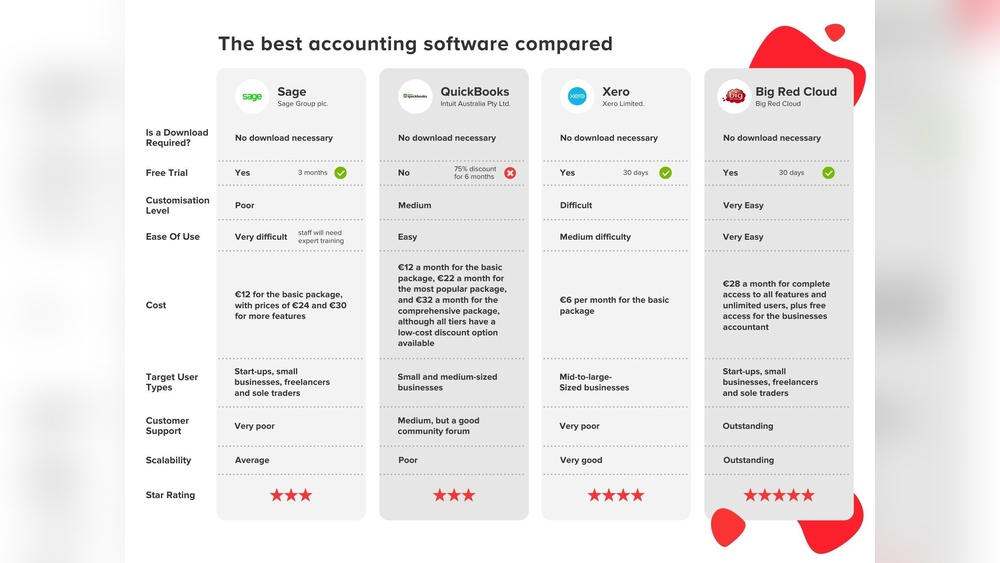
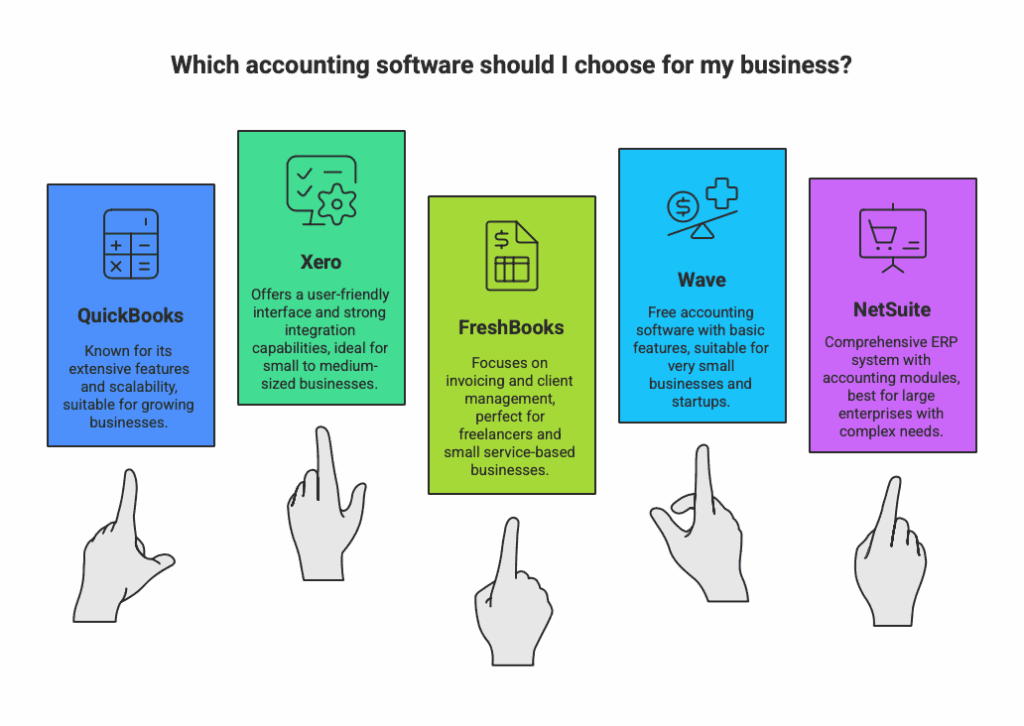
People often replace QuickBooks with alternatives like Xero, FreshBooks, Sage Intacct, or Zoho Books for scalability and advanced features. These options suit growing businesses needing robust financial management beyond QuickBooks’ basic tools.
Conclusion
Choosing between QuickBooks and Sage depends on your business size and needs. QuickBooks suits small businesses and startups with simple accounting tasks. Sage fits larger or growing companies requiring advanced features and detailed financial control. Both have strengths and limitations.
Understanding these helps you pick the right tool. Remember to consider budget, ease of use, and future growth. The right software supports your business’s success efficiently. Take time to evaluate which matches your goals best before deciding.