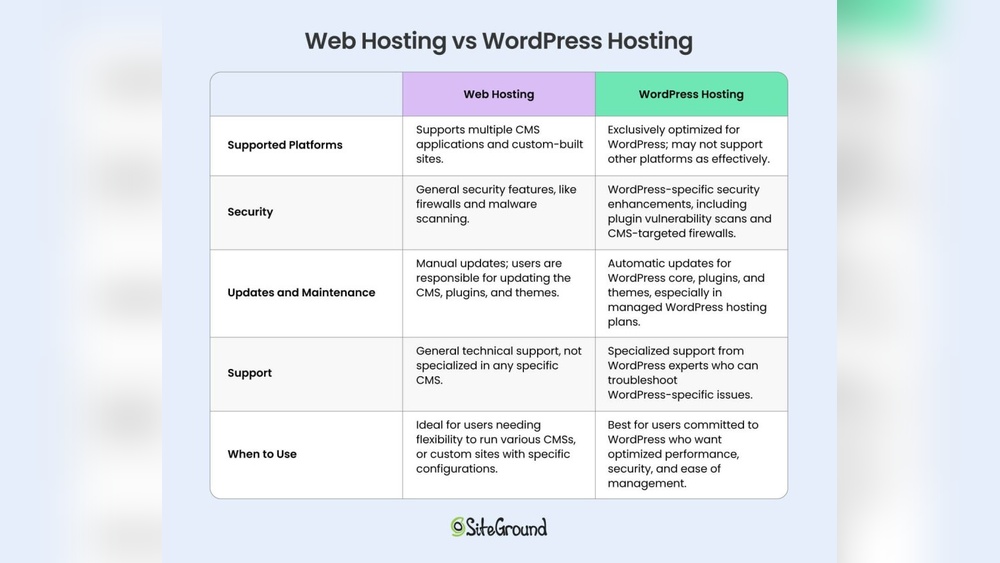
Are you trying to decide between web hosting and WordPress hosting for your website? Choosing the right hosting can make a huge difference in your site’s speed, security, and ease of management.
But with so many options out there, it’s easy to feel overwhelmed. Which one will give you the best performance and support for your needs? You’ll discover the key differences between web hosting and WordPress hosting, and learn which option fits your goals and budget perfectly.
Keep reading to make an informed choice that sets your website up for success.
Web Hosting Basics
Web hosting is the service that makes your website accessible online. It stores your website files on servers connected to the internet. Without hosting, your website cannot be seen by visitors. Hosting providers offer different plans to suit various needs and budgets.
Choosing the right hosting depends on your website type, traffic, and technical skills. Understanding basic hosting types helps you make better decisions. This section explains the main types, typical uses, and cost factors.
Types Of Web Hosting
Shared hosting means many websites share one server. It is affordable but offers limited resources. VPS hosting divides a server into private spaces. It gives more control and better performance. Dedicated hosting means you rent a whole server. It is ideal for large websites needing high power. Cloud hosting uses multiple servers to host sites. It offers flexibility and can handle traffic spikes well.
Typical Use Cases
Shared hosting suits beginners, small blogs, or personal sites. VPS hosting works for growing businesses and medium traffic sites. Dedicated hosting fits large companies with heavy traffic and special needs. Cloud hosting is good for sites expecting rapid growth or variable traffic. Each type matches different website goals and budgets.
Cost Considerations
Shared hosting is the cheapest option, starting around a few dollars monthly. VPS costs more, reflecting better resources and control. Dedicated hosting is the most expensive, often costing hundreds monthly. Cloud hosting pricing varies by usage, which can be cost-efficient or higher. Consider what features and resources you need before choosing.
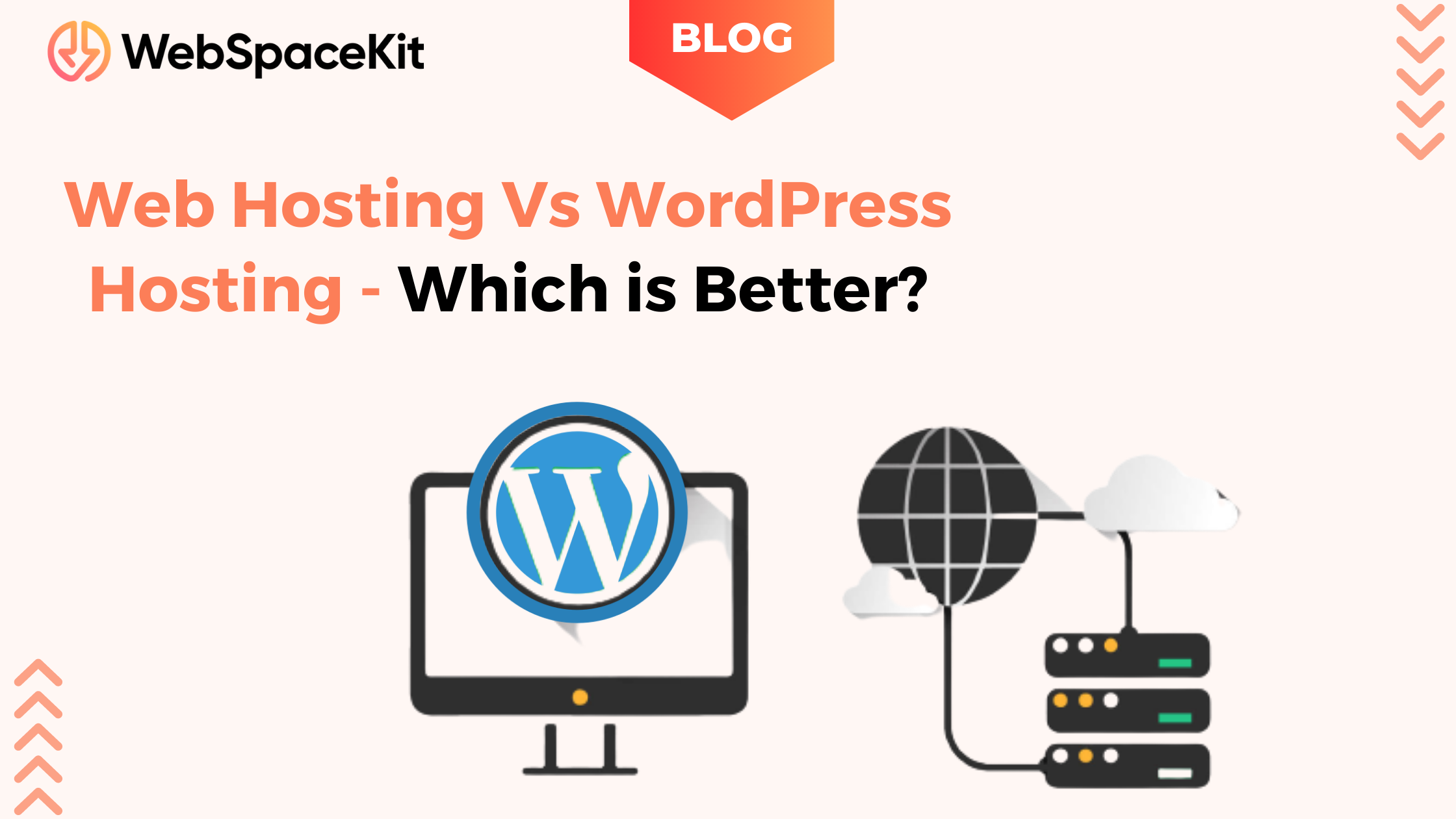
Credit: webspacekit.com
WordPress Hosting Features
WordPress hosting offers specific features designed to enhance WordPress websites. These features improve site speed, security, and ease of use. WordPress hosting focuses on the needs of WordPress users.
WordPress Optimization
WordPress hosting servers are fine-tuned to run WordPress fast. This means better loading times and smooth performance. The hosting environment supports the latest WordPress updates and PHP versions. It also uses caching systems that speed up page delivery.
Included Plugins And Tools
Many WordPress hosting plans include useful plugins and tools. These often help with backups, SEO, and site management. Some hosts offer premium plugins at no extra cost. These tools make managing a WordPress site easier and more efficient.
Security Enhancements
Security is a key part of WordPress hosting. Hosts provide automatic updates for WordPress core, themes, and plugins. Firewalls and malware scanning protect sites from attacks. Some plans offer daily backups and easy restoration options. These features reduce the risk of hacking and data loss.
Performance Comparison
Performance plays a key role in choosing between web hosting and WordPress hosting. Fast loading times and stable service improve user experience. This section compares their performance on core aspects like speed, server resources, and scalability.
Speed And Reliability
WordPress hosting is built to load WordPress sites quickly. It uses caching and server tweaks for faster page delivery. Web hosting serves various site types, so speed can vary. WordPress hosting often provides better uptime and fewer crashes for WordPress sites.
Server Resources
WordPress hosting allocates resources specifically for WordPress needs. It optimizes CPU and memory use for plugins and themes. General web hosting shares resources among many site types. This can limit performance if traffic spikes or plugins demand more power.
Scalability Options
Web hosting offers flexible plans to grow with any website. You can upgrade from shared to VPS or dedicated servers easily. WordPress hosting also scales but focuses on WordPress site growth. It often includes tools to manage traffic surges and larger databases smoothly.
Credit: themeisle.com
Ease Of Use
Ease of use plays a big role in choosing between web hosting and WordPress hosting. It affects how fast you start and how simple it is to manage your site. Both options offer different experiences for setup, daily management, and support. Understanding these can help pick the right hosting for your needs.
Setup And Installation
Web hosting usually requires manual setup. You often need to install WordPress yourself. This might involve downloading files and creating databases. It can be tricky for beginners.
WordPress hosting comes with WordPress pre-installed. You can start building your site right away. This saves time and reduces technical steps. The process is simple and user-friendly.
Management And Maintenance
Managing web hosting means handling updates and backups on your own. You control everything but need more effort. It suits users who want full control.
WordPress hosting often includes automatic updates and backups. It reduces the workload and keeps your site secure. This service suits users who want easy maintenance.
Support Services
Web hosting support covers general server issues. They may not specialize in WordPress problems. Support can be slower for WordPress-specific questions.
WordPress hosting offers expert support for WordPress issues. The team understands the platform well. This leads to faster and better help for your site.
Flexibility And Compatibility
Flexibility and compatibility are key factors in choosing between web hosting and WordPress hosting. These aspects affect how easily you can use various tools and customize your website. Understanding these elements helps pick the right hosting for your needs.
Supported Cms And Software
Web hosting supports many content management systems (CMS). You can install Joomla, Drupal, Magento, and others. WordPress hosting focuses only on WordPress CMS. This makes it easier to manage WordPress sites but limits other options.
Web hosting allows using multiple software types. You can run e-commerce stores, forums, or custom apps. WordPress hosting optimizes performance for WordPress software only. It may not support other CMS or apps well.
Customization Options
Web hosting offers broad customization. You control server settings, databases, and file management. This suits users with technical skills or special needs. WordPress hosting restricts some server access. It focuses on simplifying WordPress setup and updates.
WordPress hosting often includes pre-installed themes and plugins. This speeds up site building but limits deep customization. Web hosting allows full freedom to add or modify any script or tool you want.
Third-party Integrations
Web hosting supports integrations with many third-party services. You can connect email, analytics, payment gateways, and more. WordPress hosting provides easy integration mainly with WordPress plugins. These plugins cover many popular tools but may miss niche services.
Using web hosting, you can install any software or API. This gives flexibility for custom workflows or advanced features. WordPress hosting focuses on smooth plugin use and automatic updates. It may restrict some third-party installations for security.
Security Factors
Security is a crucial factor when choosing between web hosting and WordPress hosting. Protecting your website from cyber threats keeps your data safe and your visitors confident. Both hosting types offer security features, but they differ in approach and effectiveness. Understanding these differences helps you pick the right option for your site.
Vulnerability To Attacks
WordPress is a popular target for hackers due to its wide use. Regular web hosting may not focus on WordPress-specific threats. WordPress hosting often includes tools to block common attacks like malware and brute force. This lowers the risk of your site being compromised. Web hosting security depends on the provider and your own setup.
Backup And Recovery
Backups save your site data in case of failure or attack. WordPress hosting usually offers automatic backups daily or weekly. This makes recovery quick and easy. With general web hosting, backups might need manual setup. Missing regular backups can cause permanent data loss.
Automatic Updates
Keeping software updated fixes security holes fast. WordPress hosting often manages updates for the core, themes, and plugins automatically. This reduces the chance of attacks on outdated software. Web hosting may leave updates to the user. Neglecting updates makes your site vulnerable.
Cost Analysis
Cost plays a major role in choosing between web hosting and WordPress hosting. Understanding how pricing works helps you pick the best option. Comparing costs reveals which service fits your budget and needs.
Examining pricing models, value for money, and hidden fees uncovers the true cost of each hosting type. This clear analysis prevents surprises later on.
Pricing Models
Web hosting often uses shared, VPS, or dedicated plans. Prices vary widely by features and server resources. Shared hosting is the cheapest and suits small sites.
WordPress hosting usually offers managed plans. These include WordPress-specific tools and support. Managed plans cost more than basic web hosting.
Monthly and yearly billing options exist for both types. Yearly plans often come with discounts. Some hosts provide pay-as-you-go models too.
Value For Money
Web hosting gives flexibility for different platforms and apps. It suits users who want control and lower costs. You get standard server resources without extras.
WordPress hosting adds value by optimizing performance for WordPress sites. It includes automatic updates, backups, and security. These extras save time and reduce risks.
Choosing WordPress hosting can be worth the extra cost for serious bloggers or businesses. It streamlines site management and improves speed.
Hidden Fees
Both hosting types may have hidden fees. Setup fees, renewal price hikes, or add-ons can increase costs. Always read terms carefully before buying.
Some WordPress hosts charge extra for premium plugins or advanced security. Web hosts may charge for extra storage or bandwidth.
Watch out for cancellation fees or limits on traffic and storage. These charges affect your budget over time.
Ideal Users For Each Hosting
Choosing between web hosting and WordPress hosting depends on who will use it. Each hosting type suits different needs and skills. Understanding ideal users helps pick the right option. Here is a clear view of who benefits most from each hosting type.
Beginners And Personal Sites
Beginners and personal site owners want simple and easy hosting. Web hosting offers basic tools for starting small websites. It supports various site types beyond WordPress. Users can try different platforms and learn hosting basics. Web hosting often costs less, fitting small budgets. No need for advanced features or high performance at this stage.
WordPress hosting suits those focused only on WordPress. It simplifies setup and maintenance. Beginners get automatic updates and security tailored for WordPress. This reduces technical tasks and risks. Personal bloggers or hobbyists enjoy faster, smoother WordPress experiences here.
Business And Growing Websites
Businesses and growing websites need more power and reliability. Web hosting can serve these sites but may require manual tweaks. It offers flexibility to run custom applications beyond WordPress. Companies with diverse web tools might prefer general web hosting. It scales well with increased traffic and content.
WordPress hosting targets businesses using WordPress as their main platform. It provides optimized speed, security, and support. Growing WordPress sites benefit from specialized caching and backups. This hosting reduces downtime and improves user experience. Business owners save time on technical issues and focus on content and sales.
Agencies And Developers
Agencies and developers need control and advanced features. Web hosting gives full server access and freedom to customize. It supports multiple websites and various coding languages. Developers can install any software or tools needed. This suits complex projects and client work with diverse needs.
WordPress hosting offers tools focused on WordPress development. It includes staging environments, one-click installs, and developer-friendly workflows. Agencies working mainly with WordPress sites find this helpful. It speeds up site building and testing. Support teams understand WordPress deeply, aiding problem solving.
Common Myths And Misconceptions
Many people confuse web hosting and WordPress hosting. This confusion leads to myths and wrong ideas. Knowing the facts helps you make better choices for your site. Here, we clear up some common myths and misconceptions.
Is WordPress Hosting Always Better?
WordPress hosting is not always the best for every website. It is made for WordPress sites and has features for them. But if you run other types of websites, regular web hosting might work better. WordPress hosting can be more expensive and may have limits. Choose based on your site needs, not just the name.
Do You Need Hosting To Use WordPress?
You do not always need hosting to use WordPress. WordPress.com offers free hosting but with limits on design and plugins. For full control, you need web hosting to install WordPress yourself. This self-hosted WordPress lets you customize everything. Hosting is essential for a professional website with your own domain.
Security Concerns
Many think WordPress is unsafe. WordPress is popular, so hackers try to attack it more. But WordPress itself is secure if updated often. Problems happen with old plugins and weak passwords. Good web hosting can add security layers. Both web hosting and WordPress hosting can be safe if managed well.
Credit: wpx.net
Frequently Asked Questions
What Is The Difference Between WordPress Hosting And Web Hosting?
WordPress hosting is optimized specifically for WordPress sites, offering better performance and WordPress-focused features. Web hosting supports any website type but lacks specialized WordPress tools.
Why Are People Moving Away From WordPress?
People move away from WordPress due to security risks, frequent updates, plugin conflicts, and slower performance on some hosts.
Which Type Of Hosting Is Best For A Website?
The best hosting depends on your website type. Shared hosting suits small sites, VPS fits growing businesses, and managed WordPress hosting optimizes WordPress sites. Choose based on your site’s size, traffic, and platform for optimal performance and cost-efficiency.
Do You Need Web Hosting With WordPress?
Yes, WordPress requires web hosting to be accessible online. Hosting stores your site’s files and ensures it runs smoothly.
Conclusion
Choosing between web hosting and WordPress hosting depends on your website needs. Web hosting offers flexibility for various site types. WordPress hosting focuses on performance and ease for WordPress sites. Consider your budget, technical skills, and growth plans. Both have pros and cons to weigh carefully.
The right choice helps your website run smoothly and grow well. Take time to research and decide what fits you best. This ensures a solid foundation for your online presence.