

Choosing the right accounting software can make or break your business success. If you’re torn between FreshBooks and QuickBooks, you’re not alone.
Both are popular, but which one truly fits your needs in 2025? This ultimate comparison breaks down everything—from ease of use to pricing, features, and scalability—so you can confidently pick the best tool for your business. Keep reading to discover which software will save you time, reduce stress, and help your business thrive.
Your perfect accounting partner is just a few scrolls away.
Freshbooks Features
FreshBooks offers a range of features designed to simplify business accounting. Its tools focus on making invoicing, expense tracking, and project management easier. The interface aims to be user-friendly for business owners and freelancers.
These features help save time and keep finances organized without complex steps. FreshBooks suits small businesses that need straightforward financial tools.
Invoicing And Billing
FreshBooks provides customizable invoice templates. Users can send professional invoices quickly by email. It supports automatic payment reminders to reduce late payments. Multiple payment options include credit cards and online gateways. Recurring invoices help businesses bill clients regularly without extra work.
Expense Tracking
Tracking expenses is simple with FreshBooks. Users can snap photos of receipts and upload them instantly. The system categorizes expenses for easy review and tax preparation. It also connects with bank accounts to import transactions. This feature ensures accurate records of business spending.
Project Management
FreshBooks offers basic project management tools. Users can create projects and assign tasks to team members. Time tracking is built-in for billing hours accurately. Collaboration happens through comments and file sharing within projects. This helps keep work organized and on schedule.
User Interface And Usability
The FreshBooks interface is clean and intuitive. Menus are easy to navigate even for beginners. The dashboard highlights important info like unpaid invoices and recent expenses. Mobile apps provide access to features on the go. Overall, FreshBooks focuses on simplicity and ease of use.
Quickbooks Features
QuickBooks offers a robust set of features designed to support small to medium-sized businesses. Its tools help manage finances, track sales, and keep accounts organized. The platform suits various industries with tailored solutions. Below is a detailed look at the key features of QuickBooks.
Comprehensive Accounting Tools
QuickBooks provides a full range of accounting functions. Users can create invoices, track expenses, and manage bills easily. The software supports bank reconciliation and tax filing tasks. It also allows multiple users to access data securely. These tools simplify day-to-day accounting work.
Inventory Management
QuickBooks includes inventory tracking to monitor stock levels and costs. It helps businesses avoid overstocking or running out of products. Users can set reorder points and track items sold. This feature integrates smoothly with sales and purchase data. It is useful for retailers and product-based companies.
Advanced Reporting
The software offers detailed financial reports for better insights. Reports include profit and loss, balance sheets, and cash flow statements. Customizable reports help meet specific business needs. Users can schedule reports to be sent automatically. These reports support informed decision-making.
Industry-specific Solutions
QuickBooks tailors features to various industries such as retail, construction, and nonprofits. Each version includes tools suited to that sector’s requirements. For example, contractors get project tracking and job costing options. This customization helps businesses operate more efficiently.
Pricing And Plans
Pricing and plans are key factors for small businesses choosing accounting software. Both FreshBooks and QuickBooks offer multiple pricing options. Each targets different business needs and budgets. Understanding their pricing tiers helps decide the best fit. This section breaks down costs clearly.
Freshbooks Pricing Tiers
FreshBooks offers four main plans. The Lite plan costs $15 per month. It supports up to 5 billable clients. The Plus plan is $25 per month with 50 clients allowed. The Premium plan charges $50 monthly for 500 clients. Lastly, the Select plan is custom-priced for large businesses. All plans include basic invoicing and expense tracking.
Quickbooks Pricing Options
QuickBooks has several plans too. The Simple Start plan starts at $30 monthly. It suits one user and basic needs. The Essentials plan costs $55 per month. It supports three users and more features. The Plus plan is $85 monthly with up to five users. Advanced plan pricing is custom and offers more tools. QuickBooks often includes payroll and tax support.
Value For Small Businesses
FreshBooks tends to be cheaper for very small businesses. It is ideal for freelancers or service providers. QuickBooks offers more features for growing companies. It works well for product sellers and larger teams. Both provide free trials to test their services. Businesses should pick based on their size and needs.
Cost Scalability
FreshBooks pricing increases as client count grows. This can limit very fast-growing businesses. QuickBooks scales better with multiple users and features. It suits companies planning to expand operations. Both platforms charge monthly fees with no hidden costs. Users can upgrade or downgrade plans anytime.

Credit: austinbookkeepinghub.com
Ease Of Use
Ease of use is a key factor when choosing accounting software. Small business owners want tools that save time and reduce stress. Both FreshBooks and QuickBooks offer user-friendly designs, but they differ in how simple they are to start and operate. This section breaks down their ease of use in four important areas.
Setup And Onboarding
FreshBooks stands out with a quick and simple setup process. Users can create an account, enter basic info, and start invoicing within minutes. The onboarding guides are clear and easy to follow.
QuickBooks requires more steps during setup. It asks for detailed business info and preferences. This can take longer but helps tailor the software to specific needs. New users may find this more complex.
Learning Curve
FreshBooks has a gentle learning curve. Its clean interface and straightforward features make it easy for beginners. Most users get comfortable quickly without formal training.
QuickBooks offers more features, which means a steeper learning curve. Users often need time to explore tools and functions. Tutorials and help articles are useful but take effort to review.
Mobile Experience
FreshBooks mobile app is simple and focused. Invoicing, expense tracking, and time management work smoothly on phones and tablets. The app’s design mirrors the desktop version for easy transition.
QuickBooks mobile app packs more features but feels busier. It supports invoicing, payments, bank connections, and reports. Some users may find the navigation less intuitive on small screens.
Customer Support
FreshBooks offers responsive support via chat, email, and phone. Their team is helpful and friendly, guiding users through any issues. Support hours cover most business times.
QuickBooks provides extensive support options, including community forums and tutorials. Phone and chat support are available but wait times can be longer. Help is detailed but sometimes overwhelming.
Integration And Compatibility
Integration and compatibility are key factors for any accounting software. They determine how well the software fits with your existing tools and systems. Both FreshBooks and QuickBooks offer various options to connect with other apps, banks, and devices. This section explores their strengths in integration and compatibility to help you decide which suits your needs best.
Third-party App Integrations
FreshBooks supports over 100 third-party apps. These include tools for project management, time tracking, and CRM. The integrations are simple to set up and help automate many tasks.
QuickBooks offers more than 600 integrations. It connects with popular business apps like Shopify, PayPal, and Square. This makes QuickBooks very flexible for different industries.
QuickBooks has a wider range of app options. FreshBooks focuses more on service-based business tools.
Bank And Payment Connections
FreshBooks links with major banks and credit card companies to import transactions automatically. It also supports payment gateways like Stripe and PayPal for quick invoicing.
QuickBooks connects with thousands of banks worldwide. It supports multiple payment methods including ACH, credit cards, and mobile payments.
QuickBooks provides more bank options and payment features. FreshBooks offers a smoother experience for simple payment processing.
Platform Accessibility
FreshBooks is cloud-based and works on all devices with internet access. It offers mobile apps for iOS and Android, allowing users to manage finances on the go.
QuickBooks provides both cloud and desktop versions. The desktop version works offline, which is useful for areas with poor internet.
FreshBooks excels in mobility and ease of access. QuickBooks suits users needing offline access or more power.

Credit: waveup.com
Security And Compliance
Security and compliance are vital for any accounting software. Both FreshBooks and QuickBooks handle sensitive financial data. Protecting this data builds trust and avoids costly breaches. Compliance with laws ensures your business meets legal standards. Understanding their security features helps you pick the best option.
Data Protection Measures
FreshBooks uses encryption to guard data during transfer and storage. It stores data on secure servers with multiple backups. QuickBooks also applies strong encryption and firewall protection. Both offer two-factor authentication for added account safety. These measures keep your financial information safe from hackers.
Audit Trail Controls
Audit trails track every change made in the system. FreshBooks provides basic audit logs to monitor activity. QuickBooks offers detailed audit trails that show who made changes and when. This feature helps detect errors or fraud. For businesses needing strict oversight, QuickBooks’ controls are stronger.
Regulatory Compliance
FreshBooks complies with standard financial regulations like GDPR. It ensures customer data is handled properly and with consent. QuickBooks meets more extensive compliance standards, including SOC 1 and SOC 2 reports. This makes QuickBooks suitable for larger businesses with complex rules. Both keep your business aligned with legal requirements.
Suitability By Business Type
Choosing the right accounting software depends on your business type. FreshBooks and QuickBooks serve different needs. Understanding their suitability helps you pick the best fit. Each software has strengths tailored to specific business models. Here is a breakdown by business type.
Service-based Businesses
FreshBooks works well for service providers. It simplifies invoicing and time tracking. QuickBooks offers detailed financial reports and expense tracking. Service businesses with complex accounting may prefer QuickBooks. Small service firms benefit from FreshBooks’ easy interface.
Product-based Businesses
QuickBooks excels with inventory management tools. It tracks stock levels and sales efficiently. FreshBooks lacks advanced inventory features. Product sellers needing inventory control find QuickBooks ideal. It integrates well with sales platforms and payment systems.
Freelancers And Small Teams
FreshBooks suits freelancers who want quick invoicing. It handles basic accounting with minimal setup. Small teams appreciate its collaboration features. QuickBooks can be too complex for very small teams. FreshBooks keeps bookkeeping simple and affordable.
Growing Companies
QuickBooks supports scaling with advanced features. It manages payroll, taxes, and multiple users. FreshBooks may limit fast-growing companies due to fewer integrations. Businesses planning to expand often choose QuickBooks. It adapts to increasing financial complexity and needs.
Common Drawbacks
Both FreshBooks and QuickBooks have strong features, but they also share some common drawbacks. These limitations can affect your daily accounting tasks and overall user experience. Understanding these challenges helps you choose the right software for your needs.
Freshbooks Limitations
FreshBooks lacks some advanced accounting tools found in other software. It is mainly designed for small service-based businesses. Users report limited inventory management features. The pricing can increase quickly as your business grows. Offline access is not available, requiring a constant internet connection. Switching from other accounting systems can be slow and complex. Reporting options are basic compared to competitors.
Quickbooks Challenges
QuickBooks offers many features but has a steeper learning curve. The interface can be confusing for beginners. Some users find the software slow during high data usage. The mobile app lacks full functionality of the desktop version. Price increases have been a concern for long-term users. Audit trail controls are weak, making error tracking difficult. Deleting transactions is easy, which may cause mistakes in records.
User Feedback And Reviews
Many users praise the ease of use in FreshBooks but want more features. QuickBooks users appreciate its power but complain about complexity. Customer support ratings vary for both platforms. Common user complaints involve pricing and feature gaps. Reviews suggest choosing based on business size and accounting knowledge. User feedback highlights the need for continuous software improvements.
Final Comparison Insights
The final comparison insights highlight the key differences between FreshBooks and QuickBooks. Choosing the right software depends on your business needs and budget. Both tools offer strong accounting features but excel in different areas. Understanding their strengths and ideal users helps make a clear choice.
Feature Strengths
QuickBooks offers advanced features for detailed accounting. It supports inventory, payroll, and tax management. FreshBooks focuses on easy invoicing and time tracking. Its interface is simple and user-friendly. QuickBooks suits businesses needing complex reports. FreshBooks fits service-based businesses well.
Pricing Considerations
FreshBooks has straightforward pricing with fewer plans. It is affordable for small businesses and freelancers. QuickBooks has more pricing tiers and options. It can be more expensive as features increase. FreshBooks offers good value for basic needs. QuickBooks provides more tools but at a higher cost.
Best Use Cases
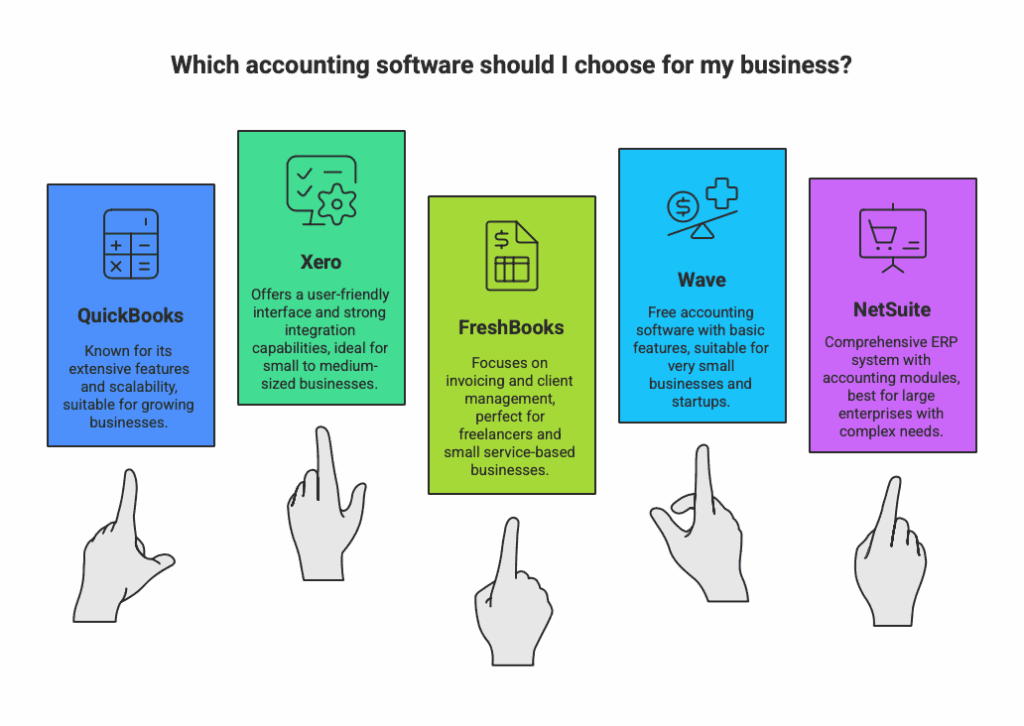
FreshBooks works best for small service businesses and freelancers. It is great for managing invoices and client payments. QuickBooks is ideal for growing companies with diverse accounting needs. It fits businesses that sell products or need inventory control. Choose FreshBooks for simplicity and QuickBooks for scale.
Credit: austinbookkeepinghub.com
Frequently Asked Questions
Which One Is Better, Quickbooks Or Freshbooks?
QuickBooks offers more advanced features and scalability for growing businesses. FreshBooks suits small service-based businesses needing simple, cost-effective invoicing. Choose QuickBooks for comprehensive accounting and FreshBooks for user-friendly billing.
What Are The Downsides Of Freshbooks?
FreshBooks can become costly as your business grows. It lacks some advanced accounting features. The software requires a constant internet connection. Switching from other systems may take time and effort.
Why Do Cpas Not Like Quickbooks Online?
CPAs dislike QuickBooks Online due to weak audit trails and easy transaction deletion, causing challenges during audits and reviews.
How Much Is Quickbooks 2025?
QuickBooks 2025 pricing starts at $30 per month for Simple Start. Advanced plans cost up to $180 monthly. Prices vary by features.
Conclusion
Choosing between FreshBooks and QuickBooks depends on your business needs. FreshBooks suits small service businesses with simple accounting. QuickBooks offers more features for growing companies and product-based businesses. Both tools help manage finances efficiently. Consider your budget, required features, and ease of use.
Trying each software can clarify which fits best. The right choice supports smooth accounting and business growth. Evaluate carefully before deciding for 2025 success.




