Are you tired of juggling complicated scheduling tools that drain your time and your budget? If you’ve been using Calendly but wonder if there’s a simpler, more affordable way to book your meetings, you’re not alone.
That’s where TidyCal steps in — designed to make your scheduling effortless and wallet-friendly without sacrificing the features you actually need. But is TidyCal really better than Calendly? You’ll discover how these two popular tools stack up, what makes TidyCal stand out, and which one fits your unique scheduling style best.
Keep reading to find out which scheduling software can truly simplify your life and help you book more meetings with less hassle.
Introduction To Tidycal And Calendly
Scheduling meetings can be simple or complex, depending on the tool you choose. TidyCal and Calendly are two popular calendar scheduling apps. Both help users book meetings efficiently, but they serve different needs and audiences. Understanding each tool helps pick the right one for your workflow.
Overview Of Tidycal: Purpose And Target Audience
TidyCal offers a straightforward, affordable way to schedule meetings. It targets individuals and small agencies who want basic but reliable scheduling features. The interface is clean and easy to use, removing clutter and complexity.
- Built as a simpler, cost-effective alternative to Calendly
- Focuses on essential scheduling tools without extra bells and whistles
- Ideal for freelancers, solo entrepreneurs, and small teams
- Integrates with popular calendars for smooth booking
- Launched in 2021 with over 200,000 users and millions of bookings
Overview Of Calendly: Purpose And Target Audience
Calendly is a widely used scheduling tool designed for broader, more complex needs. It suits individuals, mid-size, and large teams that require advanced scheduling features. The platform supports multiple calendar integrations and custom workflows.
- Offers extensive features including team scheduling and automation
- Targets professionals, sales teams, recruiters, and enterprises
- Supports round-robin scheduling and group events
- Provides detailed analytics and integrations with CRM tools
- Priced higher due to advanced functionality and scale
Why Comparing These Two Schedulers Matters
Choosing the right scheduler impacts productivity and cost. Both tools help avoid back-and-forth emails and double bookings. Yet, they differ in price, features, and user focus.
| Feature | TidyCal | Calendly |
|---|---|---|
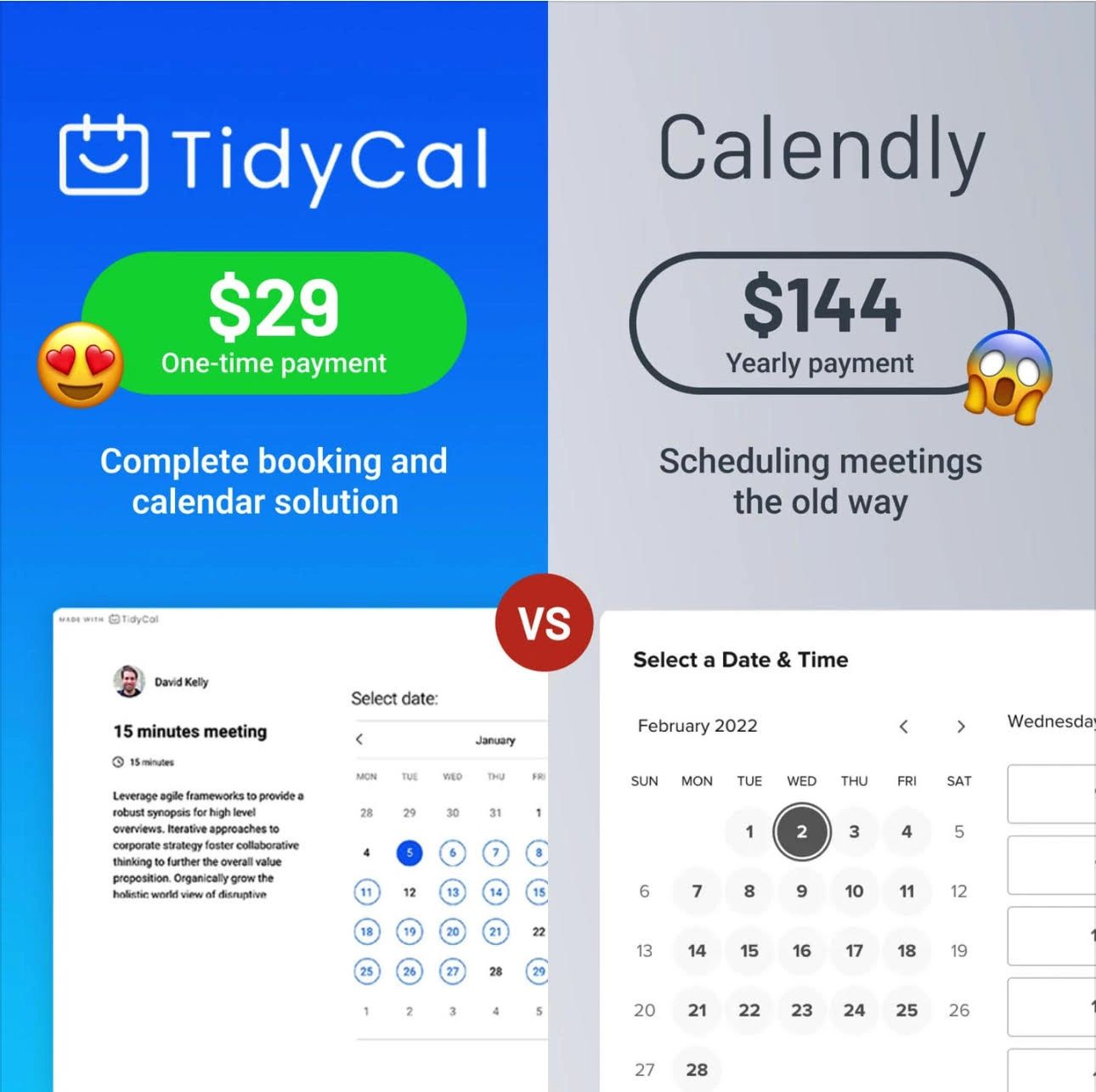
| Pricing | One-time payment, affordable | Subscription-based, higher cost |
| Target Users | Individuals, small agencies | Individuals to large teams |
| Features | Basic scheduling essentials | Advanced scheduling options |
| Interface | Simple and minimal | Feature-rich and complex |
| Integrations | Popular calendar apps | Calendar apps + CRM and automation tools |
This comparison helps you decide based on your scheduling needs and budget. TidyCal suits users wanting simplicity and savings. Calendly fits users needing comprehensive, team-based solutions.
Key Features That Differentiate Tidycal And Calendly
Choosing the right scheduling tool depends on features and how they fit your needs. Both TidyCal and Calendly offer great options but differ in pricing, team support, and integrations. Exploring their key features helps clarify which tool suits your workflow better.
Tidycal’s One-time Payment Model And Unlimited Scheduling Types
TidyCal offers a simple, cost-effective pricing model. Users pay once for lifetime access. This is ideal for individuals or small teams with limited budgets.
- One-time payment, no monthly fees
- Unlimited scheduling types for different meeting needs
- Simple interface focusing on essentials
- Supports calendar integrations for easy booking
This approach appeals to users wanting straightforward scheduling without ongoing costs.
Calendly’s Advanced Scheduling Capabilities For Large Teams
Calendly excels in features designed for larger teams and businesses. It includes:
- Team scheduling and round-robin assignments
- Advanced workflows with conditional logic
- Multiple event types with custom rules
- Analytics and reporting tools
These capabilities help manage complex scheduling needs and team coordination efficiently.
Integration Options: Calendars, Video Conferencing, And Crm Tools
| Feature | TidyCal | Calendly |
|---|---|---|
| Calendar Integrations | Google Calendar, Outlook, iCal | Google Calendar, Outlook, iCal, Office 365 |
| Video Conferencing | Zoom, Google Meet | Zoom, Google Meet, Microsoft Teams, Webex |
| CRM and Other Apps | Limited third-party integrations | Salesforce, HubSpot, Zapier, Slack, and more |
Calendly offers broader integrations, ideal for users needing deep app connectivity. TidyCal covers basic needs well.
User Interface And Ease Of Use: Streamlining Scheduling Tasks
TidyCal focuses on simplicity with a clean, minimal design. This reduces distractions and speeds up booking.
- Easy setup with clear options
- Intuitive controls for creating event types
- Fast scheduling for individuals and small teams
Calendly provides a polished interface with more features, which can feel complex for new users. It suits those who need detailed customization and team management.
Pricing And Affordability Breakdown
Choosing the right scheduling tool depends largely on pricing and value. Both TidyCal and Calendly offer distinct pricing models that suit different users. Understanding their cost structures helps you pick the best fit for your needs and budget.
Tidycal’s Affordable One-time Fee: Lifetime Access Benefits
TidyCal offers a simple pricing approach: a one-time payment for lifetime access. This means you pay once and get all core features forever without recurring charges.
This model benefits users who want to avoid monthly or annual fees. You receive:
- Unlimited meetings and bookings
- Essential calendar integrations
- Access to all basic scheduling tools
Lifetime access eliminates surprises or price hikes. It suits individuals or small agencies with steady scheduling needs.
Calendly’s Subscription Plans And Feature Tiers
Calendly uses a subscription model with multiple tiers. Users pay monthly or annually based on feature needs and team size.
| Plan | Price (Monthly) | Features |
|---|---|---|
| Basic | Free | Limited event types, 1 calendar connection |
| Essentials | $10/user | More event types, integrations, automated notifications |
| Professional | $15/user | Advanced integrations, metrics, workflows |
| Teams | $20/user | Team scheduling, admin controls, reporting |
Higher tiers unlock features suited to complex scheduling and team collaboration.
Cost-effectiveness For Solo Users Vs. Teams
Solo users often find TidyCal more cost-effective because of its one-time fee. There are no monthly bills, which adds up to savings over time.
Teams benefit from Calendly’s tiered plans. The features support multiple users, team scheduling, and workflow automation. Paying monthly can be justified by productivity gains.
Consider these points:
- TidyCal fits small teams or freelancers wanting basic tools.
- Calendly suits larger teams needing advanced features and support.
- Subscription costs increase with team size on Calendly.
Hidden Costs And Add-ons To Consider
Both platforms may have costs beyond the base price:
- Calendly charges extra for premium integrations, SMS notifications, and advanced reporting.
- TidyCal keeps add-ons minimal, focusing on core features with no recurring fees.
- Payment processing fees apply if accepting payments via scheduling links.
Watch out for limits on event types, user seats, or calendar connections. These can lead to upgrading plans or buying extras.

Credit: zapier.com
Pros And Cons Based On Real-world Usage
Choosing between TidyCal and Calendly depends on your scheduling needs. Both tools serve booking but differ in features and pricing. Real users share insights on what works and what falls short in each. This section breaks down their strengths and weaknesses clearly.
Advantages Of Using Tidycal For Basic Scheduling Needs
TidyCal offers a simple, user-friendly interface focused on straightforward scheduling. It is ideal for individuals or small agencies who want to book meetings without hassle.
- Affordable pricing with a one-time payment for lifetime access.
- Supports calendar integrations for seamless syncing.
- Easy to set up and manage without extra features cluttering the interface.
- Allows quick creation of booking links for clients or team members.
- Good fit for basic scheduling without complex requirements.
Limitations Of Tidycal Compared To More Feature-rich Alternatives
TidyCal lacks advanced features found in more robust tools. Users needing intricate workflows or team management may find it limiting.
- No support for complex team scheduling or round-robin assignments.
- Limited automation options for reminders and follow-ups.
- Fewer customization choices for booking pages and workflows.
- Does not handle multiple time zones as effectively for global teams.
- Not ideal for businesses with large teams or high-volume bookings.
Strengths Of Calendly In Handling Complex Scheduling Scenarios
Calendly excels in managing detailed scheduling needs for individuals and teams alike. It is built for flexibility and scalability.
- Advanced features like round-robin scheduling and collective meetings.
- Supports team management with roles and permissions.
- Automation of reminders, follow-ups, and integrations with CRM tools.
- Robust handling of multiple time zones and availability preferences.
- Customizable booking pages with branding options.
Challenges Users Face With Calendly’s Pricing And Features
Calendly’s rich feature set comes with a higher cost, which can be a barrier for small users.
- Subscription pricing can become expensive for individuals or small teams.
- Many useful features require upgrading to premium plans.
- Complex interface may overwhelm users wanting simple scheduling.
- Some users report difficulty with the learning curve and setup.
- Annual or monthly payments add up over time.
Ideal Users And Use Case Recommendations
Choosing between TidyCal and Calendly depends on your team size, budget, and scheduling needs. Both tools offer strong calendar integrations and easy booking. However, their features and pricing fit different users best. Understanding who benefits most from each can guide the right choice.
Who Should Choose Tidycal: Freelancers, Small Businesses, And Budget-conscious Users
TidyCal suits individuals and small teams needing a simple scheduling solution. It offers a clean, easy-to-use interface without complex features.
- Freelancers managing client calls and consultations
- Small businesses with basic meeting needs
- Users wanting affordable pricing with a one-time payment option
- Anyone preferring straightforward booking without automation complexity
TidyCal supports essential calendar integrations and fast setup. Its low cost makes it ideal for budget-conscious users.
Best Fit For Calendly: Large Teams, Enterprises, And Users Requiring Automation
Calendly works well for organizations needing advanced features and scalability.
- Large teams coordinating multiple calendars and users
- Enterprises requiring deep workflow automation
- Users needing custom workflows and integrations with CRM tools
- Those who want detailed analytics and reporting
Calendly’s automation features save time on repetitive tasks. Its robust integrations fit complex business needs.
When To Consider Other Scheduling Tools Based On Specific Needs
Some users might need tools outside TidyCal or Calendly.
- Scheduling for events with hundreds of attendees
- Highly customized booking forms and multi-step workflows
- Industry-specific solutions like healthcare appointment systems
- Tools with in-built payment gateways or special compliance requirements
Explore options tailored for your exact use case to ensure smooth scheduling.
Tips For Selecting The Right Scheduler Based On Workflow And Integration Needs
- Assess your team size: Small teams may prefer simplicity; large teams need scalability.
- Identify must-have integrations: Check if the scheduler supports your calendar, CRM, or payment tools.
- Consider automation requirements: Basic scheduling vs. automated reminders and follow-ups.
- Evaluate pricing models: One-time fee vs. subscription based on your budget.
- Test user experience: Choose a tool with an intuitive interface for you and your clients.
Balance features with ease of use to improve your scheduling workflow efficiently.
Credit: www.byrosanna.co.uk
Conclusion: Which Scheduler Is Ultimately Better?
Choosing the right scheduler depends on your needs, budget, and priorities. Both TidyCal and Calendly offer solid solutions for booking meetings. Each has unique strengths that suit different users and teams.
Summarizing The Key Differences And Benefits
| Feature | TidyCal | Calendly |
|---|---|---|
| Pricing | One-time payment for lifetime access, very affordable | Subscription-based, can be costly for advanced plans |
| Ease of Use | Simple, clean interface with essential features only | More complex, packed with advanced options |
| Target Users | Individuals, freelancers, small agencies | Large teams, enterprises needing advanced workflows |
| Features | Basic scheduling, calendar integrations, affordable | Advanced scheduling, team management, automation |
| Booking Volume | Over 3.7 million bookings by 200,000+ users | Millions of users globally, strong enterprise adoption |
Making The Final Choice Based On User Priorities And Budget
- Choose TidyCal for a simple, budget-friendly scheduler.
- Ideal for users needing easy setup and fewer features.
- Choose Calendly for complex scheduling needs and team collaboration.
- Better for businesses requiring automation and integrations.
- Consider monthly vs. one-time cost depending on your budget.
Future Trends In Scheduling Tools To Watch
- AI-powered scheduling: Tools will suggest optimal meeting times automatically.
- Deeper calendar integrations: More seamless syncing with work apps and CRMs.
- Enhanced customization: Users will get more control over booking pages and workflows.
- Mobile-first design: Scheduling apps will prioritize better mobile experiences.
- Security and privacy: Increased focus on data protection and compliance.
Both TidyCal and Calendly will likely evolve with these trends. Your choice today should reflect your current needs and how you expect to grow.
Credit: myvirtualsuperhero.godaddysites.com
Frequently Asked Questions
What Is The Difference Between Calendly And Tidycal?
Calendly offers advanced features and team options with subscription plans. TidyCal provides essential scheduling tools at a low one-time cost, ideal for individuals and small teams.
Is There Anything Better Than Calendly?
Several alternatives like Acuity Scheduling, Zoho Bookings, and TidyCal offer unique features. Choose based on your budget, team size, and required integrations.
Is Cal Better Than Calendly?
Cal offers more customization and open-source options, ideal for developers. Calendly suits users wanting easy, advanced scheduling with robust integrations. Choose Cal for flexibility; Calendly for user-friendly, feature-rich scheduling. Both serve different needs effectively.
What Is The Best Appointment Scheduling Software?
The best appointment scheduling software depends on your needs. Calendly suits large teams and advanced features. TidyCal offers affordable, basic scheduling with a one-time fee. Alternatives like Acuity Scheduling and Zoho Bookings excel in client management and integrations. Choose based on features, budget, and integrations.
Conclusion
TidyCal offers a simple and affordable way to schedule meetings. It fits well for individuals and small teams who need basic features. Calendly suits larger teams or users needing advanced tools. Both tools help save time and avoid back-and-forth emails.
Choosing depends on your budget and feature needs. Trying TidyCal can be a smart choice if you want less complexity and lower cost. The right scheduler makes booking easy and stress-free. Explore both options to find what works best for you.