

Are you ready to take control of your online presence but don’t know where to start? Using Namecheap is simpler than you think, whether you want to buy a domain, set up hosting, or add professional email to your website.
With Namecheap, everything you need to build your site is just a few clicks away — from registering the perfect domain name to securing your site with SSL certificates and boosting performance with handy apps. In this guide, you’ll discover how to navigate Namecheap’s user-friendly platform step-by-step, so you can launch your website quickly and confidently.
Keep reading, and you’ll be on your way to owning a powerful, professional website that truly represents you.

Credit: www.namecheap.com
Introduction To Namecheap And Its Website
Namecheap is a popular platform that helps people buy domains and build websites. It offers many services beyond just domain registration. The website is designed to be easy to use for beginners and experts alike. This section explains what Namecheap is, how its website works, and who can benefit from its services.
What Is Namecheap And Its Purpose
Namecheap is a company that provides domain registration and web hosting services. Its main goal is to help users create their online presence quickly and affordably.
- Register new domain names with various extensions
- Transfer existing domains for free
- Offer web hosting options such as shared, VPS, dedicated, and Managed WordPress
- Provide professional email services linked to your domain
- Ensure website security with SSL certificates, PremiumDNS, and VPN
- Offer apps and tools to improve website performance and branding
Overview Of Namecheap’s Website Interface
The Namecheap website has a clean, user-friendly layout. The homepage highlights top deals and quick links to all services. Navigation menus allow easy access to domain registration, hosting, security, and apps.
| Section | Description |
|---|---|
| Domain Search | Search and register domain names with a smart generator tool |
| Hosting | Various hosting packages to suit different needs and budgets |
| Professional email plans connected to your domain | |
| Security | SSL certificates, DNS services, and VPN for protection |
| Apps | Tools for logo design, website speed, and branding |
The website also offers guides and support to help users at every step.
Who Can Benefit From Using Namecheap
Namecheap suits a wide range of users who want to build or improve their online presence.
- Individuals who want to register a personal domain or blog
- Small businesses needing affordable hosting and professional email
- Startups looking for fast domain registration and scalable hosting
- Freelancers and creatives seeking branding tools and website security
- Developers and agencies requiring advanced hosting and domain management
Anyone who wants a simple way to set up a website will find Namecheap helpful and easy to navigate.
Setting Up Your Account On Namecheap
Starting with Namecheap is simple and fast. Setting up your account gives you access to domain registration, hosting, email, and security tools. This section guides you through creating your account, understanding the dashboard, and managing your profile and security settings.
Creating And Verifying Your Namecheap Account
Begin by visiting Namecheap’s website. Click on the Sign Up button at the top right corner. Fill in your details:
- Username
- Email address
- Password
- Confirm password
Agree to the terms and click Create Account.
Check your email inbox for a verification message from Namecheap. Click the verification link inside to activate your account. This step is crucial for full access and security.
Navigating The Dashboard For Beginners
After logging in, the dashboard appears. It offers a clear view of your services and tools.
| Dashboard Section | Description |
|---|---|
| Domain List | View and manage all your registered domains |
| Hosting | Access hosting plans and settings |
| Emails | Set up and manage professional email accounts |
| Security | Manage SSL certificates, VPN, and 2FA |
| Apps | Explore tools like Logo Maker and CDN |
The left menu helps you jump between these areas quickly. Use the search bar to find specific tools or settings.
Managing Your Profile And Security Settings
Click your profile icon at the top right to open account settings.
- Personal Information: Update your name, email, and contact details.
- Password: Change your password regularly for safety.
- Two-Factor Authentication (2FA): Enable 2FA to add an extra security layer.
- Payment Methods: Add or update your credit card or PayPal details.
Enabling 2FA is highly recommended. It protects your account from unauthorized access.
Keep your profile details current to avoid issues with domain renewals or purchases.
How To Register A Domain On Namecheap
Registering a domain on Namecheap is the first step to building your online presence. The process is simple and user-friendly, designed to help you secure the perfect domain quickly. This guide walks you through searching for a domain, understanding pricing, and explains the benefits of free WHOIS privacy protection.
Searching And Selecting The Perfect Domain Name
Start by visiting Namecheap’s homepage and using the domain search bar. Enter keywords related to your business or idea. Namecheap’s advanced domain name generator suggests available domains based on your input.
- Try different keywords for better results
- Check for easy-to-remember and short names
- Consider popular domain extensions like .com, .net, or .org
Once you find a domain you like, add it to your cart to proceed.
Understanding Domain Pricing And Registration Periods
Domain prices vary depending on the extension and popularity. Namecheap shows clear pricing for each domain you select. Common registration periods include 1, 2, or 5 years.
| Domain Extension | Starting Price (per year) | Registration Period Options |
|---|---|---|
| .com | $8.88 | 1, 2, 5 years |
| .net | $10.98 | 1, 2, 5 years |
| .org | $9.98 | 1, 2, 5 years |
Choose the registration period that fits your needs. Longer registrations often save money in the long run.
Benefits Of Free Whois Privacy Protection
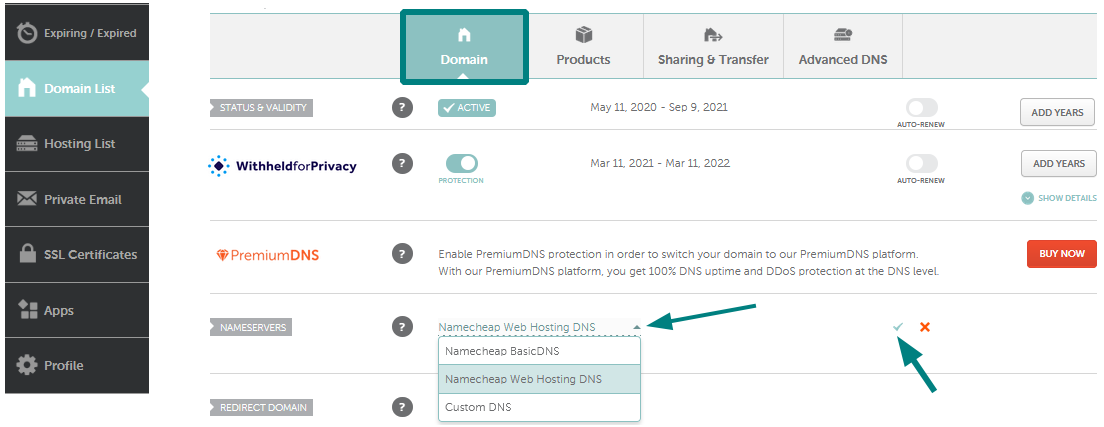
Namecheap includes free WHOIS privacy protection with every domain registration. This service hides your personal contact details from the public WHOIS database. The benefits include:
- Protects your privacy and reduces spam emails
- Prevents identity theft and unwanted solicitations
- Keeps your contact information secure and private
WHOIS privacy is automatically enabled, so you do not need to take extra steps.
Credit: www.namecheap.com
Exploring Namecheap Hosting Services
Namecheap offers a range of hosting services tailored to fit different website needs. Hosting is the space where your website lives online. Choosing the right hosting plan affects your site’s speed, security, and reliability. Namecheap provides options from basic shared hosting to advanced Managed WordPress and VPS hosting. This helps you pick the perfect plan for your website type and budget.
Different Hosting Plans And Their Ideal Use Cases
| Hosting Plan | Best For | Main Features |
|---|---|---|
| Shared Hosting | Small websites, personal blogs, startups | Affordable, easy to use, suitable for low traffic |
| VPS Hosting | Growing websites, moderate traffic, developers | More control, better performance, scalable resources |
| Dedicated Hosting | High traffic sites, businesses needing full server control | Full server, high speed, advanced customization |
| Managed WordPress Hosting | WordPress sites needing speed and security | Optimized for WordPress, automatic updates, security features |
| Site Maker | Users wanting quick site setup without coding | Drag-and-drop builder, simple templates, fast setup |
Step-by-step Guide To Setting Up Hosting
- Choose a Hosting Plan: Visit Namecheap and pick the plan that fits your needs.
- Create an Account: Sign up or log in to your Namecheap account.
- Register or Transfer a Domain: Register a new domain or transfer an existing one.
- Select Hosting Package: Add your hosting plan to the cart and complete the purchase.
- Set Up Hosting: Access your hosting dashboard from the Namecheap control panel.
- Install Website Platform: Use the one-click installer for WordPress or upload your site files.
- Configure Email: Add professional email connected to your domain for business use.
- Secure Your Site: Enable SSL certificates provided by Namecheap for free or purchase premium options.
How Hosting Enhances Your Website Performance
Good hosting improves your website’s speed and uptime. Fast loading pages reduce visitor drop-off. Namecheap’s servers are optimized for reliability and speed.
- Better Loading Times: Servers close to your visitors make pages load faster.
- Higher Uptime: Reliable hosting means your site stays online almost all the time.
- Improved Security: Built-in SSL and security tools protect your data and visitors.
- Scalability: Upgrade your hosting easily as your website grows.
Hosting also supports professional email services linked to your domain. This adds trust for your visitors and customers. Namecheap’s hosting services include helpful apps to improve your site’s speed and user experience.
Managing Your Domain And Website On Namecheap
Managing your domain and website on Namecheap is simple and clear. The platform offers easy tools to control your domain, set up email, and build your website. This guide helps you handle all these tasks smoothly.
Accessing Domain Management Tools
Start by logging into your Namecheap account. Go to the Dashboard to see your domains.
- Click on Domain List to view all your domains.
- Select the domain you want to manage.
- Use the Manage button next to your domain for settings.
The management area lets you update domain details, renew your domain, and check domain status.
Configuring Dns And Email Settings
DNS settings control where your domain points. To configure them:
- In the domain Manage area, select the Advanced DNS tab.
- Add or edit records like A, CNAME, MX, TXT, and more.
- Save changes to update your domain’s connection.
Email setup lets you send professional emails from your domain.
- Go to the Email section in your account.
- Choose Private Email to add a mailbox.
- Configure MX records in DNS to link your email service.
Using Namecheap’s Website Builder And Tools
Namecheap offers easy tools to create websites even without coding skills.
- Site Maker: Build a simple website fast using templates.
- Managed WordPress Hosting: Use WordPress with added support and speed.
- Apps and Add-ons: Add extra features like SSL, CDN, and security tools.
Access these tools via the Hosting or Apps sections in your account dashboard.

Credit: www.youtube.com
Pricing And Affordability Of Namecheap Services
Namecheap offers a range of services that fit various budgets. Their pricing is clear and competitive. Whether you want to register a domain or host a website, Namecheap provides affordable options.
The pricing structure helps users select plans that suit their needs without overspending. Understanding the costs involved makes it easier to plan your online presence.
Domain Registration And Renewal Costs Explained
Domain registration with Namecheap starts at very low prices for popular extensions like .com, .net, and .org. The initial cost is often discounted for the first year.
Renewal fees are slightly higher but remain affordable compared to many competitors. Namecheap also offers free domain transfers, making it easy to move your domain.
| Domain Extension | Registration Price (First Year) | Renewal Price |
|---|---|---|
| .com | $8.88 | $12.98 |
| .net | $10.98 | $14.98 |
| .org | $9.98 | $14.98 |
Hosting Plans Pricing Breakdown
Namecheap offers different hosting plans to fit your needs. They include shared hosting, VPS, dedicated servers, and Managed WordPress hosting.
- Shared Hosting: Starts at $1.58 per month for basic websites.
- VPS Hosting: Begins at $9.88 per month for more control and power.
- Dedicated Servers: Starting at $48.88 per month for high performance.
- Managed WordPress Hosting: Starts at $3.88 per month, optimized for WordPress sites.
All plans include free SSL certificates and 24/7 support. Users can scale their hosting as their website grows.
Comparing Namecheap’s Value With Competitors
Namecheap stands out with its affordable pricing and solid features. Many competitors charge more for similar services.
| Provider | .com Domain Price (First Year) | Shared Hosting Price (Basic Plan) | Free SSL |
|---|---|---|---|
| Namecheap | $8.88 | $1.58/month | Yes |
| GoDaddy | $11.99 | $5.99/month | No |
| Bluehost | $12.99 | $2.95/month | Yes |
Namecheap also provides free domain privacy protection, which many competitors charge extra for. This feature adds value and security at no extra cost.
Pros And Cons Of Using Namecheap
Namecheap is a popular platform for buying domains and hosting websites. It offers many services to help users create and manage their online presence. Understanding its advantages and drawbacks helps make better choices for your website needs.
Advantages Based On Real-world User Experiences
- Affordable pricing: Namecheap offers low-cost domains and hosting plans.
- Free domain transfer: Users can easily move domains from other registrars without extra fees.
- Wide domain extensions: Many options to choose the perfect domain name.
- User-friendly interface: The dashboard is simple and easy to navigate for beginners.
- Professional email services: Secure and reliable email linked to your domain at a low price.
- Free security features: Includes 2-Factor Authentication and affordable SSL certificates.
- Variety of hosting options: Shared, VPS, dedicated, and Managed WordPress hosting available.
- Extra tools and apps: Logo Maker, Visual Suite, and CDN to boost website performance.
Common Drawbacks And How To Overcome Them
Some users report slower customer support response times during peak hours. Patience and using online resources can help.
Limited advanced features in basic hosting plans may not suit very large websites. Upgrade to VPS or dedicated hosting to solve this.
Occasional upselling prompts might feel distracting. Staying focused on your needs and ignoring offers helps avoid this.
| Drawback | How to Overcome |
|---|---|
| Slower support response at busy times | Use the knowledge base or community forums for quick answers |
| Basic plans lack advanced features | Choose higher-tier hosting plans for more power and flexibility |
| Frequent upselling notifications | Focus on your goals and ignore extra offers |
Customer Support Quality And Resources
Namecheap offers 24/7 live chat and ticket support. Response times vary but generally meet user expectations.
The comprehensive knowledge base covers common issues with detailed guides and FAQs. This resource helps users solve problems independently.
Community forums provide user discussions and tips. They are useful for troubleshooting uncommon problems.
Overall, customer support is reliable but may require some patience during busy periods.
Who Should Use Namecheap?
Namecheap suits a wide range of users seeking affordable and reliable online services. It fits those who need domain registration, web hosting, email solutions, and security tools all in one place. The platform balances cost and features, making it a solid choice for individuals and small businesses.
Namecheap’s services appeal to users who want simplicity and value without complex setups. Its tools help beginners start quickly and offer scalable options for growing sites. The combination of domain options, hosting types, and security features targets various user needs effectively.
Ideal Users Based On Budget And Needs
- Budget-conscious individuals: Those who want low-cost domains and hosting without sacrificing quality.
- Small business owners: Need professional email, SSL certificates, and scalable hosting plans.
- Beginners and bloggers: Prefer easy domain registration and simple website builders like Site Maker.
- Developers and tech-savvy users: Appreciate VPS, dedicated servers, and advanced hosting options.
- Users focused on security: Benefit from free 2-Factor Authentication and affordable SSL certificates.
Best Scenarios For Choosing Namecheap Services
- Registering a new domain with access to many extensions.
- Transferring an existing domain easily and without fees.
- Launching a personal or business website quickly using shared or WordPress hosting.
- Securing a website with SSL and DNS services included in plans.
- Setting up professional email tied to your domain at low cost.
- Using additional apps like Logo Maker or Supersonic CDN to enhance your site.
Comparing Namecheap To Other Platforms For Specific Users
| User Type | Namecheap Advantages | Other Platforms |
|---|---|---|
| Budget Users | Low prices for domains and hosting, free domain transfers | Some competitors have higher renewal rates and extra fees |
| Beginners | Simple domain search, easy hosting setup, Site Maker tool | Others may offer more complex setups or limited support |
| Small Businesses | Professional email, SSL, and security tools included | Some platforms charge extra for these essentials |
| Advanced Users | VPS, dedicated hosting, and developer-friendly features | Specialized hosts may offer more customization options |
Tips And Best Practices For Beginners
Starting with Namecheap can feel simple, yet some tips help avoid pitfalls. These best practices guide beginners to set up smartly, secure their site, and use features that support growth. Follow clear steps to get the most from your domain and hosting services.
Maximizing Security And Privacy On Namecheap
Protect your website and data with Namecheap’s built-in security tools. Use these steps:
- Enable Two-Factor Authentication (2FA) to add an extra layer of login security.
- Purchase and activate SSL Certificates to keep visitor data safe and boost search rankings.
- Use PremiumDNS for faster, safer domain name system management.
- Consider Namecheap’s VPN service to protect your internet connection when managing your site.
Regularly update passwords and keep your account info private. These simple steps reduce hacking risks and build trust with visitors.
Avoiding Common Mistakes During Setup
Many beginners face setup errors. Avoid these to save time and frustration:
- Double-check domain spelling before purchase or transfer to prevent losing your online identity.
- Choose the right hosting plan based on your site’s needs—shared hosting suits small blogs, while VPS or dedicated servers fit larger sites.
- Don’t skip email setup. Use Namecheap’s professional email linked to your domain for credibility.
- Backup your website regularly, especially before making big changes.
- Review all settings twice to avoid issues with domain forwarding or DNS records.
Leveraging Namecheap’s Features For Growth
Namecheap offers tools that help your website grow smoothly:
| Feature | Benefit | How to Use |
|---|---|---|
| Domain Name Generator | Find the perfect domain quickly | Enter keywords to get creative domain ideas and extensions |
| Site Maker | Create a website without coding | Use drag-and-drop tools for fast site design |
| Professional Email | Build trust with custom email addresses | Set up email accounts linked to your domain easily |
| Security Apps | Enhance performance and protection | Install SSL, VPN, or CDN apps from Namecheap’s store |
Use these features step-by-step to grow your online presence and improve user experience.
Conclusion And Next Steps
Using Namecheap makes creating and managing your website simple and efficient. The platform offers all you need, from domain registration to hosting and security. Follow these steps to move forward with your online project.
Summary Of Key Points Covered
- Domain Registration: Quickly find and register your ideal domain with Namecheap’s generator.
- Domain Transfers: Easily move existing domains without extra cost.
- Hosting Options: Choose from shared, VPS, dedicated, or Managed WordPress hosting.
- Professional Email: Get secure email with your domain for a professional look.
- Security Features: Benefit from SSL certificates, PremiumDNS, VPN, and free 2-Factor Authentication.
- Performance Apps: Enhance your site with tools like Logo Maker and Supersonic CDN.
How To Get Started Today With Namecheap
- Visit Namecheap.com.
- Use the domain name generator to find your perfect domain.
- Register your chosen domain or transfer an existing one free of charge.
- Select a hosting plan based on your website needs.
- Add professional email for your domain to enhance communication.
- Secure your site with SSL and other security tools offered.
- Explore apps to boost website performance and brand identity.
Additional Resources And Support Channels
Namecheap provides various ways to help you:
| Resource | Description | Access |
|---|---|---|
| Knowledgebase | Detailed articles on domains, hosting, and security. | Available on Namecheap website |
| Live Chat Support | Real-time help for quick questions and issues. | 24/7 on Namecheap site |
| Ticket System | Submit detailed requests for technical assistance. | Accessible through your Namecheap account |
| Community Forums | Engage with other users and share experiences. | Found on Namecheap support page |
Use these resources to ensure smooth website setup and management.
Frequently Asked Questions
How To Manage A Website On Namecheap?
Log in to your Namecheap account and go to the Domains tab. Select Manage beside your domain. Use the dashboard to update DNS, set up hosting, or configure email settings. Regularly check and renew your domain to keep your website active and secure.
Can Namecheap Host A Website?
Yes, Namecheap offers reliable web hosting services for personal and business websites. Plans include security, speed, and easy management.
Which Is Better, Godaddy Or Namecheap?
Namecheap suits budget users with low costs and free WHOIS privacy. GoDaddy offers stronger support, security tools, and a broader service range at higher prices. Choose based on your budget, support needs, and desired features.
What Website Builder Is Best For Beginners?
Wix offers an intuitive drag-and-drop interface ideal for beginners. Squarespace provides stylish templates and easy customization. Weebly simplifies site building with user-friendly tools. These platforms require no coding and include helpful tutorials for smooth website creation.
Conclusion
Using Namecheap makes building your website simple and affordable. Register your domain, choose hosting, and secure your site with ease. Manage your domains and emails all in one place. Namecheap offers tools that help your site run smoothly. Start small or grow big—the platform adapts to your needs.
Keep your website safe with built-in security features. Explore Namecheap’s services to find what fits you best. Your online presence begins here, step by step.




