

If you’ve bought your domain from Namecheap and are setting up your Shopify store, you’re probably wondering: Can I connect my Namecheap domain to Shopify? The good news is yes—you can!
Using your own custom domain gives your online store a professional look and helps customers remember your brand. But how exactly do you link your Namecheap domain to Shopify? You’ll discover easy, step-by-step instructions to connect your domain smoothly. By the end, you’ll have your store live with your personalized web address, boosting trust and sales.
Ready to make your Shopify store truly yours? Let’s dive in!
Credit: www.youtube.com
Introduction To Connecting A Namecheap Domain To Shopify
Connecting a Namecheap domain to your Shopify store lets you create a strong online brand. A custom domain makes your store look professional and trustworthy. This guide explains the basics of linking Namecheap domains with Shopify.
Understanding The Importance Of A Custom Domain For Your Shopify Store
A custom domain gives your Shopify store a unique web address. It helps customers find your store easily and remember it better. Using a custom domain builds trust and boosts your store’s credibility.
Benefits of a custom domain:
- Brand identity: Shows your business name clearly.
- SEO advantages: Helps your store rank higher on search engines.
- Customer trust: A professional domain looks reliable.
- Email branding: Use your domain for professional emails like
you@yourstore.com.
Overview Of Shopify’s Domain Connection Options
Shopify offers easy ways to connect domains. You can:
- Buy a domain directly from Shopify.
- Connect an existing domain. This includes domains from providers like Namecheap.
To connect a Namecheap domain, you usually update DNS settings. This includes changing the A record and CNAME record to point to Shopify’s servers.
| DNS Record | Value for Shopify |
|---|---|
| A Record | 23.227.38.65 |
| CNAME Record | shops.myshopify.com |
Shopify provides step-by-step guidance inside your admin panel. This makes the process simple, even for beginners.
Why Choose Namecheap For Your Domain Registration
Namecheap offers affordable and reliable domain registration services. It provides a wide range of domain extensions to fit any business.
- Easy domain search: Advanced tools to find your perfect domain.
- Free domain transfers: Move your domain to Namecheap without extra cost.
- Secure services: Includes free 2-Factor Authentication and SSL certificates.
- Additional tools: Hosting, professional email, and business apps all in one place.
Namecheap’s user-friendly dashboard simplifies domain management. Their support team helps with domain setup and Shopify connection.
Key Features Of Connecting Namecheap Domains To Shopify
Connecting a Namecheap domain to Shopify offers several benefits. It helps you build a professional online store with a custom web address. The process is designed to be straightforward and user-friendly. Below, explore the key features that make this integration effective and secure for your business.
Seamless Dns Management: Simplifying Domain Pointing
Namecheap provides an easy-to-use DNS management panel. It allows you to point your domain to Shopify quickly without technical hassle. You can:
- Update A records and CNAME records effortlessly
- Manage DNS settings directly from your Namecheap account
- Track changes in real time to ensure smooth domain connection
This seamless DNS control ensures your domain directs visitors to your Shopify store fast and reliably.
Automatic Vs Manual Domain Connection: Choosing The Best Method
Two main ways exist to connect your Namecheap domain to Shopify:
- Automatic connection: Shopify guides you through a simple setup process. It updates DNS settings for you.
- manual connection: You manually change DNS records in Namecheap’s dashboard. Ideal for users who prefer full control.
Automatic connection suits beginners and saves time. Manual connection works well for advanced users wanting custom setups.
Maintaining Brand Identity With A Custom Domain
Using your own Namecheap domain on Shopify helps maintain your brand identity. A custom domain:
- Makes your store look professional and trustworthy
- Improves customer recall with a memorable web address
- Supports marketing efforts with a consistent brand name
Customers feel more confident buying from a store with a unique domain.
Ensuring Website Security With Shopify’s Free Ssl Certificates
Shopify provides free SSL certificates for all connected domains. This feature:
- Encrypts data between visitors and your store
- Builds trust by showing the secure “https” prefix
- Protects sensitive customer information during checkout
SSL certificates work automatically after connecting your Namecheap domain to Shopify. No extra cost or setup needed.
Step-by-step Guide To Connecting Your Namecheap Domain To Shopify
Connecting your Namecheap domain to Shopify is simple and clear. This guide walks you through each step. Follow carefully to ensure your online store uses your custom domain smoothly.
Preparing Your Namecheap Domain Settings For Connection
Start by logging into your Namecheap account. Go to Domain List and click Manage next to your domain.
In the Domain Settings, check that your domain is active and not locked. Disable any domain privacy services that could block the connection.
- Ensure the domain status is Active.
- Turn off WhoisGuard if enabled.
- Make sure domain locking is off for easy DNS editing.
How To Update Dns Records To Point Your Domain To Shopify
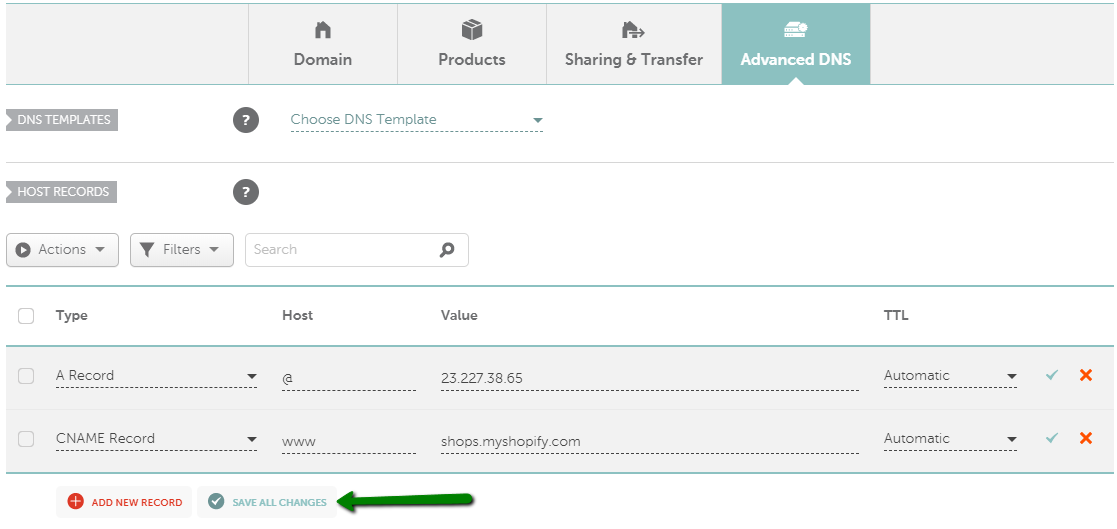
In the same Manage area, open the Advanced DNS tab. You need to update two key DNS records:
| Record Type | Host | Value | TTL |
|---|---|---|---|
| A Record | @ | 23.227.38.65 | Automatic |
| CNAME Record | www | shops.myshopify.com | Automatic |
Delete any existing A or CNAME records that conflict. Save your changes. These updates tell the internet to connect your domain to Shopify’s servers.
Verifying Your Domain Connection In Shopify Admin
Log in to your Shopify admin panel. Go to Online Store > Domains. Click Connect existing domain and enter your Namecheap domain.
Shopify will check your DNS settings. This can take a few minutes to a few hours to verify. Once verified, your domain will show as Connected.
- Use the Refresh button to update the status.
- Set your Namecheap domain as the Primary domain for your store.
Troubleshooting Common Connection Issues
Issues may happen. Check these common problems:
- DNS changes not updated: Wait up to 48 hours for DNS propagation.
- Incorrect DNS records: Review A and CNAME records carefully.
- Domain privacy enabled: Disable WhoisGuard or privacy protection.
- Domain locked: Unlock domain in Namecheap settings.
Use Namecheap’s support or Shopify’s help center for extra assistance.
Credit: www.namecheap.com
Pricing And Affordability Breakdown
Understanding the costs involved helps plan your Shopify store budget well. Connecting a Namecheap domain to Shopify involves domain purchase costs and Shopify plan fees. This section breaks down these expenses for clarity.
Namecheap Domain Costs: What To Expect
Namecheap offers domains starting at very affordable rates. Prices vary by domain extension (TLD), typically between $8 to $15 per year. Some popular TLDs include .com, .net, and .org.
Additional costs may include:
- Domain privacy protection (often free with Namecheap)
- Domain transfers (free and easy)
- Renewal fees similar to initial purchase price
Namecheap also provides free DNS management, so connecting to Shopify is smooth without hidden fees.
Shopify Plans And Domain Connection Fees
Shopify charges monthly fees based on the plan you choose. Here are the common plans:
| Plan | Monthly Cost | Domain Connection Fee |
|---|---|---|
| Basic Shopify | $39 | No extra fee |
| Shopify | $105 | No extra fee |
| Advanced Shopify | $399 | No extra fee |
Shopify allows connection of external domains at no additional cost. Domain registration via Shopify is optional and usually higher priced.
Cost Comparison: Buying A Domain Via Shopify Vs Namecheap
| Aspect | Namecheap | Shopify |
|---|---|---|
| Domain Price (average .com) | $8 – $15 per year | Approx. $14 – $20 per year |
| Privacy Protection | Free | Usually paid |
| Renewal Fees | Same as initial price | Higher than Namecheap |
| Ease of Connection to Shopify | Requires manual setup but supported | Automatic setup |
Namecheap domains are generally cheaper with privacy included. Shopify domains cost more but offer automatic integration.
Value Added By Using Your Own Domain On Shopify
Using your own Namecheap domain on Shopify builds brand trust. It creates a professional look and helps customers remember your site.
Benefits include:
- Better search engine ranking potential
- Complete control over your domain settings
- Ability to use custom email addresses
- Easy switching between platforms without losing your domain
Connecting a Namecheap domain to Shopify is cost-effective and flexible for growing businesses.
Pros And Cons Of Using A Namecheap Domain With Shopify
Connecting a Namecheap domain to Shopify offers several benefits and some challenges. Understanding these helps you make the right choice for your online store. Below, we explore key advantages and potential issues to consider.
Advantages: Flexibility, Control, And Cost Savings
Namecheap domains give you strong control over your domain settings. You can customize DNS records easily to suit your Shopify store needs.
- Flexibility: Manage your domain independently from Shopify.
- Control: Full access to advanced domain features like email forwarding and privacy protection.
- Cost Savings: Namecheap offers domains and services at competitive prices, often lower than Shopify’s domain fees.
This setup suits store owners who want more control and want to reduce ongoing costs.
Potential Challenges: Dns Configuration And Support Differences
Using Namecheap domains with Shopify requires correct DNS setup. Misconfiguration can lead to site downtime or email issues.
- DNS records must be updated to point to Shopify’s servers.
- Namecheap and Shopify support teams handle different aspects, which can cause confusion.
- Some users might find DNS changes technical and challenging without guidance.
Clear instructions and patience are essential for a smooth connection process.
How Shopify’s Hosting Complements Namecheap Domains
Shopify’s hosting offers fast, secure, and reliable service. It handles your store’s performance while Namecheap manages your domain.
| Feature | Namecheap Domain | Shopify Hosting |
|---|---|---|
| Domain Registration | Yes | No |
| DNS Management | Full control | Limited |
| Website Hosting | No | Yes |
| Security & SSL | Requires setup | Included |
| Customer Support | Domain-related only | Store and hosting |
This combination helps you benefit from Shopify’s optimized hosting while keeping domain costs low.
Real-world User Experiences And Feedback
Many users appreciate Namecheap domains for affordability and ease of transfer to Shopify.
- Positive feedback highlights cost savings and flexibility.
- Some users report initial confusion in DNS setup but success after following tutorials.
- Support differences can cause delays but are manageable with patience.
Overall, users find this setup effective for growing their online presence without extra expenses.
Who Should Connect A Namecheap Domain To Shopify?
Connecting a Namecheap domain to Shopify suits many users. It lets you keep your domain while building an online store. This option helps maintain your brand identity and control over domain settings. It is perfect for those who want a smooth transition without changing domain registrars.
Choosing to connect an existing domain depends on your business needs, technical skills, and branding goals. This section explains who benefits most from linking a Namecheap domain to Shopify.
Ideal Scenarios For Using An Existing Namecheap Domain
- Businesses with an established domain name want to keep their brand.
- Entrepreneurs who already bought domains on Namecheap but need an online store.
- Users who prefer to manage domain settings separately from their store platform.
- Companies planning to use advanced DNS or email services outside Shopify.
Keeping your domain on Namecheap gives flexibility. You can update DNS records anytime without affecting Shopify hosting.
Best Practices For Small Businesses And Entrepreneurs
- Verify domain ownership in your Namecheap account before connecting.
- Use Shopify’s guide to update
CNAMEandArecords correctly. - Keep your domain renewal active on Namecheap to avoid downtime.
- Set up professional email linked to your domain for better communication.
Small businesses benefit from this setup by controlling costs and maintaining brand consistency.
When To Consider Transferring Your Domain To Shopify
Transfer your domain to Shopify if you want:
- One platform to manage both your store and domain.
- Automatic domain renewal and simplified billing.
- Shopify’s customer support to assist with domain issues.
- Less technical work updating DNS records yourself.
Transferring reduces management complexity but may limit advanced DNS options.
Recommendations For Users Seeking Maximum Control And Branding
- Keep your domain on Namecheap for full DNS and email control.
- Use Shopify only as your online store platform.
- Regularly back up your domain settings and renewals.
- Consider adding SSL certificates via Namecheap for added security.
Maintaining your domain with Namecheap maximizes branding and technical control.
Conclusion And Final Tips
Connecting a Namecheap domain to Shopify creates a professional online store. It enhances your brand identity and builds customer trust. Understanding key steps ensures a smooth setup. Maintaining your domain and Shopify store keeps your business running well. Useful resources offer help when needed.
Summary Of Key Steps And Benefits
- Purchase or transfer your domain at Namecheap.
- Update DNS settings to point to Shopify’s servers.
- Verify domain connection in your Shopify admin panel.
- Enjoy benefits: professional branding, easy management, and secure hosting.
| Step | Description | Benefit |
|---|---|---|
| Domain Purchase/Transfer | Get your domain on Namecheap or transfer it. | Own a unique web address. |
| DNS Configuration | Set Shopify’s IP and CNAME records. | Link domain to Shopify store. |
| Domain Verification | Confirm domain works with Shopify. | Ensure store accessibility. |
Tips For Maintaining Your Domain And Shopify Store
- Renew domain before expiration to avoid downtime.
- Enable SSL on Shopify for secure customer data.
- Keep contact info updated in Namecheap account.
- Regularly backup your Shopify store data.
- Monitor site speed and optimize images and apps.
Use Namecheap’s security tools like 2-Factor Authentication and SSL certificates to protect your domain and customers.
Resources For Further Assistance And Support
- Namecheap Support Center – Guides and live chat for domain help.
- Shopify Domain Help – Step-by-step domain setup instructions.
- Shopify Community Forums – Ask questions and share tips.
- Namecheap Blog – Tips on domains, hosting, and security.
Reach out to support teams for quick solutions. Use official guides for trusted information.

Credit: help.shopify.com
Frequently Asked Questions
How To Link Namecheap Domain With Shopify?
Log in to Namecheap and Shopify accounts. In Namecheap, update DNS by pointing A record to Shopify’s IP and CNAME to shops. myshopify. com. In Shopify, go to Settings > Domains, choose “Connect existing domain,” and verify connection. Wait for DNS propagation to complete.
Can You Connect A Domain To Shopify?
Yes, you can connect a domain to Shopify by buying, transferring, or linking an existing domain. Shopify manages hosting and DNS.
What Domain Can I Use For Shopify?
You can use a new domain bought via Shopify, connect an existing domain from providers like Namecheap, or transfer your domain to Shopify. Shopify also provides a free. myshopify. com domain, but a custom domain improves branding and professionalism.
How Long Does It Take For A Domain To Connect To Shopify?
Connecting a domain to Shopify typically takes a few minutes to 48 hours. DNS propagation speed depends on your domain provider. Shopify supports instant or manual setup for smooth connection. Check your domain settings and follow Shopify’s instructions to complete the process quickly.
Conclusion
Connecting your Namecheap domain to Shopify is simple and effective. Just update your DNS settings in Namecheap to point to Shopify. This lets you use your custom domain for your online store. Managing your domain and Shopify in one place keeps things organized.
It helps build a professional brand and trust with customers. Start with Namecheap’s easy domain setup, then link it to Shopify. Your online store can have a unique web address fast. Keep your business growing with this straightforward connection.




